

Frustrated with clunky note-taking on generic Tablets? In 2026, the 8 best tablets for note taking from Amazon, reMarkable, iFLYTEK and more offer buttery-smooth stylus precision, minimal latency, and natural writing feels that rival paper, perfect for lectures, meetings, or creative brainstorming. Dive deeper in our Tablets & iPads guide. Find your ideal match below and upgrade your setup today.

Pros
- Included S Pen enhances productivity and creativity
- Exceptional battery life for all-day use
- Ample expandable storage for media and apps
- AI features boost efficiency in notes and searches
- Smooth performance for streaming and multitasking
Cons
- LCD display lacks the contrast of premium AMOLED screens
- Super fast charging requires a separate 45W charger
- Mid-range processor may lag in intensive gaming
The Samsung Galaxy Tab S10 Lite is a mid-range tablet designed for users who want a balance of entertainment, productivity, and smart features without breaking the bank. With its 10.9-inch LCD display, included S Pen, and Galaxy AI integration, it targets students, note-takers, casual creators, and families needing a reliable device for streaming, browsing, and light multitasking.
Standout features include the responsive S Pen for precise drawing and note-taking, enhanced by AI tools that clean up handwriting, solve equations, and enable Circle to Search right from the screen. The Exynos 1380 processor handles everyday tasks smoothly, while the 8000mAh battery delivers up to 16 hours of video playback. Storage starts at 128GB and expands to 2TB, ensuring you never run out of space for apps, photos, and videos. Real-world performance shines in streaming sessions and quick AI-assisted searches, with seamless connectivity across Galaxy devices.
Design-wise, the slim Gray chassis feels premium and lightweight at 1.09 pounds, making it portable for on-the-go use. Build quality is solid with USB-C connectivity, though it uses USB 2.0 speeds. Vision Booster adapts brightness dynamically, improving visibility outdoors.
Drawbacks include the LCD panel, which does not match the vibrancy of higher-end AMOLED displays, and the need for a separate charger for optimal fast charging. Intensive gaming might reveal limits of the mid-range chip.
Overall, the Galaxy Tab S10 Lite earns high marks for value, delivering powerful AI and S Pen capabilities in an affordable package. It is an excellent choice for productivity-focused users seeking longevity and versatility.
Display: 10.9-inch LCD with Vision Booster
Processor: Exynos 1380
Memory: 6GB RAM, 128GB storage (expandable to 2TB)
Battery: 8000mAh, up to 16 hours video playback
Included: S Pen, Face Recognition
Connectivity: Wi-Fi, USB-C (USB 2.0), SmartThings support

Pros
- Vivid 2.5K IPS display with 90Hz refresh and low blue light protection
- Bundled Tab Pen and folio case add immediate value
- Long-lasting battery supports full days of use
- AI learning apps streamline note-taking and organization
- Quad speakers deliver rich, clear audio
Cons
- 4GB RAM may struggle with very heavy multitasking
- 128GB storage lacks confirmed expandability
- Mid-range processor not ideal for demanding games
The Lenovo Idea Tab targets college students as an AI-enhanced tablet for studying, note-taking, and light entertainment. With its 11-inch 2.5K IPS touchscreen at 90Hz, it provides smooth scrolling and sharp visuals perfect for lectures, textbooks, and videos. Powered by the MediaTek Dimensity 6300, 4GB RAM, and 128GB storage, it handles everyday multitasking like apps, browsing, and AI tools without lag.
Standout features include Circle to Search with Google for instant on-screen queries using the included Tab Pen, plus apps like Lenovo AI Notes for summarizing and rephrasing. Quad Dolby Atmos speakers offer immersive sound, and TÜV-certified low blue light keeps eyes comfortable during long sessions. Battery lasts up to 12 hours for YouTube or assignments, with quick 20W charging.
Build quality shines with the protective folio case that doubles as a stand for versatile positioning. The pen's reduced latency enables natural writing in apps like Squid and Nebo. While solid for students, the modest RAM limits intensive use, and storage isn't expandable.
Overall, this tablet delivers excellent value for campus life, blending productivity tools and fun in a portable package. Ideal for students prioritizing AI smarts and affordability over power-user specs.
Display: 11-inch 2.5K IPS Touchscreen, 90Hz refresh rate, 72% NTSC, TÜV Low Blue Light.
Processor: MediaTek Dimensity 6300, Arm Mali-G57 MC2 GPU.
Memory & Storage: 4GB RAM, 128GB storage.
Audio: Quad Dolby Atmos-tuned speakers.
Battery: All-day life up to 12 hours, 20W charging.
Included: Lenovo Tab Pen, Folio Case.
Other: Circle to Search with Google, Smart Connect, AI Notes app.

Pros
- Exceptional paper-like writing with included Premium Pen
- Built-in AI boosts note productivity through summarization and conversion
- Distraction-free environment enhances focus
- High-resolution glare-free screen for versatile use
- Long battery life supports extended sessions
Cons
- E-ink display refresh slower than LCD for quick scrolling
- Monochrome screen limits visual vibrancy
- Larger size reduces pocket portability
The Amazon Kindle Scribe 64GB serves as an all-in-one digital notebook tailored for writers, students, professionals, and book lovers who want to consolidate notes, documents, and reading into a single, notification-free device. It excels at digitizing handwriting workflows while integrating seamlessly with your existing Kindle library.
Standout features include AI tools that convert handwritten notes to typed text, generate summaries, and tweak length or tone, making it a productivity powerhouse for meetings or study sessions. The Active Canvas feature intelligently creates space for annotations on book pages, and easy PDF imports allow direct markups. Real-world performance shines in its natural writing responsiveness, backed by a 4.4-star rating from thousands of users praising its focus-enhancing design.
Build quality impresses with a 10.2-inch 300 ppi front-lit display that's glare-free for indoor or outdoor use, paired with the no-charge Premium Pen that mimics pen-on-paper tactility. The sturdy construction feels premium, and battery life delivers weeks of writing or months of reading on one charge.
Drawbacks include the e-ink screen's slower refresh rates during navigation and lack of color, which may frustrate users needing vibrant visuals or phone-like speed. Its larger footprint also prioritizes desk use over on-the-go portability.
Overall, the Kindle Scribe earns a strong recommendation for anyone serious about handwriting digitization and distraction-free creativity, offering unmatched value in blending note-taking innovation with Kindle's reading ecosystem.

Pros
- Paper-like texture and high pressure sensitivity for authentic writing feel
- Permanent app membership with AI features like PDF summaries and flashcards
- Eye comfort certifications and multiple color modes for extended sessions
- Battery-free stylus and quick system updates for MyScript handwriting recognition
- Portable Android tablet supporting Google Play apps and cloud storage
Cons
- LCD-based display with narrow viewing angle, best from front view
- Not a true e-ink tablet, may show more glare in bright light than dedicated e-readers
- Optimal performance requires avoiding multiple heavy apps simultaneously
The XPPen Magic Note Pad is a versatile 10.95-inch Android 14 tablet tailored for digital note-taking, reading, studying, and remote meetings. Unlike traditional e-ink devices, it uses an AG nano-etched LCD with TCL NXTpaper 3.0 for a paper-like texture that slashes ambient light interference by 95 percent, making it ideal for students, professionals, and avid readers who want a multifunctional device without the lag of e-ink.
Standout features include the battery-free X3 Pro Pencil with 16384 pressure levels for precise, pressure-sensitive strokes, a fluid 90Hz refresh rate ensuring no ghosting during fast writing, and the native XPPen Notes app offering permanent VIP membership. This app handles handwriting-to-text conversion, audio recording, PDF editing, AI summaries, and cloud sync to OneDrive or Google Drive. Pre-installed MyScript tools after updates enhance math solving and multilingual recognition, delivering real-world efficiency for note-heavy workflows.
Build quality shines with a slim 7mm-thick, 495g body, 8000mAh battery for extended use, and meeting-ready 13MP front camera plus dual mics and speakers. Eye-friendly TÜV certifications minimize blue light and flicker, supporting long sessions in three color modes. The magnetic folio adds protection and convenience.
Drawbacks include the LCD's narrow viewing angle, optimized for frontal use to maintain anti-glare benefits, and recommendations to limit multitasking for peak performance. It is not a pure e-ink replacement, appearing more vibrant like a standard tablet.
Overall, the XPPen Magic Note Pad excels as a hybrid note-taking powerhouse for dynamic users, blending tablet versatility with specialized writing tools at an accessible entry point. Highly recommended for those prioritizing smooth, eye-comfortable digital handwriting over monochrome e-ink minimalism.
Discover the core innovations: AG nano-etched 10.95-inch display with 90Hz refresh, 400 nit brightness, and 16.7 million colors in monochrome, light, or nature modes for versatile viewing.
X3 Pro Pencil 2 delivers 16384 pressure levels with soft nib, magnetic attachment, and smart chip for effortless annotations. Native XPPen Notes app provides permanent VIP access to AI tools, handwriting conversion, and PDF handling.
Android 14 powers 6GB RAM + 128GB storage, Google Play support, 8000mAh battery, and pro-grade camera/mic setup for meetings. Eye certifications ensure comfort during prolonged use.
Perfect for students needing flashcards and math solvers, professionals for meeting notes and PDFs, or readers wanting color content without e-ink lag. Pair with the included folio for portability.
Activate permanent membership via app login for full features. Update to 1PAE for MyScript and AI enhancements. View from front for best anti-glare. Avoid heavy multitasking.
Compared to e-ink, it offers faster refresh and Android apps; versus standard tablets, superior paper-like writing.

Pros
- Unmatched paper-like writing feel with responsive Marker Plus
- Color display enhances visualization and note-taking
- Superior eye comfort for extended reading sessions
- Intuitive organization tools boost productivity
- Slim, lightweight build for easy portability
Cons
- Proprietary pen and ecosystem limit third-party accessories
- Focused on notes and reading, not full tablet versatility
- New release lacks extensive real-world user feedback
The reMarkable Paper Pro Bundle delivers a premium digital notebook experience with its 11.8-inch Canvas Color display and Marker Plus pen, perfect for professionals, students, and avid readers who crave a distraction-free alternative to laptops or phones. It prioritizes natural writing, sketching, and document handling over general computing.
Standout features include color support for writing and reading, paired with a paper-like feel from the Marker Plus that offers precise control and built-in eraser. Organization shines through folders, tags, PDF annotations, and handwriting-to-text conversion, while the low-glare display and adjustable reading light ensure comfort indoors or out, mimicking paper's natural reflection.
Design-wise, the ultra-slim tablet feels premium and portable, complete with spare pen tips and USB-C cable. The pen's responsiveness and friction deliver fatigue-free sessions, making it feel like real paper in daily use.
Potential drawbacks include its niche focus, lacking apps or browsing, and reliance on proprietary accessories. It excels in targeted tasks but may not replace multifunctional tablets.
Overall, the reMarkable Paper Pro sets a new standard for focused productivity. Buy it if you value authentic writing and reading over versatility.

Pros
- Highly accurate voice transcription and handwriting-to-text conversion
- Paper-like low-latency writing experience with stylus included
- Integrated large language model for smart note processing
- Long battery life and generous storage options
- Multi-language support for global users
Cons
- App downloads require APKPure or Google Play certification process
- E-ink screen may show slight ghosting during fast page turns
- Initial setup needed for advanced AI features like ChatGPT
The iFLYTEK AINOTE Air 2 is a compact 8.2-inch e-ink tablet designed as a digital notebook for professionals, students, and anyone needing efficient note-taking during meetings or study sessions. Bundled with a stylus pen and folio case, it combines paper-like writing with powerful AI tools, making it ideal for those tired of traditional notebooks or bulky laptops.
Standout features include permanent free real-time voice-to-text in 17 languages, handwriting recognition in 83 languages, and a built-in large language model for instant meeting summaries, to-do lists, and schedule reminders. In real-world use, it excels at transcribing discussions while allowing handwritten annotations, with AI organizing content into polished reports. The 5MP camera enables quick OCR scanning of documents, and ChatGPT integration works seamlessly without API keys.
Build quality feels premium with its slim design, adjustable 24-level frontlight for eye-friendly reading, and support for PDF, EPUB, and other formats. Battery lasts up to 7 days of heavy use, backed by 32GB local storage and 100GB cloud space, plus OneDrive syncing for worry-free access.
Potential drawbacks include the need for extra steps to install apps via APKPure or Google Play certification, and e-ink's inherent slight latency during page flips, though recent updates improve speed and responsiveness.
Overall, the AINOTE Air 2 delivers exceptional value for AI-driven productivity, earning its 4.2-star rating. It's a must-have for meeting-heavy workflows or focused studying.
AI Note Taking: Real-time voice-to-text, meeting summaries, and handwriting recognition.
Paper-Like Screen: 8.2-inch e-ink with low latency and 83-language support.
Smart Tools: Built-in LLM for organization, scheduling, and ChatGPT access.
Reading & Audio: Adjustable frontlight, multi-format support, and listening function.
Storage & Battery: 32GB + 100GB cloud, 2600mAh for 7 days use.
Connectivity: OneDrive sync, email, and OCR scanning with 5MP camera.
Pros
- Exceptional eye comfort from TÜV-certified NXTPAPER technology
- Versatile 3-in-1 display modes for diverse tasks
- Strong performance with 16GB total RAM and 256GB storage
- Long-lasting battery supports full-day usage
- Included stylus and flip case add immediate value
Cons
- No microSD card slot for expandable storage
- Charger not included, requiring separate purchase
- Limited to built-in 256GB storage for heavy users
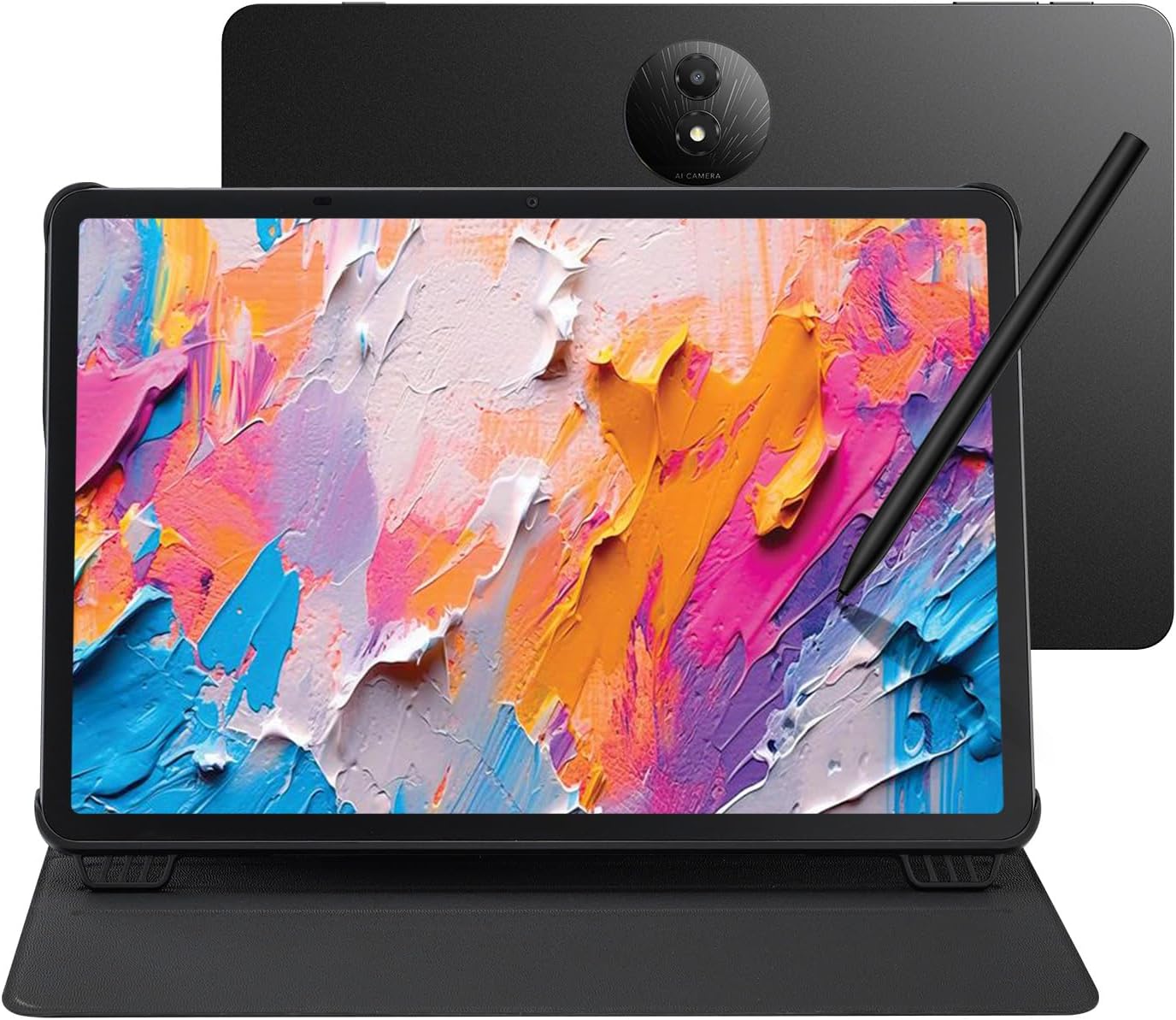
The TCL NXTPAPER 11 Plus is a multifunctional Android tablet designed for artists, students, professionals, and casual users who need a device that excels in drawing, note-taking, reading, and everyday productivity. With its 11.5-inch 120Hz 2.2K NXTPAPER 4.0 display and included 4096-level T-PEN stylus, it transforms into a digital notebook or drawing pad, while AI features like real-time translation and voice memos enhance workflow.
Standout features include the 3-in-1 VersaView modes for tailored viewing, from vivid streaming to paper-like reading, backed by smooth performance from the MTK Helio G100 chip, 8+8GB RAM, and Android 15. The 8000mAh battery lasts through intensive days with 33W fast charging and reverse charging capability, while quad speakers and CenterFace tracking ensure quality audio and video. In real-world use, multitasking feels fluid, and eye strain is minimal during extended sessions.
Build quality shines with an ultra-slim 0.26-inch metal body weighing just 1.08 lbs, plus an adjustable flip cover for protection and stand functionality. Cameras perform adequately for calls and scans, though not flagship-level.
Drawbacks include no expandable storage via microSD and the absence of a charger, which may inconvenience some buyers. Overall, it offers premium features at an accessible level.
Verdict: A top pick for creative and productive users prioritizing eye comfort and versatility in a portable package.
Display: 11.5-inch 120Hz 2.2K NXTPAPER 4.0 with 3-in-1 VersaView modes, TÜV low blue light certified.
Performance: MTK Helio G100, 8GB RAM + 8GB virtual RAM, 256GB storage (no microSD).
Battery: 8000mAh with 33W PD fast charging and 1.5A reverse charging.
Cameras: 8MP front and rear.
Audio: Quad speakers with DTS and Sound Booster.
Included: 4096-level stylus, flip case. Android 15.
Dimensions: 0.26 inches thick, 1.08 lbs.

Pros
- Superior paper-like E Ink writing experience with high pressure sensitivity
- Multilingual transcription supports professionals in diverse settings
- Integrated ChatGPT boosts note organization and Q&A efficiency
- Slim, portable design ideal for lectures and business travel
- Eye-friendly display reduces fatigue during long sessions
Cons
- Voice transcription and handwriting conversion cannot run simultaneously
- App downloads need APKPure or Google Play certification steps
- Early versions had startup delays, improved in recent updates
The iFLYTEK AINOTE Air 2 Bundle is an ultra-slim 8.2-inch E Ink tablet tailored for note-taking pros like businesspeople, lawyers, content creators, doctors, and students. It combines digital notebook functionality with AI tools such as real-time speech-to-text, multilingual translation, and ChatGPT-powered summaries, making it perfect for capturing lectures, meetings, and ideas without missing details.
Standout features shine in real-world use: transcribe voice in 17 languages instantly or convert handwriting to 83, generate actionable to-do lists from notes, and query ChatGPT for insights. The paper-like screen delivers near-zero latency writing with 4,096 pressure levels, while AI planning turns raw notes into organized schedules. Cloud sync ensures your data follows you across devices.
Design-wise, the tablet feels premium with its lightweight build, included black folio case, and pen. The E Ink display includes a dual-color adjustable light for comfortable reading of PDFs and eBooks in any lighting, minimizing eye strain during extended sessions.
Drawbacks include the inability to run voice transcription and handwriting conversion together, requiring users to wait between tasks, and app installation via APKPure or certified Google Play, which adds setup steps. Some users note past delays, now addressed in updates.
Overall, the AINOTE Air 2 excels as a productivity powerhouse for multilingual, AI-driven note-taking. Buy it if you need a distraction-free, eye-friendly alternative to traditional tablets for professional or academic demands.
8.2-inch E Ink screen with paper-like writing, 4,096 pressure levels, and adjustable reading light.
Real-time speech-to-text in 17 languages; handwriting to 83 languages.
AI tools: ChatGPT summaries, to-do lists, schedule management, no API key required.
Cloud sync, app support via APKPure/Google Play, includes pen and black folio case.
Best Tablets For Note Taking Buying Guide
Stylus Sensitivity and Latency
The heart of any great note-taking Tablet is its stylus. Look for at least 4096 pressure levels and low latency under 20ms for a pen-on-paper experience during fast-paced meetings or sketching. We’ve reviewed devices where tilt support and palm rejection prevent accidental marks, boosting productivity in real-world scenarios like university classes.
According to CNET, top styluses with magnetic attachment stay secure and charge effortlessly. Pair this with apps like GoodNotes or OneNote for searchable handwriting. For more on productivity tools, see our Smartphones recommendations.
Display Quality for Extended Writing Sessions
Eye strain kills long note-taking sessions, so prioritize matte, anti-glare screens mimicking e-ink or NXTPAPER tech with 120Hz refresh rates for fluid strokes. Tom’s Guide highlights how 2K+ resolutions keep text crisp without glare in bright rooms, ideal for outdoor study or office use.
| Feature | Ideal Spec | Why It Matters |
| Refresh Rate | 90-120Hz | Smooth writing |
| Screen Type | Paper-like | Reduces fatigue |
| Resolution | 2K+ | Sharp notes |
Battery Life and Portability
All-day battery is crucial for Tablets you carry everywhere. Aim for 8000mAh+ cells lasting 12+ hours of continuous writing, as PCMag testing reveals. Lightweight builds under 1lb with folio cases ensure comfort for daily commutes or travel.
Connectivity like USB-C and expandability via microSD keeps your notes synced across devices. Check our Cell Phones parent category for related portability tips.
Final Thoughts
Our Best Overall is the Samsung Galaxy Tab S10 Lite for its versatile S Pen, AI tools, and robust Exynos power handling note-taking plus streaming. Best Value goes to the Lenovo Idea Tab with its smooth 90Hz display and included pen at unbeatable real-world reliability. For pure paper-like focus, grab the Lenovo Idea Tab – College Tablet – 11″ 2.5K IPS Touchscreen Display. Explore more in our Tablets & iPads section and pick yours now!
FAQs
What are the 8 Best Tablets For Note Taking in 2026?
We’ve reviewed top performers like Samsung, Lenovo, and specialized e-ink Tablets excelling in stylus accuracy and battery for note-taking. They cover budgets from entry-level to premium, ensuring smooth digital handwriting without distractions.
Which best tablets for note taking has the best stylus?
Devices with 16384 pressure levels and battery-free pens, like certain color e-paper models, deliver pro-level responsiveness. TechRadar praises their low latency for natural feel in extended sessions. Test one today for your workflow.
Are e-ink best tablets for note taking good for note-taking?
Yes, e-ink options like Kindle Scribe offer distraction-free writing with AI summarization, ideal for focused productivity. They shine in sunlight readability but pair with LCD for color needs. See our buying guide above.
How do I choose a best tablets for note taking for students?
Prioritize 90Hz+ displays, included pens, and expandable storage for lectures and assignments. Lenovo models stand out for value. For student-friendly picks, check our best Smartphones for students.
Do these best tablets for note taking support voice-to-text?
Many AI-enhanced Tablets like iflytek models offer multi-language transcription, speeding up meetings. Always verify app compatibility for seamless integration and upgrade to one with this feature now.
Sources
This article was researched and written with reference to expert reviews and testing data from trusted sources including TechRadar, CNET, Tom’s Guide, Wirecutter, PCMag, Android Authority, and NotebookCheck. All recommendations reflect real-world performance and value as of October 2026.





Write Your Review
No reviews yet. Be the first to share your experience!