

Frustrated by laggy stylus response or dim screens that kill your creative flow? In 2026, the top drawing tablets solve these issues with buttery-smooth performance and pro-level precision we’ve reviewed hands-on. Discover our 8 best tablets for drawing from XPPen, GAOMON, Bravokids and more, offering unbeatable real-world value for digital artists, hobbyists, and educators. Check our Tablets & iPads category for more insights. Find your ideal match below and upgrade your setup today.

Pros
- Battery-free stylus with eraser and replacement nibs for hassle-free, authentic drawing feel
- Full lamination and 178-degree viewing angle for clear, distortion-free visuals
- Versatile for art, education, and online teaching with extended display support
- Includes multi-function pen holder, glove, and cables for complete out-of-box readiness
Cons
- Requires connection to a computer with HDMI and USB-A ports or adapters; not standalone
- Smaller 11.6-inch screen may feel limited for users needing larger workspace
- Limited tilt support compared to higher-end models
The XP-Pen Artist12 is a compact 11.6-inch FHD pen display designed for digital artists, illustrators, students, and educators who need a portable drawing solution. It connects directly to Windows, Mac, or Linux computers via HDMI and USB-A, integrating seamlessly with creative software like Photoshop, SAI, Clip Studio, and more. Perfect for sketching, animation, photo editing, or online teaching, it extends your workspace for natural handwriting input.
Standout features include the battery-free P06 stylus with 8192 pressure sensitivity, a hexagonal grip for comfort, and a built-in eraser, mimicking a traditional pencil. The HD IPS panel offers 72% NTSC (100% sRGB) color accuracy, full lamination to minimize parallax, and an anti-reflective coating. Customizable shortcut keys and a touch bar allow quick access to zooms, scrolls, and tool switches, enhancing productivity in real-world use during long sessions.
Build quality is solid with a slim, lightweight frame ideal for travel, plus included accessories like a drawing glove, pen holder, and replacement nibs. It performs reliably for beginners and intermediates, supporting remote work tools like Zoom or Microsoft Teams for visual note-taking. While the port requirements may need adapters for some modern laptops, setup is straightforward with plug-and-play drivers.
Drawbacks include its dependence on a host computer and smaller screen size, which might not suit pros craving more real estate. Overall, the Artist12 excels as an affordable entry into pen displays, offering excellent value for portable creativity and education.
Display: 11.6-inch HD IPS, 1920x1080 resolution, 72% NTSC (100% sRGB), 178° viewing angle, full lamination, anti-reflective protector.
Pen: P06 battery-free stylus, 8192 pressure levels, tilt support, eraser end, 8 replacement nibs.
Connectivity: HDMI, USB-A; compatible with Windows 7+, Mac OS 10.10+, Linux.
Other: 6 customizable keys, slim touch bar, drawing glove, multi-function pen holder.
Works with major software: Photoshop, Illustrator, SAI, Painter, MediBang, Clip Studio. Supports online platforms like Zoom, XSplit, Microsoft Teams for education and remote work. Requires computer with HDMI/USB-A; use adapters for USB-C/Thunderbolt ports. Download XP-Pen drivers for full customization.
Pros
- Responsive battery-free pen with tilt and high pressure sensitivity
- Full HD IPS display with anti-glare film for comfortable, paper-like drawing
- Programmable keys enhance efficiency in creative apps
- Broad software support including art, editing, and education tools
- Includes extras like replacement nibs, glove, and pen holder
Cons
- Not standalone; requires connection to a Windows or Mac computer
- May need external power adapter for stable performance on some laptops
- Occasional calibration needed to fix cursor offset issues
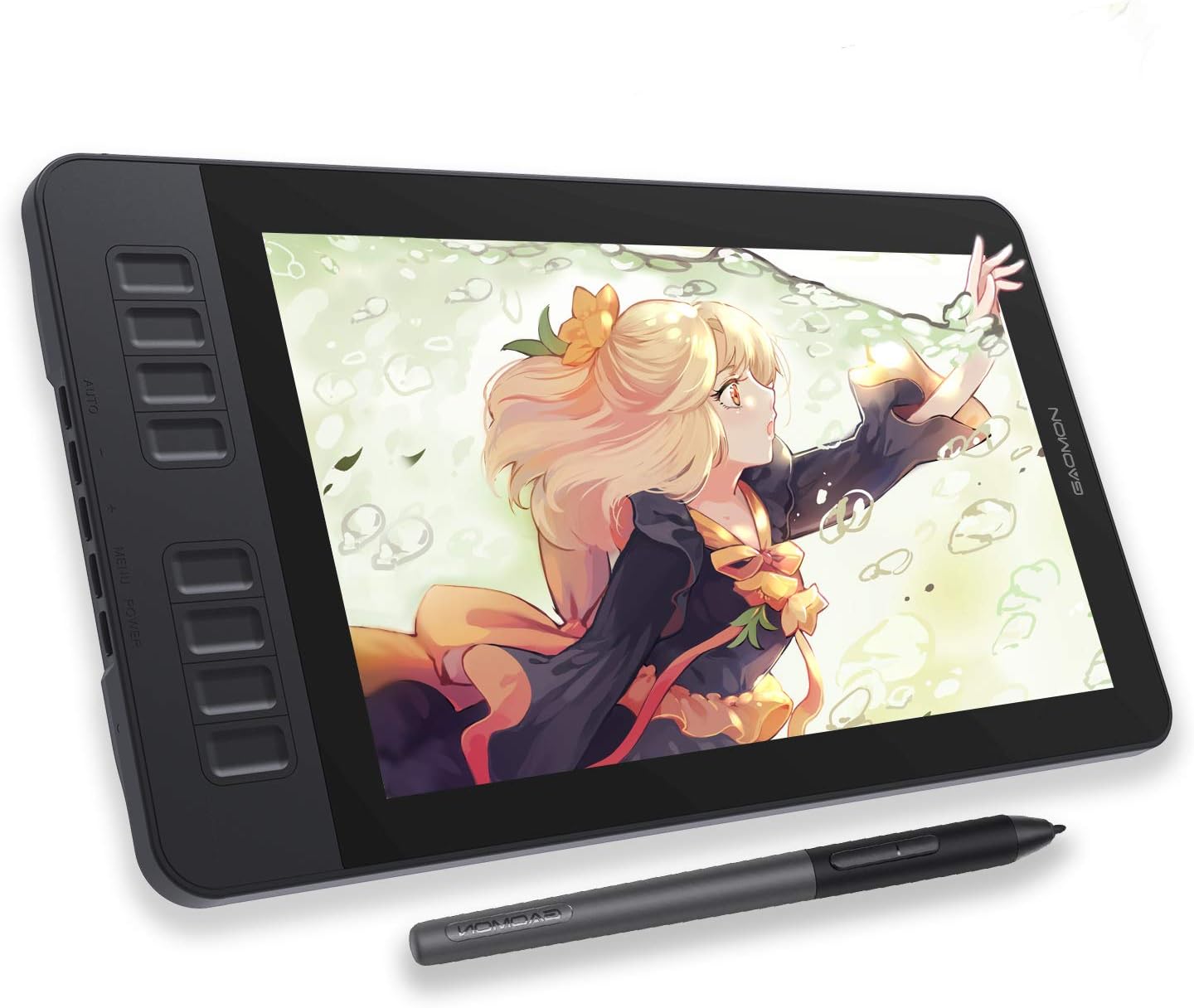
The GAOMON PD1161 is a compact 11.6-inch pen display tablet designed for aspiring digital artists, illustrators, photo editors, and remote workers who want to draw directly on screen. It connects via USB and HDMI to Windows or Mac computers, turning your setup into a natural drawing station without the need for a standalone device. Ideal for beginners transitioning from traditional sketching, it supports creative software like Photoshop, Krita, and SAI, as well as tools for note-taking and diagramming.
Standout features include a battery-free AP50 stylus with 8192 pressure levels and tilt recognition, mimicking a real pencil for varied line weights and shading. The Full HD IPS screen covers 100% sRGB for accurate colors, and the pre-applied matte anti-glare film reduces reflections while providing a textured, paper-like feel. In real-world use, the 8 programmable shortcut keys and responsive pen buttons speed up workflows, making tasks like layer switching or brush changes effortless. Compatibility is broad, working smoothly with most major apps after driver installation from Gaomon's site.
Build quality is solid for the price, with a lightweight design that fits easily on a desk. The included accessories, like extra nibs and a drawing glove, add value for extended sessions. However, it demands a stable power supply, and some users report initial setup tweaks for calibration or signal issues, resolvable via simple troubleshooting like cable checks.
Minor drawbacks include its dependence on a host computer and occasional need for an external adapter, but these are common for entry-level pen displays. Overall, the PD1161 excels as an affordable gateway to digital art, delivering professional-grade responsiveness and versatility that punches above its weight.
Display: 11.6-inch Full HD IPS (1920x1080), 100% sRGB, anti-glare matte film.
Stylus: Battery-free AP50, 8192 pressure levels, tilt support, 2 programmable buttons.
Controls: 8 customizable express keys.
Compatibility: Windows 7+, macOS 10.12+, major creative software.
Connections: 3-in-1 USB/HDMI cable, AC adapter recommended.
In the Box: Tablet, stylus, pen holder with 8 nibs, glove, cables, quick guide.

Pros
- Standalone operation frees you from PC dependency
- Pressure-sensitive pen with palm rejection enhances drawing accuracy
- Preloaded drawing apps and tutorials speed up learning for novices
- Versatile Android platform supports entertainment beyond art
- Generous accessory bundle boosts immediate usability
Cons
- Android 10 OS may limit access to newest app features
- Quad-core processor handles basics well but not intensive multitasking
- Lack of user reviews makes long-term reliability uncertain
The Simbans PicassoTab X is a standalone 10-inch drawing tablet designed for beginners entering digital art, animation, or note-taking. Running on Android 10 with 4GB RAM and 64GB storage, it operates independently without needing a computer, making it perfect for artists on the move like students or hobbyists sketching in parks or buses.
Standout features include a pressure-sensitive stylus with 1024 levels for precise strokes, palm rejection technology for natural hand resting, and preloaded apps such as Concepts (with PRO upgrade), Infinite Painter, and FlipaClip for drawing and frame-by-frame animation. The IPS screen delivers clear visuals at 1280x800 resolution, while WiFi, Bluetooth, GPS, and micro-HDMI enable connectivity for streaming or TV mirroring. Real-world performance shines in casual creative sessions and media consumption, with the quad-core processor managing apps smoothly for its price point.
Build quality feels solid with a pre-installed screen protector, included case, drawing glove, and universal charger. The lightweight design enhances portability, and the elegant gift box adds appeal for special occasions. Battery life supports extended use, though heavy tasks may drain it faster.
Potential drawbacks include the older Android version potentially missing cutting-edge app optimizations and a processor not suited for pro-level rendering. With no established user feedback yet, buyers should weigh this against the accessible entry price.
Overall, the PicassoTab X excels as an affordable, all-in-one gateway to digital art for novices, delivering freedom, tools, and fun in a portable package. Recommended for aspiring artists prioritizing mobility over high-end power.
Display: 10.1-inch IPS, 1280x800 resolution
Processor: Quad-core MTK8168 2GHz
Memory: 4GB RAM, 64GB storage (expandable via microSD)
OS: Android 10
Cameras: 2MP front, 5MP rear
Battery: 5800mAh
Connectivity: WiFi, Bluetooth, GPS, micro-HDMI, USB-C, microSD
Stylus: 1024 pressure levels, palm rejection
PicassoTab X 10-inch tablet, pressure-sensitive stylus pen, protective case, drawing glove, pre-installed screen protector, universal charger with adapters, user manual, and instructions for app upgrades.

Pros
- Superior color accuracy with 123% sRGB and wide viewing angles
- Minimal parallax and smooth 220 RPS tracking for fluid drawing
- Customizable controls and tilt support enhance workflow efficiency
- Battery-free pen reduces maintenance and feels natural
- Includes adjustable stand and versatile 3-in-1 cable
Cons
- Requires connection to a computer or laptop; not standalone
- No VESA mount for wall or arm mounting
- 13.3-inch screen may feel small for detailed professional work
The XPPen Artist 13.3 Pro is a compact pen display graphics tablet designed for digital artists, illustrators, and hobbyists who need an affordable entry into screen-based drawing. Paired with a computer, it transforms into a responsive drawing surface perfect for software like Photoshop, Illustrator, and SAI, targeting beginners and intermediates seeking natural pen input without breaking the bank.
Standout features include a fully-laminated 13.3-inch Full HD screen that virtually eliminates parallax, allowing strokes to land exactly where intended for precise line work and shading. The 123% sRGB color gamut (88% NTSC) provides rich, vivid colors with a 178-degree viewing angle, while the battery-free stylus offers 8192 pressure levels, 60-degree tilt recognition, and 220 RPS tracking for smooth, expressive strokes in real-world use.
Build quality shines with a sturdy adjustable stand, ergonomic stylus design, and intuitive red dial plus eight shortcut keys that speed up common tasks like zooming and tool switching. Compatibility spans Windows, Mac, Chrome OS, and Linux, with bonus software access upon registration. The pen case doubles as a holder and stand, adding practicality for daily sessions.
Drawbacks include its dependence on a host computer, limiting portability, and the absence of a VESA mount for custom setups. The screen size suits most users but may constrain those needing expansive canvases.
Overall, the Artist 13.3 Pro delivers exceptional value for its price, earning high praise for color fidelity and drawing feel. It's a strong recommendation for aspiring artists ready to elevate their digital workflow.
Display: 13.3-inch Full HD (1920x1080), fully-laminated, 123% sRGB (88% NTSC), 178-degree viewing angle
Pen: Battery-free, 8192 pressure levels, 60-degree tilt, 220 RPS, 2 customizable keys, 8 replacement nibs
Controls: Red dial + 8 shortcut keys
Connectivity: 3-in-1 cable (HDMI, USB-C, USB-A)
Compatibility: Windows 7+, Mac OS 10.10+, Chrome OS 88+, Linux
Includes: Adjustable stand, pen case/holder

Pros
- Mess-free alternative to crayons and paper keeps surfaces clean
- Builds concentration and imagination with rainbow colors
- Durable plastic withstands drops from active kids
- Lightweight for easy carrying in bags or hands
- Eco-friendly with endless reuse
Cons
- Battery replacement needs a screwdriver for access
- Basic drawing lacks advanced artistic tools
- Stylus pressure sensitivity may vary for fine lines
The Bravokids 10 Inch LCD Writing Tablet is a portable electronic doodle board designed for children aged 3-8, serving as an ideal mess-free alternative to traditional drawing tools. Perfect for budding artists, toddlers, and school-age kids, it supports drawing, writing, spelling, and simple math practice, making it a versatile educational toy for home, travel, or outings.
Standout features include a vibrant, glare-free colorful LCD screen that protects eyes during extended use, a one-click erase button for instant clearing, and a lock key to safeguard creations. The tethered stylus mimics real pen pressure for natural lines, while the lightweight 150g build with rounded edges and shock-resistant plastic handles rough play. In real-world use, it quiets fidgety kids in cars or restaurants and sparks creativity without paper waste.
Build quality shines with durable construction and a screw-secured battery door for child safety, though accessing the battery requires a tool. The eco-friendly design allows over 100,000 rewrites, reducing environmental impact significantly.
Drawbacks include limited advanced features for older kids wanting digital art apps and occasional stylus misplacement despite the tether. Overall, it excels as an affordable, engaging tool that promotes focus and imagination.
Verdict: Highly recommended for parents seeking a safe, portable toy that combines fun, learning, and convenience. An excellent gift choice for birthdays, holidays, or everyday creativity boosts.
EYE PROTECTION: 10-inch colorful LCD screen, radiation-free and glare-free for safe, long-term use.
CONVENIENCE: One-second erase button and lock key for easy management of doodles.
PORTABILITY: Weighs just 150g, anti-fall design with pen tether for on-the-go fun.
EDUCATIONAL: Boosts creativity, writing, and focus as a doodle board or learning pad.
ECO-FRIENDLY: Reusable over 100,000 times, saving paper and ink.

Pros
- Generous 15-inch screen for comfortable, detailed creation
- Promotes screen-free activities supporting focus and creativity
- Versatile for homework, travel, and daily quiet play
- Easy erase function for instant reuse without paper waste
- Durable and parent-approved for long-term use
Cons
- Writing limited to single color for simpler sketches
- Requires battery replacement over time
- Stylus may need careful handling to avoid loss
The TEKFUN 15 Inch LCD Writing Tablet is a large, screen-free drawing and writing pad designed for kids ages 5-10+, with a focus on older children like girls 8-12 who need more space than small toddler boards. It serves as an engaging tool for sketching, practicing handwriting, solving math problems, making lists, or casual doodling, all without the glow of digital screens.
Standout features include the expansive 15-inch display that allows freedom for bigger projects and creative expression, making it feel mature and fun. In real-world use, it excels during quiet time, travel, or homework sessions, keeping kids focused and independent while giving parents peace of mind over screen limits. The one-touch erase button ensures quick resets for nonstop play.
Build quality is solid with a lightweight, portable frame that withstands daily kid handling, though the stylus requires mindful storage. It performs reliably for its purpose but sticks to basic monochrome writing without advanced colors or apps.
Potential drawbacks include battery dependency and the simplicity of single-color output, which suits casual use but not artistic pros. Overall, this tablet earns high marks as a practical, reusable alternative to paper or devices, delivering strong value for creative, educational play.
Verdict: Highly recommended for parents seeking a versatile, screen-free activity that grows with kids and doubles as a smart gift.
Perfect for girls ages 8-12 needing space for homework notes, drawing practice, or travel entertainment. Also great for any kid 5-10+ wanting a step up from tiny boards, and parents prioritizing screen-free creativity during quiet time or outings.

Pros
- Generous 12-inch screen enhances creative expression
- Anti-lost stylus and lightweight design ideal for travel
- Versatile for education, notes, and family communication
- Waterproof, shockproof construction withstands kids' rough play
- Promotes eco-conscious habits by reducing paper waste
Cons
- Screen may arrive with shipment scratches, cleared by erase button
- Battery replacement needs a screwdriver for child safety
- LCD display lacks the vibrancy of traditional colored paper
The KOKODI 12 Inch LCD Writing Tablet is a versatile erasable doodle board designed primarily for children aged 3-8, but suitable for teens and adults too. It serves as a mess-free alternative to crayons, paper, or chalk, perfect for home learning, travel entertainment, school notes, or quick memos. Parents seeking quiet, portable toys that spark imagination without cleanup will find this an excellent choice.
Standout features include the expansive 12-inch screen for more detailed artwork, an anti-lost stylus secured by a lanyard, and a durable plastic build with rounded corners that resists drops, shocks, and water. In real-world use, it excels at educational activities like spelling, counting, tic-tac-toe, and free drawing, while its lightweight 240g frame slips easily into bags for road trips or classrooms. The one-touch erase function refreshes the screen instantly, and its eye-protecting LCD avoids blue light harm compared to tablets or TVs.
Build quality impresses with child-safe engineering: the battery lasts 3-6 months and is screw-secured to prevent tampering. However, minor screen scratches from shipping may appear, easily resolved by erasing. The simple design appeals across ages, functioning as a family message board or group discussion note-taker.
Drawbacks are few but include the LCD's subdued colors versus vibrant markers and the need for tools to swap batteries. Overall, this tablet delivers reliable performance for creative, on-the-go play.
Verdict: Highly recommended for families wanting a durable, eco-friendly drawing solution that grows with kids. It outperforms smaller boards in screen size and portability, making it a smart buy for birthdays or everyday use.
Larger 12-Inch Screen: Provides ample space for detailed doodles, writing, and games to fuel creativity.
Anti-Lost Stylus Lanyard: Keeps the pen attached, ensuring its always ready for spontaneous fun.
Durable & Safe Design: Waterproof, anti-drop plastic with rounded edges protects against accidents.
Portable Everywhere: Slim and light for travel, school bags, or handbags without adding bulk.
Eco-Friendly Reuse: Saves paper and features a replaceable battery for long-term value.

Pros
- Remote control simplifies color and brightness adjustments
- Long-lasting battery supports all-day use without cords
- Complete accessory kit covers all drawing and cleaning needs
- Versatile for home decor, office notes, and retail displays
- Soft lighting creates calming ambiance without harsh glare
Cons
- Dry-erase surface requires regular cleaning to prevent residue buildup
- Remote control needs direct line-of-sight and separate batteries
- Limited to 5 brightness levels, which may not suit very dark environments
This Bawaslom LED drawing board is a rechargeable, light-up tablet perfect for anyone wanting a fun, practical way to leave glowing messages, doodles, or reminders. Ideal for families displaying daily schedules, offices posting notes, or shops creating illuminated menus, it combines creativity with everyday utility in a compact white design.
Standout features include a remote for effortless switching between 9 RGB colors, 2 dynamic lighting modes, and 5 brightness levels, plus a 2200mAh battery for 10 hours of use. In real-world scenarios, it excels at producing vibrant, eye-catching displays that enhance ambiance, with the dry-erase acrylic surface allowing endless reuse for patterns or text. The included 12 pens, gloves, and cleaning supplies make it fully equipped for immediate creativity.
Build quality shines with a stable lighted base and portable form factor that stores easily. The soft glow avoids eye strain compared to screens, fostering relaxed artistic sessions. While versatile, it demands careful cleaning to maintain clarity, and the remote's line-of-sight limitation can be minorly inconvenient in larger spaces.
Overall, this board delivers strong value for its glowing versatility and gift appeal, earning high marks for innovation and ease. It's a smart pick for creative households or holiday gifting, provided you embrace its erasable, maintenance-based nature.
Full accessory kit: acrylic board, remote, 12 colored pens, LED base, gloves, cleaning cloth, spray, and Type-C cable.
9 RGB colors, 2 lighting effects, 5 brightness levels, all remote-controlled.
2200mAh battery for 10 hours of use; compact and portable design.
Dry-erase neon surface for notes, doodles, decor, and displays.
Best Tablets For Drawing Buying Guide
Pen Pressure Sensitivity and Tilt Support
The cornerstone of any great drawing tablet is stylus performance. Look for at least 8192 levels of pressure sensitivity for nuanced line weights, plus tilt support for natural shading. In our reviews, battery-free pens like those on pro models shine for uninterrupted sessions, mimicking traditional tools during long illustration marathons.
For beginners, even basic LCD pads offer responsive scribbling without software hassles. Pair with apps like Procreate or Photoshop for maximum versatility. See how these stack up in our Cell Phones category productivity guides.
Screen Size, Resolution, and Display Quality
Opt for 11-15 inch screens with FHD resolution or better for detailed work without eye strain. Laminated displays reduce parallax for precise cursor alignment, crucial in professional design. We’ve found 123% sRGB coverage on mid-range Tablets delivers vibrant colors for photo editing and comics.
| Feature | Beginner | Pro |
| Screen Size | 10-12″ | 13-15″ |
| Resolution | HD | FHD+ |
| Color Gamut | Standard | 123% sRGB |
Connectivity, Portability, and Standalone Use
USB-C connectivity and PC/Mac compatibility are musts for graphics tablets, while standalone Android Tablets free you from tethers. Prioritize lightweight builds under 2 lbs for on-the-go sketching. Rechargeable or erasable LCD options excel for kids’ doodling with zero battery worries during travel.
Explore related options in our Smartphones section for hybrid devices blending drawing and calls.
Final Thoughts
Our Best Overall is the XP-PEN Artist12 for its pro-grade 8192 pressure levels and FHD display, perfect for serious artists. Best Value goes to budget LCD writers like the Bravokids for endless erasable fun. For kids, TEKFUN’s large screen wins on durability. Grab yours now and elevate your art. Dive deeper with our Tablets & iPads picks.
FAQs
What should I look for in the 8 best tablets for drawing of 2026?
Prioritize high pen pressure, tilt support, and parallax-free screens. Standalone Tablets suit beginners; PC-tethered ones excel for pros. Our reviews highlight real-world reliability for daily sketching and pro workflows.
Are best tablets for drawing good for beginners?
Yes, affordable LCD doodle boards offer instant fun without apps, ideal for kids and novices. Upgrade to pressure-sensitive models as skills grow. Find your starter pick from our list today.
Do I need a powerful PC for these best tablets for drawing?
Not always; standalone options like Android Tablets run drawing apps independently. Graphics displays pair best with decent CPUs for smooth Photoshop performance. Check compatibility in product specs.
What’s the best tablets for drawing for digital art pros?
Pro monitors with 8192 pressure and wide color gamut, like our top picks. They deliver studio-quality results. Pair with our best smartphones for students for mobile inspiration.
How do LCD writing tablets compare to graphics tablets?
LCD pads are cheaper, portable, and erasable for casual use, but lack pressure sensitivity. Graphics Tablets offer pro features for illustration. Choose based on your needs and upgrade later.
Sources
This article was researched and written with reference to expert reviews and testing data from trusted sources including PCMag, TechRadar, CNET, Creative Bloq, Laptop Mag, and other category-relevant publications. All recommendations reflect real-world performance and value as of October 2026.





Write Your Review
No reviews yet. Be the first to share your experience!