

Struggling with choppy streams, dropped frames, or subpar video quality during your live broadcasts in 2026? Our expert team at WikiElectronics has reviewed the top 7 best laptops for streaming from Dell, Morostron, prioritizing real-world performance for OBS encoding, multi-tasking with chat and games, and immersive viewing on the go. Check out our comprehensive Laptops category page for more insights. Find your ideal match below and upgrade your setup today.

Pros
- Powerful i7 processor and RTX 4050 handle demanding games and editing at high FPS
- 165Hz refresh rate ensures fluid motion and competitive edge
- Generous 16GB DDR5 upgradable to 32GB and 1TB SSD for future-proof storage
- Multiple ports including Thunderbolt 4 for versatile connectivity
Cons
- Battery life limited to about 5 hours, best plugged in for gaming
- No built-in webcam, requiring external setup for video calls
- Weighs 4.66 pounds, less ideal for frequent travel
The Acer Nitro V 15 (ANV15-52-76NK) is a gaming laptop designed for enthusiasts seeking strong performance without breaking the bank. It targets gamers, students, and creators who need a machine for high-FPS gaming, video editing, and multitasking on the go.
Standout features include the Intel Core i7-13620H processor paired with NVIDIA GeForce RTX 4050 GPU supporting DLSS 3.5 and ray tracing for breathtaking visuals and smooth frame rates. The 15.6-inch FHD IPS display at 165Hz delivers vibrant colors and minimal blur, while 16GB DDR5 RAM and 1TB Gen4 SSD ensure lightning-fast performance in real-world scenarios like streaming or content creation.
Build quality features a sturdy clamshell design in black with a backlit keyboard and numeric keypad for comfortable use. Connectivity shines with Wi-Fi 6, Thunderbolt 4, and HDMI, though its 4.66-pound weight makes it more desk-bound than ultra-portable.
Drawbacks include modest 5-hour battery life and lack of webcam, which may inconvenience mobile users or video callers. Overall, it excels in value for gaming prowess.
Verdict: Excellent choice for budget-conscious gamers wanting RTX 40-series power and high-refresh gaming.
Processor: Intel Core i7-13620H (13th Gen, up to 4.9GHz)
Graphics: NVIDIA GeForce RTX 4050 (6GB GDDR6)
Display: 15.6-inch FHD IPS, 165Hz, 300 nits, matte
Memory & Storage: 16GB DDR5 (up to 32GB), 1TB PCIe Gen4 SSD
Connectivity: Wi-Fi 6, Bluetooth, Thunderbolt 4, HDMI, 2x USB
Other: Backlit KB, Windows 11 Home, 57Wh battery
Pros
- Upgraded 16GB RAM boosts performance for everyday tasks
- Generous storage bundle with docking station expands usability
- Lightweight 3.24 lbs design enhances portability
- Multiple ports including USB-C and HDMI for connectivity
- Pre-installed Windows 11 S with Office 365 subscription
Cons
- HD resolution (1366x768) lacks sharpness of Full HD
- Entry-level Celeron processor limits demanding workloads
- Seal opened for upgrades, though fully warranted
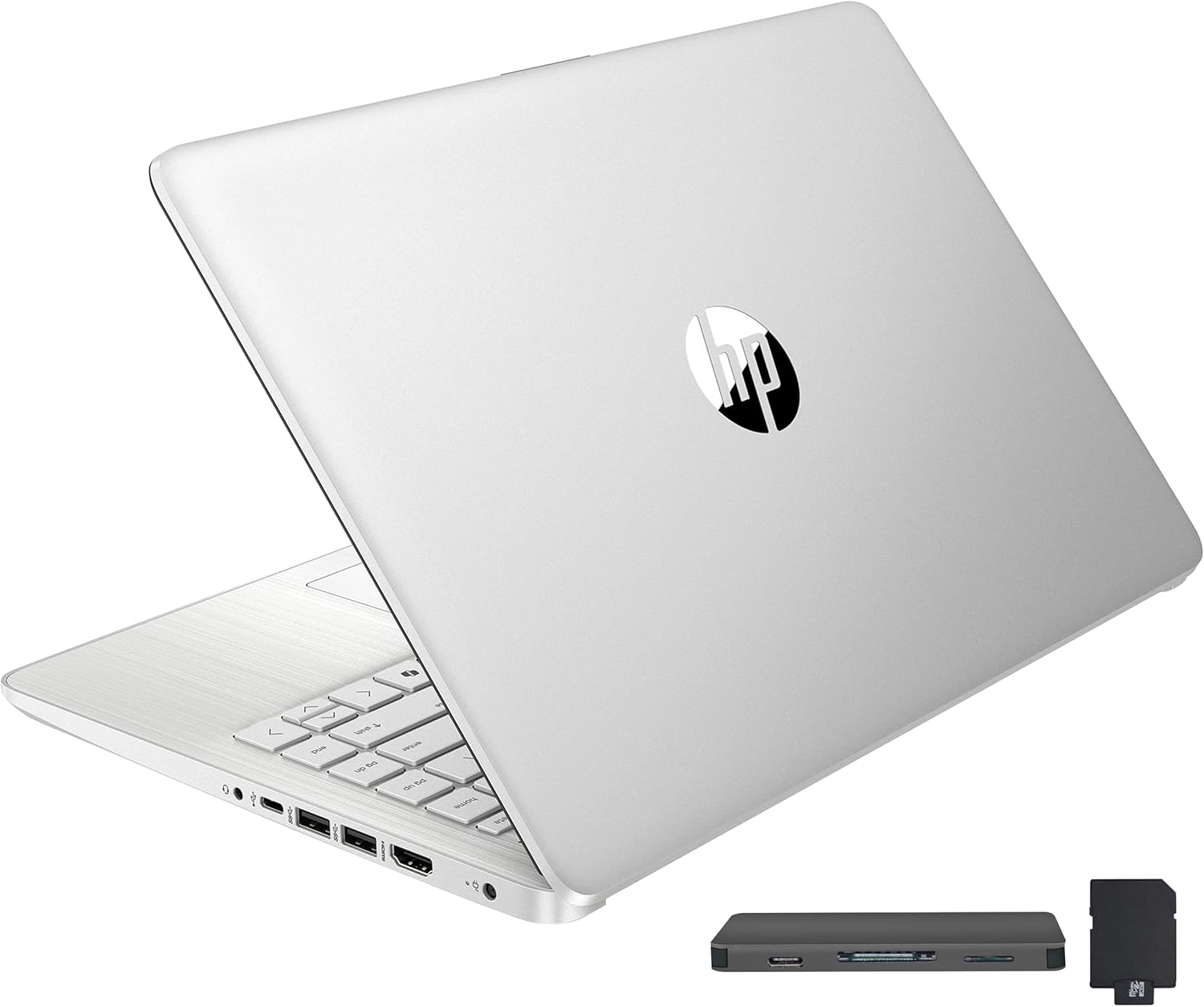
This HP Stream 14-inch laptop targets budget-conscious users like students, remote learners, and casual professionals seeking an affordable entry into Windows computing. Upgraded from its base model, it packs an Intel Celeron N150 processor, 16GB DDR4 RAM, and 288GB storage split between onboard eMMC and a bonus docking station set, making it suitable for web browsing, document editing, video calls, and light multimedia.
Standout features include the vibrant 14-inch HD BrightView display for enjoyable viewing, Intel UHD Graphics for solid everyday visuals, and a 720p webcam for reliable virtual interactions. The 16GB RAM shines in real-world use, allowing seamless app switching without slowdowns, while the docking station adds practical expandability with extra storage, ports, and cables. Paired with Windows 11 Home in S Mode and a year of Office 365, it streamlines productivity out of the box.
Design-wise, its slim 0.71-inch profile and 3.24-pound weight make it highly portable, with a silver finish and essential ports like USB-C, HDMI, and a media card reader. Build quality feels sturdy for daily carry, though the HD resolution may disappoint on larger desks.
Drawbacks include the modest processor for intensive tasks like video editing and the opened seal for upgrades, but warranties cover all components. Overall, this laptop offers excellent value for basic needs, earning a strong recommendation for cost-effective computing.
Processor: Intel Celeron N150 (4-core)
RAM: 16GB DDR4
Storage: 128GB eMMC + 160GB Docking Station (288GB total)
Display: 14-inch HD BrightView (1366 x 768)
Graphics: Intel UHD Graphics
Webcam: 720p HD
OS: Windows 11 Home in S Mode
Ports: USB-C 3.0, 2x USB-A 3.0, HDMI 1.4, Media Card Reader, Headphone/Mic
Dimensions: 12.76 x 8.86 x 0.71 inches, 3.24 lbs
Includes: 1-Year Office 365, Docking Station Set

Pros
- Powerful RTX 4050 with 194 AI TOPS for stunning graphics and high frame rates
- 165Hz refresh rate ensures fluid gameplay and quick response times
- Fast PCIe Gen 4 SSD and DDR5 RAM for quick load times and smooth performance
- Versatile ports including Thunderbolt 4 for connectivity and expansion
- AI features like Copilot and PurifiedView enhance productivity and video calls
Cons
- Base 8GB RAM may require upgrade for intensive multitasking
- 512GB SSD could fill up quickly with modern games
- Entry-level for ultra-high-end 4K gaming demands
The Acer Nitro V 15 is a mid-range gaming laptop designed for gamers who want solid performance without breaking the bank. It targets casual players, streamers, and content creators needing a balance of power, portability, and upgradability. With its Intel Core i5-13420H and RTX 4050 GPU, it handles modern titles at high settings while supporting multitasking like video editing.
Standout features include the 15.6-inch FHD IPS display at 165Hz for buttery-smooth visuals and minimal ghosting, paired with AI-powered DLSS 3.5 for enhanced ray tracing and realism. The processor excels in simultaneous gaming and streaming, while Wi-Fi 6 and Killer Ethernet ensure stable connections. Real-world performance shines in fast-paced shooters and RPGs, delivering high FPS effortlessly.
Build quality features a sleek design with a backlit keyboard and 82.64% screen-to-body ratio for immersive viewing. Connectivity is robust with Thunderbolt 4 for versatile charging and displays. It's portable enough for gaming on the go, though the chassis may warm during extended sessions.
Potential drawbacks include the 8GB DDR5 RAM, which is upgradable to 32GB but starts basic for heavy users, and 512GB storage that may need expansion. It's not for top-tier 4K gaming but punches above its weight for the price.
Overall verdict: A knockout choice for budget-conscious gamers seeking victory in battles and beyond. Highly recommended for entry-to-mid level play with future-proofing options.
Processor: Intel Core i5-13420H
Graphics: NVIDIA GeForce RTX 4050 Laptop GPU (194 AI TOPS)
Display: 15.6-inch FHD IPS, 165Hz, 16:9, 82.64% screen-to-body
Memory: 8GB DDR5 (up to 32GB, 2 slots)
Storage: 512GB PCIe Gen 4 SSD
Connectivity: Wi-Fi 6, Killer Ethernet E2600, Thunderbolt 4
Other: Backlit Keyboard, AI features (Copilot, PurifiedView, PurifiedVoice)
Pros
- Vibrant 15.6-inch FHD 120Hz anti-glare display
- Fast 512GB NVMe SSD for quick boot and load times
- Energy-efficient battery with smart charging
- Spacious keyboard and lifted hinges for ergonomics
- 1-Year Onsite Service for convenient support
Cons
- Integrated Intel UHD Graphics limits gaming and graphics-intensive work
- 8GB RAM may struggle with heavy multitasking
- USB-C port supports data only, no charging or display output
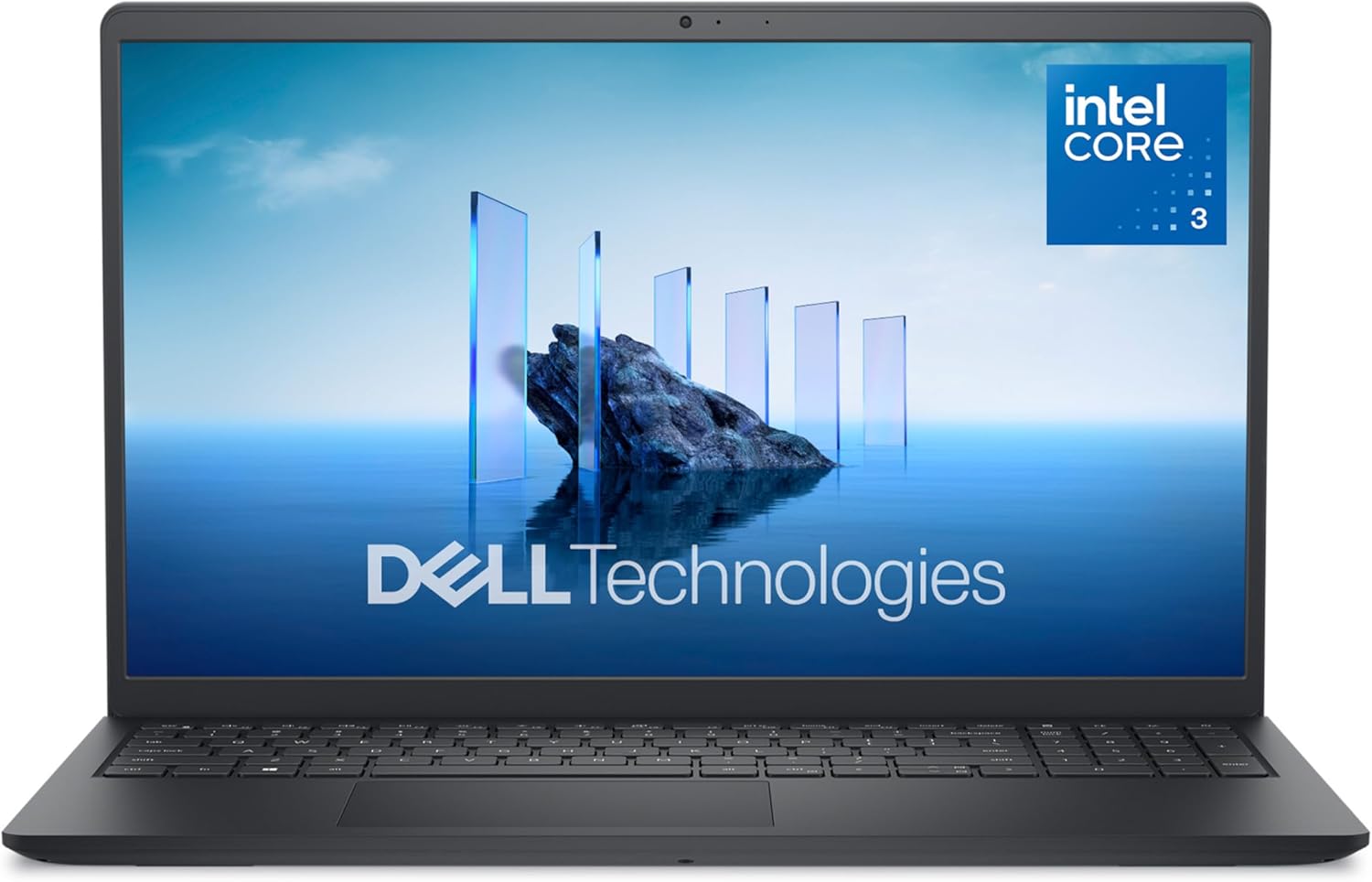
The Dell 15 Laptop DC15250 is a versatile 15.6-inch traditional laptop designed for everyday users like students, remote workers, and home office professionals. Powered by an Intel Core 3 100U processor with 8GB DDR4 RAM and a 512GB SSD, it excels at web browsing, document editing, video streaming, and light productivity tasks, running smoothly on Windows 11 Home.
Standout features include a 120Hz FHD anti-glare display for fluid visuals, ExpressCharge for quick 80% battery replenishment in one hour, and Dell ComfortView to minimize blue light for comfortable long sessions. The enlarged ergonomic keyboard with a numeric keypad and calculator hotkey, plus lifted hinges, promotes fatigue-free typing. Adaptive thermals ensure consistent performance in various positions, from desk to lap.
Build quality impresses with a chic Carbon Black finish, using 30% post-consumer recycled plastic in the palmrest and 50% in the bottom cover, plus 100% recycled packaging. Ports offer practical connectivity like HDMI 1.4, USB 3.2, and an SD card reader. While integrated UHD Graphics handle casual use well, they fall short for gaming or video editing.
Potential drawbacks include 8GB RAM that may limit intensive multitasking and a data-only USB-C port. Overall, this laptop delivers excellent value for budget-conscious users prioritizing efficiency, comfort, and eco-friendliness, backed by 1-Year Onsite Service.
Processor: Intel Core 3 100U (6 cores, up to 4.7 GHz)
Display: 15.6-inch FHD (1920x1080) 120Hz, 250 nits, Anti-Glare WVA
Memory: 8GB DDR4 2666 MHz
Storage: 512GB M.2 PCIe NVMe SSD
Graphics: Intel UHD Graphics
OS: Windows 11 Home
Ports: USB 3.2 Gen1 Type-A/C, USB 2.0, HDMI 1.4, SD card, audio jack
Other: HD camera, ExpressCharge, ComfortView, 1-Year Onsite Service

Pros
- Upgraded 16GB RAM handles multiple apps effortlessly
- Generous storage bundle with docking station adds value
- Includes 1-year Office 365 for instant productivity
- Multiple ports including USB-C and HDMI for easy connectivity
- Compact and lightweight for on-the-go use
Cons
- Seal opened for upgrades may concern some buyers
- HD resolution lacks sharpness of Full HD screens
- Entry-level processor not suited for demanding tasks
This upgraded HP Stream 14-inch HD BrightView laptop targets budget-conscious students, casual users, and remote workers seeking an affordable entry into Windows computing. Powered by the efficient Intel Celeron N150 quad-core processor and boosted to 16GB DDR4 RAM, it handles web browsing, document editing, and light multitasking without lag. The inclusion of a 1-year Office 365 subscription adds immediate value for productivity needs.
Standout features include the 288GB total storage combining 128GB eMMC with a 160GB docking station set, providing ample space for files and apps. Intel UHD Graphics delivers solid everyday visuals on the 1366x768 display, while the 720p webcam supports clear video calls. Real-world performance shines in basic tasks like streaming and office work, though it avoids heavy gaming or video editing.
The build is slim at 0.71 inches thick and 3.24 pounds, with a gold finish for a premium feel. Ports abound with USB-C, USB-A, HDMI, and a media card reader, enhanced by the bonus 7-in-1 docking station for expanded connectivity. Windows 11 Home in S Mode keeps it simple and secure.
Drawbacks include the opened seal from upgrades, HD resolution that may feel dated, and the processor's limits on intensive workloads. Battery life suits all-day light use but varies with tasks.
Overall, this HP Stream offers excellent value for portable, everyday computing with smart upgrades and accessories, earning a strong recommendation for beginners and light users.
Processor: Intel Celeron N150 (4-core)
RAM: 16GB DDR4
Storage: 288GB (128GB eMMC + 160GB Docking Station Set)
Display: 14-inch HD BrightView (1366 x 768)
Graphics: Intel UHD Graphics
Webcam: 720p HD
OS: Windows 11 Home in S Mode
Ports: USB-C 3.0, 2x USB-A 3.0, HDMI 1.4, Media Card Reader, Headphone/Mic
Dimensions: 12.76 x 8.86 x 0.71 inches, 3.24 lbs
Includes: 1-Year Office 365, Docking Station Bundle

Pros
- Highly portable at just 3.24 pounds with thin profile
- Long battery life supports all-day unplugged use
- Includes valuable 1-year Microsoft 365 for instant productivity
- Micro-edge display maximizes viewing area
- Quick setup for basic tasks like browsing and streaming
Cons
- 4GB RAM limits multitasking with multiple apps
- 64GB eMMC storage fills quickly without external options
- Basic Celeron processor struggles with demanding tasks
The HP 14-dq0040nr Snowflake White laptop is a budget entry-level machine tailored for students, casual users, and anyone needing a secondary device for simple tasks like web surfing, email, document editing, and light streaming. Powered by an Intel Celeron N4020 dual-core processor, 4GB DDR4 RAM, and 64GB eMMC storage, it runs Windows 11 Home in S mode, prioritizing security and speed for basics.
Standout features include a 14-inch HD (1366x768) micro-edge display with 6.5mm bezels for an immersive 79% screen-to-body ratio, Intel UHD Graphics 600 for smooth 4K video playback, and up to 11.5 hours of battery life from its 41Wh cell with fast charging. Real-world performance shines for Gmail, Amazon shopping, Office apps via the bundled 1-year Microsoft 365 subscription, and casual browsing, as noted by users who praise its value after wired internet tweaks speed it up.
Design-wise, its slim 0.71-inch thick Snowflake White chassis weighs 3.24 pounds, making it highly portable with a full-size keyboard, HP Imagepad touchpad, 720p webcam, and ports like HDMI, USB, Wi-Fi 5, and Bluetooth 4.2. Build quality feels plastic but sturdy for daily carry, with eco-credentials like ENERGY STAR and EPEAT Silver.
Drawbacks include limited RAM causing slowdowns with many tabs, tight storage requiring cloud reliance, occasional slow initial setup with updates, and S mode restricting some apps like Firefox without switching (which may need a reset). It's not for gaming, video editing, or heavy multitasking.
Overall, this HP delivers solid value for light users seeking portability and essentials without frills. Ideal if basics suffice; upgrade RAM/storage models for more power.
Processor: Intel Celeron N4020 (up to 2.8GHz, 4MB cache)
Memory & Storage: 4GB DDR4-2400 RAM, 64GB eMMC
Display: 14-inch HD (1366x768) micro-edge BrightView, 220 nits
Graphics: Integrated Intel UHD Graphics 600
Battery: Up to 11.5 hours, 41Wh 3-cell Li-ion
OS: Windows 11 Home in S mode + 1-year Microsoft 365
Connectivity: Wi-Fi 5, Bluetooth 4.2, 1x HDMI, USB ports

Pros
- Large 16-inch FHD screen with high screen-to-body ratio
- Long-lasting 9000mAh battery for extended use
- Slim and lightweight for easy portability
- Expandable storage up to 1TB
- Integrated graphics superior to many budget alternatives
Cons
- AMD A9-9400 is an older processor, limiting performance for demanding tasks
- No dedicated GPU for gaming or heavy graphics work
- Limited built-in storage may require immediate expansion for large files
The Morostron 16-inch laptop is a budget-friendly traditional laptop ideal for students, remote workers, and casual users needing a portable machine for everyday tasks like web browsing, document editing, video streaming, and light photo work. With its AMD A9-9400 processor and Radeon R5 graphics, it handles basic productivity better than many entry-level Intel N-series chips.
Standout features include a vibrant 16-inch Full HD IPS display offering sharp 1920x1080 resolution and ample screen real estate, paired with 8GB RAM and 256GB SSD for smooth operation. The 9000mAh battery supports all-day use, while dual-band WiFi, USB 3.0, webcam, and numeric keypad enhance usability. In real-world scenarios, it excels at office apps and media consumption but may lag on intensive multitasking.
Design-wise, the slim 1.5cm thick, 1.4kg chassis makes it highly portable without sacrificing a full-sized keyboard. Build quality feels solid for the price, with reliable performance from the integrated graphics boasting up to 1GB video memory.
Potential drawbacks include the dated CPU, which struggles with modern gaming or video editing, and the need for storage expansion for power users. Overall, it delivers strong value for portable computing on a budget.
Verdict: Great pick for cost-conscious buyers prioritizing screen size, battery life, and portability over raw power. Pair it with an external drive for best results.
Display: 16-inch Full HD IPS, 1920x1080, 16:9, 93% screen-to-body ratio
Processor: AMD A9-9400 Radeon R5 up to 3.2GHz
Memory: 8GB DDR RAM
Storage: 256GB SSD, expandable to 1TB via TF card
Battery: 9000mAh lithium-ion
Connectivity: USB 3.0, dual-band WiFi, webcam, numeric keypad
Design: 1.4kg, 1.5cm thick
Best Laptops For Streaming Buying Guide
Processor and Graphics for Flawless Encoding
For streaming, prioritize Laptops with strong CPUs like Intel Core i5/i7 or AMD equivalents paired with dedicated GPUs such as NVIDIA RTX series. These handle real-time encoding in software like OBS without hiccups, even during demanding games. In our reviews, models with RTX 4050 GPUs excelled in maintaining high FPS while broadcasting at 1080p60.
Entry-level Intel Celeron options work for casual streaming but struggle with multitasking. Look for at least 8GB RAM to manage browser tabs, overlays, and alerts smoothly. For more on high-performance builds, see our guide to the best gaming PCs for streaming.
Display Quality and Audio for Pro-Level Viewing
A 120Hz or higher refresh rate FHD IPS display ensures buttery-smooth motion for gaming streams and previews. Anti-glare panels reduce reflections during long sessions, while 250+ nits brightness handles various lighting. Integrated audio should support clear voice capture via 720p webcams for engaging viewer interaction.
| Feature | Recommended for Streaming |
| Resolution | FHD (1920×1080) |
| Refresh Rate | 120Hz+ |
| Audio | Built-in mic + headphone jack |
Battery Life and Connectivity Essentials
Expect 6-8 hours for light streaming on battery, with fast charging to minimize downtime. Ports like USB-C, HDMI, and Wi-Fi 6 are crucial for external mics, capture cards, and stable uploads. Durable builds with ergonomic keyboards enhance comfort during extended broadcasts.
Final Thoughts
The Acer Nitro V with Intel Core i7 and RTX 4050 stands out as Best Overall for its superior encoding power and 165Hz display, perfect for pro streamers. For Best Value, the Dell 15 Laptop offers balanced performance in everyday scenarios. Grab the acer Nitro V Gaming Laptop as our top pick for demanding setups. Explore our Computers section for more and elevate your streams today.
FAQs
What should I look for in the best laptops for streaming 2026?
Focus on multi-core CPUs, dedicated GPUs for NVENC encoding, at least 16GB RAM, and high-refresh displays. These ensure lag-free streams and multitasking. Our reviews highlight models that deliver reliable performance across platforms like Twitch and YouTube.
Can budget Laptops handle streaming?
Yes, basic Intel Celeron Laptops with 8GB RAM manage 720p streaming for beginners, but upgrade to Core i5 or better for 1080p. Pair with external peripherals for improved quality. Check the picks above to find your match.
How much RAM do I need for smooth streaming?
Minimum 8GB, but 16GB+ is ideal for running games, OBS, and Discord simultaneously without stuttering. DDR5 RAM provides faster responsiveness in modern Laptops.
Are gaming Laptops best for streaming?
Gaming Laptops with RTX GPUs dominate due to hardware acceleration, but slim models suffice for lighter loads. See our related picks in the Gaming PCs category for desktop alternatives.
Do these best laptops for streaming support 4K streaming?
High-end models with UHD Graphics or RTX can handle 4K output, though most excel at 1080p60 for optimal quality. Upgrade your setup with our recommendations and start streaming professionally today.
Sources
This article was researched and written with reference to expert reviews and testing data from trusted sources including NotebookCheck, Laptop Mag, PCMag, TechRadar, CNET, and other category-relevant publications. All recommendations reflect real-world performance and value as of October 2026.






Write Your Review
No reviews yet. Be the first to share your experience!