

Suffering from wrist fatigue during long workdays or gaming marathons? The 7 Best Vertical Mice of 2026 from ProtoArc, Tecknet deliver ergonomic mastery, slashing muscle strain while boosting precision and comfort in real-world use. Whether for office productivity or extended browsing, these picks excel in hand position, smooth gliding, and seamless connectivity. Dive into our Computers category for more setup essentials. Find your ideal match below and upgrade your setup today.

Pros
- Ergonomic shape promotes natural wrist alignment to prevent strain
- Multi-device connectivity boosts productivity across PC, Mac, and laptop
- Long-lasting rechargeable battery with quick 2-hour charge
- High-sensitivity optical sensor with DPI adjustments
- Silent primary clicks for quiet office environments
Cons
- Requires 1-2 week adaptation period due to unique vertical shape
- Buttons are not programmable or customizable
- Side forward/back buttons incompatible with Mac OS
The ProtoArc EM11 NL is a Bluetooth rechargeable vertical ergonomic mouse designed for users with small to medium hands who endure long computer sessions. It connects via dual Bluetooth 5.0 modes or a 2.4GHz USB-A receiver to up to three devices, supporting Windows, Mac OS, and Android, making it versatile for office workers, gamers, or remote professionals seeking to alleviate wrist discomfort from traditional flat mice.
Standout features include adjustable DPI levels (1000/1600/2400) for smooth, precise cursor control and back/forward buttons for quick web navigation. The built-in 500mAh battery provides up to 100 hours of continuous use or 25 days at four hours daily, recharging fully in two hours via Type-C cable. In real-world use, it delivers reliable tracking on various surfaces, with quiet left and right clicks fostering a distraction-free environment, though the scroll wheel and side buttons produce audible feedback.
Build quality emphasizes comfort with a matte black plastic body that fits hands under 7.5 inches snugly, promoting a relaxed forearm position. The vertical angle encourages proper posture, potentially reducing repetitive strain over time, but first-time users note a learning curve as the grip feels unconventional initially.
Drawbacks include non-programmable buttons, Mac incompatibility for side buttons, and unsuitability for larger hands. No LED lighting keeps it professional and power-efficient.
Overall, the EM11 NL excels as an affordable entry into ergonomic computing, earning praise for pain relief after adaptation. Buy it if wrist health matters and your hand size matches; pair it with ProtoArc keyboards or pads for a full setup.
Connectivity: Bluetooth 5.0 (2 modes), 2.4GHz USB-A receiver (3 devices total)
Compatibility: Windows 8/10+, Mac OS X 10.12+, Android 4.3+
Battery: 500mAh rechargeable, 100 hours continuous, ~25 days at 4hrs/day
DPI: 1000/1600/2400 adjustable
Design: Vertical ergonomic for hands <19.05cm, Type-C charging only
Notes: Non-programmable buttons, side buttons not for Mac
Measure your hand length first: Ideal for <17.5cm (small) or 17.5-19.05cm (medium). Larger hands may find it cramped.
Expect 1-2 weeks to adapt to the vertical grip for full benefits like reduced strain.
Best paired with ProtoArc ergonomic keyboards (EK01 Plus, EK04) or mouse pads (MP50) for complete wrist support.
Not for users needing programmable buttons; await EM11 Pro upgrade.

Pros
- Ergonomist-approved for proven strain reduction
- High-precision tracking with adjustable DPI speeds
- Exceptional battery life and versatile connectivity options
- Multi-device compatibility with effortless Flow control
- Premium build with textured comfort grip
Cons
- Best suited for medium to large hands; smaller hands may prefer alternatives like Lift
- Vertical design requires short adjustment period for some users
- Lacks tilt scroll wheel found in some competitors
The Logitech MX Vertical is an advanced ergonomic wireless mouse designed for users prone to repetitive strain injury (RSI) or carpal tunnel syndrome, particularly those with medium to large hands. Its standout 57-degree vertical angle mimics a natural handshake, reducing muscle strain by 10% and wrist pressure compared to traditional flat mice, while maintaining full performance capabilities.
Key features shine in real-world use: the 4000 DPI optical sensor delivers precise tracking with four times less hand movement than standard 1000 DPI mice, and a cursor speed switch allows instant DPI adjustments. Logitech Flow lets you control up to three devices seamlessly by moving the cursor screen-edge to screen-edge across Windows and macOS. Battery life impresses with up to four months per charge and three hours from a one-minute USB-C top-up, supporting Bluetooth, Unifying Receiver, or wired connections.
Build quality feels premium with a textured rubber surface for a secure, fatigue-free grip that fits various hand shapes comfortably. It's rigorously tested by ergonomists for posture improvement and strain reduction. Multi-OS compatibility covers Windows, macOS, iPadOS, Chrome OS, and Linux.
Drawbacks include its fit primarily for medium-large hands, potentially feeling bulky for smaller ones, and a brief adaptation to the vertical orientation. No tilt scroll limits advanced wheel functions.
Overall verdict: A top choice for professionals enduring long computing sessions, offering science-backed ergonomics and pro-level performance that justifies investment in hand health.
Wireless Connectivity: Bluetooth Low Energy or Logitech Unifying USB Receiver; up to 10m range.
Sensor: 4000 DPI advanced optical tracking with cursor speed switch.
Battery: Rechargeable via USB-C; up to 4 months life, 3 hours from 1-minute charge.
Buttons: 4 customizable; precision scroll wheel.
Compatibility: Windows 10+, macOS 10.15+, iPadOS 13.4+, Chrome OS, Linux.
Ergonomics: 57° angle, natural handshake position for medium-large hands.
MX Vertical stands out with its 57° angle, 4000 DPI tracking, Flow for 3 devices, and rechargeable battery versus competitors like Lift Vertical (similar angle but shorter battery), ERGO M575 (trackball, no angle), or MX ERGO (tilt wheel, 2 devices).
Ideal if you need vertical ergonomics with multi-computer prowess; opt for others for small hands, trackball style, or budget options.

Pros
- Ergonomist-certified design promotes natural posture
- Versatile Bluetooth or Logi Bolt connectivity for multiple OS
- High 4000 DPI tracking for smooth navigation
- Eco-friendly with recycled plastic construction
- Whisper-quiet operation enhances office focus
Cons
- Designed specifically for small to medium hands; larger hands may need MX Vertical
- Full customization requires Logi Options+ software download
- Vertical grip may require short adjustment period
The Logitech Lift Vertical Ergonomic Mouse targets users with small to medium hands who suffer from wrist fatigue during extended computer use. Its standout 57-degree angle positions the hand in a natural handshake grip, easing pressure on the forearm and promoting better posture for prolonged sessions on Windows, macOS, iPadOS, or other platforms.
Key features shine in real-world performance: quiet clicks ensure minimal noise in shared spaces, while the SmartWheel toggles between precise and fast scrolling for tasks like document editing or web browsing. Multi-device connectivity via Bluetooth or Logi Bolt USB receiver, plus Logitech Flow for seamless file transfers, boosts productivity across laptops, PCs, and tablets. Customizable buttons via Logi Options+ software let you tailor shortcuts effortlessly.
Build quality impresses with a soft textured grip, cozy thumb rest, and durable construction using recycled plastics. At 125g and compact dimensions, it feels balanced and intuitive after a brief adaptation, with 4000 DPI tracking delivering responsive cursor control over 10m range.
Drawbacks include its fit limited to small-medium hands and the need for software to unlock full potential, plus an initial learning curve for the vertical shape. Overall, it excels for ergonomic relief and delivers exceptional value for daily desk warriors seeking comfort without compromise.
Connectivity: Bluetooth Low Energy or Logi Bolt USB receiver
Battery Life: Up to 24 months on 1x AA
Dimensions: 108 x 70 x 71 mm; Weight: 125g
Tracking: 4000 DPI adjustable
Buttons: 4 customizable
Compatibility: Windows 10+, macOS 10.15+, iPadOS 14+, Chrome OS, Linux
Wireless Range: 10 meters
Lift suits small to medium hands best. Measure your hand from wrist crease to tip of middle finger: ideal for under 19cm. For larger hands, consider Logitech MX Vertical.
Right-handed Graphite version featured; left-handed option available separately for mirrored comfort.
Pair with Wave Keys keyboard for full ergonomic setup.
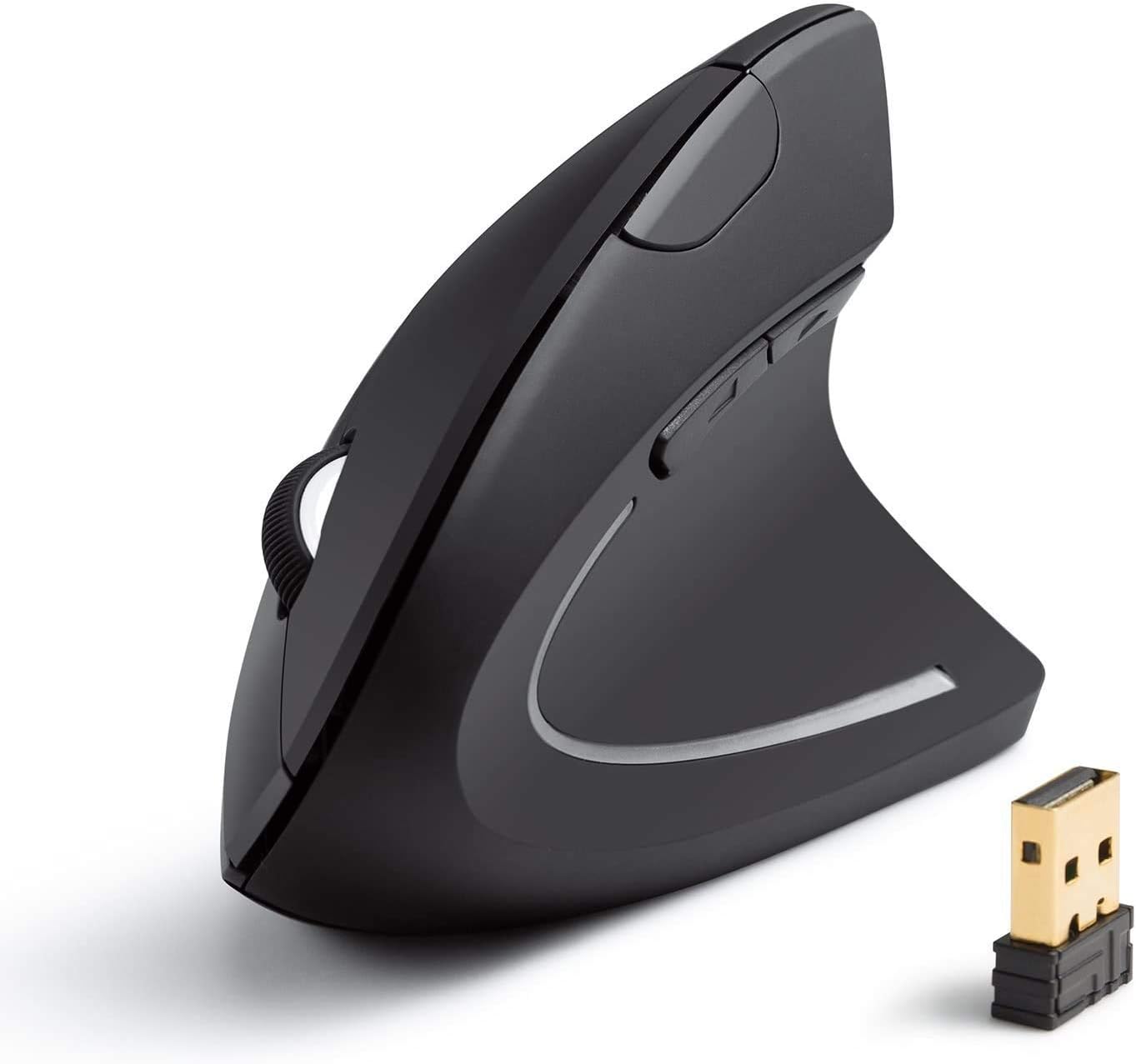
Pros
- Ergonomic shape promotes healthy wrist position
- Adjustable DPI for versatile precision
- Power-saving features for longevity
- Includes USB receiver and 18-month warranty
Cons
- Right-handed design only
- Batteries not included
- Potential interference near USB 3.0 ports
The Anker 2.4G Wireless Vertical Ergonomic Optical Mouse is designed for users spending long hours at computers, such as office professionals and gamers. Its vertical shape encourages a natural handshake posture, helping to minimize wrist and arm strain compared to flat mice.
Standout features include adjustable 800/1200/1600 DPI for precise control on various surfaces, plus next and previous buttons for quick web navigation. The 2.4G wireless connection provides lag-free performance, and it enters power-saving mode after 8 minutes of inactivity for efficiency.
Build quality feels solid with dimensions of 120x62.8x74.8 mm and a lightweight 3.4 oz design. The USB receiver stores neatly in the base, and it comes with an 18-month warranty. Real-world use shows smooth tracking, though right-handed users benefit most.
Drawbacks include no included batteries and possible interference from USB 3.0 ports, best mitigated with a USB 2.0 hub. Overall, it delivers comfort and productivity for daily computing.
Verdict: Highly recommended for anyone prioritizing ergonomics without sacrificing performance.
Connectivity: 2.4G Wireless with USB receiver
DPI: 800/1200/1600 adjustable
Buttons: 5 total, including next/previous
Dimensions: 120 x 62.8 x 74.8 mm
Weight: 3.4 oz
Batteries: 2 AAA (not included)
Warranty: 18 months

Pros
- Ergonomic vertical shape aligns wrist naturally
- Multi-device connectivity boosts productivity
- Rechargeable via Type-C with long battery life
- High-precision optical tracking with DPI options
- Silent primary clicks for quiet environments
Cons
- Requires 1-2 week adaptation period for new users
- Forward/back buttons incompatible with Mac OS
- Buttons not programmable; best for small to medium hands only
The ProtoArc EM11 NL is a wireless vertical ergonomic mouse designed for users with small to medium hands who endure prolonged computer use. It connects via dual Bluetooth 5.0 or 2.4GHz USB-A receiver to up to three devices, supporting Windows, Mac OS, and Android for versatile productivity across laptops, PCs, and tablets.
Standout features include adjustable DPI levels (1000/1600/2400) for smooth, precise tracking and a rechargeable 500mAh battery charged via Type-C cable. In real-world use, the multi-device switching enhances workflow efficiency, while quiet left and right clicks support focused sessions. The vertical design encourages a neutral wrist position, potentially alleviating strain from standard mice over time.
Build quality emphasizes comfort with a shape fitting hands under 7.5 inches, promoting a relaxed forearm angle. Materials feel sturdy, and the optical sensor delivers reliable performance on various surfaces. Pairing is straightforward, though the USB-A receiver is key for non-Bluetooth setups.
Drawbacks include a 1-2 week learning curve for grip adjustment and non-programmable buttons, with forward/back functions limited on Mac OS. It suits right-handed users best and may not fit larger hands comfortably.
Overall, the EM11 NL excels for strain-conscious professionals seeking an affordable ergonomic upgrade. Persistent use rewards with improved comfort and productivity, earning strong recommendation for daily desk warriors.
Connectivity: Dual Bluetooth 5.0 + 2.4GHz USB-A (up to 3 devices)
Compatibility: Windows 8/10+, Mac OS X 10.12+, Android 4.3+
Battery: 500mAh rechargeable via Type-C
DPI: 1000/1600/2400 adjustable
Design: Vertical ergonomic for small-medium hands (<7.5 inches); Blue color
Notes: Non-programmable buttons; forward/back not for Mac; quiet left/right clicks
Measure your hand length first; ideal under 7.5 inches (19.05 cm) for best fit. Expect 1-2 weeks to adapt to the vertical grip for maximum wrist relief. Pairs well with ProtoArc ergonomic keyboards like EK01 Plus or mouse pads like MP50 for full setup comfort.
Use Bluetooth for laptops or USB-A receiver for desktops. Charge fully before first use. Relax your palm naturally to leverage the design benefits fully.

Pros
- Exceptional ergonomic shape reduces wrist strain effectively
- Quiet operation ideal for offices or quiet environments
- Reliable wireless connectivity with multiple options
- High build quality with comfortable textured materials
- Smooth scrolling and responsive buttons enhance productivity
Cons
- Designed exclusively for right-handed users
- Best suited to small to medium hands, not larger ones
- Vertical design may require a short adjustment period
The Logitech Lift Vertical Ergonomic Mouse in Rose is crafted for small to medium right hands, offering a smart solution for those battling wrist fatigue from prolonged computer use. Its upright 57-degree angle promotes a neutral forearm position, helping users maintain comfort throughout demanding workdays on Windows, macOS, or iPadOS devices.
Standout features include a softly textured grip with a snug thumb rest for superior coziness, whisper-quiet clicks that won't disturb colleagues, and customizable buttons paired with a SmartWheel for precise, effortless scrolling. In real-world use, it delivers smooth wireless performance via Bluetooth or Logi Bolt USB receiver, fostering better focus without cable hassles.
Build quality shines with durable construction and an ergo-certified design validated by leading experts. The rose color adds a stylish touch to any setup, while the compact form suits laptops and PCs alike.
Potential drawbacks include its right-hand only orientation and fit optimized for smaller hands, which might not suit everyone, plus a brief adaptation to the vertical grip. Overall, it's a top pick for ergonomic relief.
Verdict: Highly recommended for desk-bound professionals seeking lasting wrist comfort and productivity gains without compromise.
Wireless connectivity: Bluetooth or Logi Bolt USB receiver. Buttons: 4 customizable. Compatibility: Windows, macOS, iPadOS, laptops, PCs. Design: Vertical ergonomic for right hands (small to medium), 57-degree angle, quiet clicks, SmartWheel scrolling.

Pros
- Multi-device connectivity via Bluetooth and 2.4GHz
- Adjustable high DPI for versatile performance
- Ergonomic design reduces long-term wrist strain
- Quiet operation suitable for shared environments
- Stable 15-meter wireless range
Cons
- Designed for right-handed users only
- Requires 2 AAA batteries, not included
- One-week adaptation period to vertical shape
The TECKNET Ergonomic Mouse is a wireless vertical mouse designed for right-handed users with medium-to-large hands who experience wrist discomfort from extended computer sessions. It connects via Bluetooth 5.0/3.0 or 2.4GHz USB receiver, allowing seamless switching between up to three devices for efficient multi-tasking across laptops and desktops.
Standout features include six adjustable DPI levels up to 4800 for precise optical tracking on various surfaces, quiet left and right clicks ideal for silent environments, and a 15-meter range for flexible positioning. In real-world use, the high-performance chip ensures smooth cursor movement, while the DPI indicator lights confirm settings instantly.
Build quality emphasizes comfort with a near-vertical palm angle that promotes natural hand positioning, reducing strain from traditional flat mice. The receiver stores neatly in the base, and auto deep sleep after inactivity conserves battery life, though branded AAA batteries are recommended for best results.
Potential drawbacks include its right-hand exclusivity, a brief adaptation period to the shape, and side buttons not fully supporting macOS. Battery indicator helps manage power, but replacements add minor upkeep.
Overall, this mouse excels for professionals and heavy users prioritizing wrist health and productivity, backed by a 36-month warranty. It delivers reliable performance for daily demands.
Connectivity: Bluetooth 5.0/3.0 (2 devices) + 2.4GHz USB-A (1 device), up to 3 total. DPI: 800/1200/1600/2400/3200/4800 adjustable. Buttons: 6 total, with silent left/right clicks. Power: 2x AAA batteries (not included), 12-month life, auto sleep. Compatibility: Windows/Mac/Chrome/Linux (side buttons limited on macOS). Range: 15 meters. Hand fit: Medium-to-large, right-handed only.
Best Vertical Mice Buying Guide
Ergonomics and Comfort
The hallmark of any great vertical mouse is its handshake grip, which keeps your wrist neutral to combat RSI and carpal tunnel risks. In our reviews, models with rubberized grips and adjustable angles shone during 8+ hour sessions for typing, editing, and casual gaming, far outperforming flat designs. Prioritize contoured shapes fitting medium to large hands for all-day reliability.
Check compatibility with your desk setup via our PC Components guides to ensure seamless integration.
Connectivity and Multi-Device Support
Look for Bluetooth and 2.4GHz USB receivers for lag-free switching between Laptops, Desktops, and Tablets. Top performers handled three devices effortlessly, ideal for hybrid workers toggling between Windows PCs and Macs without reconnection hassles. Battery life often exceeds 4 months on a charge, minimizing downtime.
| Feature | Why It Matters |
| Bluetooth + 2.4GHz | Versatile pairing |
| USB-C Rechargeable | Quick top-ups |
| Multi-Device | Seamless workflow |
DPI Settings and Precision
Adjustable DPI from 800 to 4800 ensures pinpoint accuracy for precise cursor control in photo editing, spreadsheets, or light gaming. Quieter clicks enhance office environments, while optical sensors deliver consistent tracking on varied surfaces. According to PCMag reviews, higher DPI options excel in fast-paced productivity without jitter.
Pair with our Computer Accessories recommendations for a full ergonomic workstation.
Final Thoughts
The Logitech MX Vertical stands as Best Overall for its premium build, strain-reducing design, and effortless multi-device flow across Laptops and Desktops. For unbeatable value, the Anker 2.4G Wireless Vertical Mouse offers solid comfort and DPI adjustability at entry-level pricing. Small-handed users love the Logitech Lift in Rose for its compact grip and quiet operation. Grab the Logitech MX Vertical Wireless Mouse to transform your daily computing. Explore Gaming PCs next for ultimate performance.
FAQs
What makes Best Vertical Mice better for health?
Vertical mice promote a natural handshake position, reducing wrist pronation and strain during prolonged use. Our reviews confirm less fatigue for productivity and office tasks compared to traditional flat mice.
Are Best Vertical Mice suitable for gaming in 2026?
Yes, with adjustable DPI up to 4800 and responsive sensors, they handle casual gaming well, though not ideal for competitive FPS. Check top picks below for smooth tracking and check out our best GPUs to elevate your rig.
How do I choose DPI for Best Vertical Mice?
Start at 1200-1600 DPI for general use; increase for speed in editing or scrolling. Most models allow on-the-fly adjustments via buttons for personalized precision.
Do Best Vertical Mice work with Mac and Windows?
Absolutely, leading options support Bluetooth and USB for broad compatibility across macOS, Windows, and even iPadOS. Seamless setup enhances hybrid workflows.
What’s the battery life on top Best Vertical Mice?
Expect 3-12 months per charge depending on usage, with rechargeable models offering USB-C convenience. Find your match in our list and upgrade today for uninterrupted performance.
Sources
This article was researched and written with reference to expert reviews and testing data from trusted sources including PCMag, TechRadar, CNET, Tom’s Hardware, PCWorld, and Wirecutter. All recommendations reflect real-world performance and value as of October 2026.







Write Your Review
No reviews yet. Be the first to share your experience!