

Tired of wrist fatigue and sluggish cursor movement slowing your workday? In 2026, the right mouse transforms office tasks from frustrating to fluid. We’ve reviewed the 7 Best Mice For Office from Lekvey, ProtoArc, focusing on real-world comfort during long typing sessions, precise tracking for spreadsheets, and seamless connectivity for multi-monitor setups. Check out our Computers category for more upgrades. Find your ideal match below and upgrade your setup today.
Pros
- Exceptional 24-month battery life reduces maintenance
- Ergonomic design supports comfortable extended use
- Laser tracking delivers smooth precision on various surfaces
- Programmable buttons enhance workflow efficiency
- Unifying receiver enables easy multi-device setup
Cons
- Designed primarily for right-handed users
- Laser sensor ineffective on glass or mirrors
- Relies on USB receiver without Bluetooth option
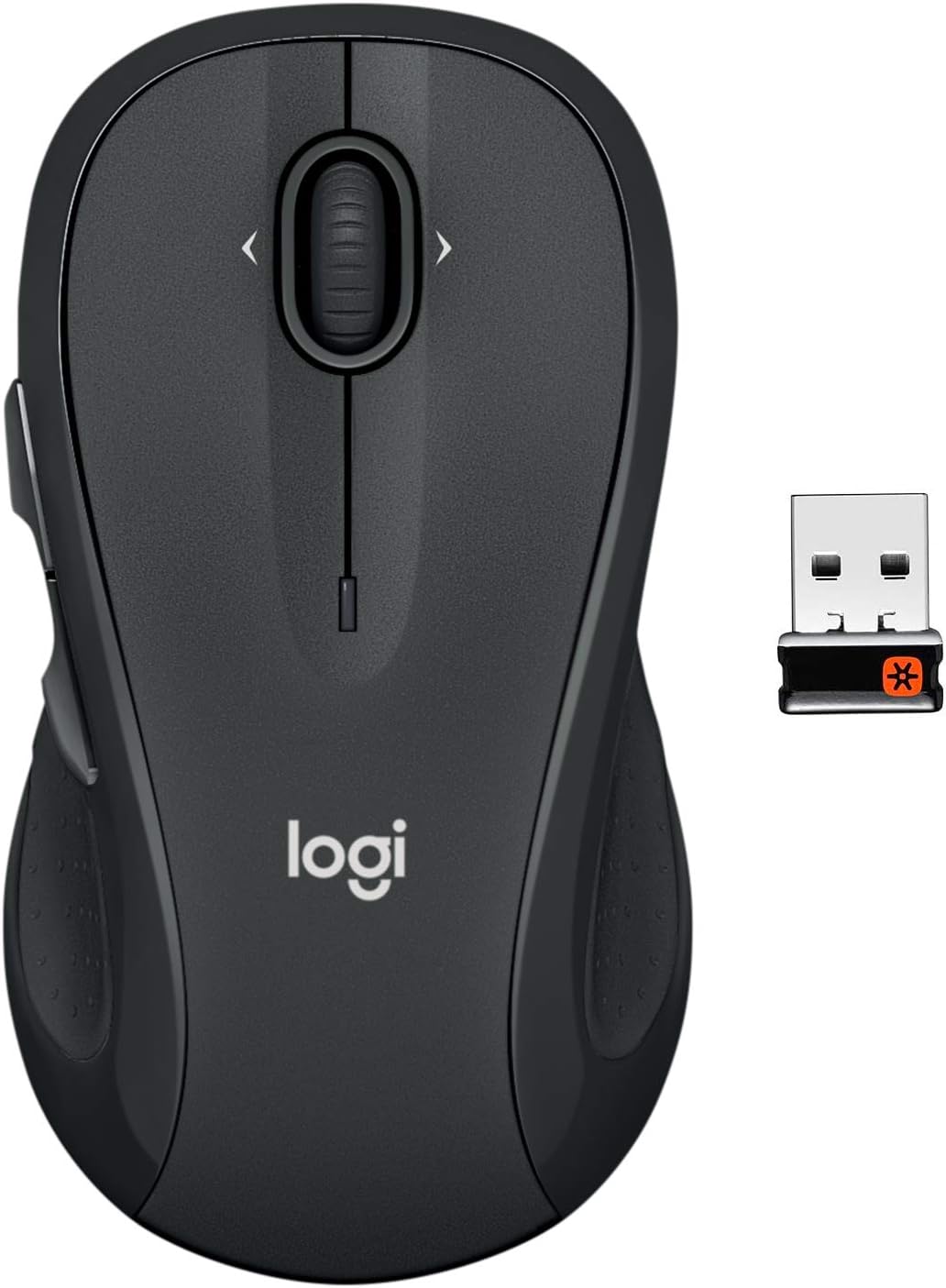
The Logitech M510 Wireless Mouse is a full-size, ergonomic option ideal for right-handed users who spend long hours on their PC or Mac. It combines practical controls with long-lasting performance, making it perfect for productivity tasks like browsing, document editing, and media navigation.
Standout features include back/forward buttons, side-to-side scrolling, and zoom functionality, all programmable via Logitech software for customized workflows. Laser-grade tracking provides responsive cursor movement on most surfaces, while the Unifying USB receiver offers a stable 2.4 GHz wireless connection that supports up to five compatible devices without frequent pairing hassles. Real-world use reveals smooth operation that speeds up tasks like flipping through web pages or spreadsheets.
Build quality shines in its contoured shape with gently curved sides, broad palm area, and soft rubber grips, promoting fatigue-free handling during extended sessions. The on/off switch, smart sleep mode, and battery indicator further enhance reliability, often lasting two years under normal conditions.
Drawbacks include its right-hand orientation, which may not suit lefties, and the laser sensor's limitation on glass or mirrors. It also lacks Bluetooth, sticking to the USB receiver method.
Overall, the M510 excels as a dependable, comfortable mouse for everyday professionals seeking value in battery life and control without complexity. It earns strong recommendation for those prioritizing endurance and ease.
Ergonomic contoured design with rubber grips for all-day comfort.
7 buttons including back/forward, side-scroll, and zoom for efficient navigation.
Up to 24 months battery life with power-saving features.
Laser-grade optical tracking for precise control on most surfaces.
Logitech Unifying receiver for reliable wireless connectivity and multi-device support.
Customizable via Logitech Options software.

Pros
- Plug-and-play setup with no drivers required
- Comfortable ergonomic fit for extended use
- Clear visual indicators for easy DPI and battery monitoring
- Efficient power-saving mode with quick wake-up
- Precise optical tracking for smooth performance
Cons
- Requires 2 AAA batteries, not included
- Side buttons do not function on Mac systems
- Occasional re-pairing needed for optimal responsiveness
This Acer wireless mouse is a budget-friendly 2.4GHz cordless option designed for laptops, PCs, and desktops, ideal for office workers, students, and casual users with medium to large hands. It delivers plug-and-play simplicity via USB-A receiver, ensuring instant connectivity without software hassles.
Standout features include three adjustable DPI settings (800, 1200, 1600) for customizable sensitivity, forward/back buttons for quick browsing, and a visible indicator light that flashes to confirm DPI levels or warn of low battery. In real-world use, the optical tracking provides smooth, precise cursor control, while the power-saving mode activates after 10 minutes of inactivity, waking with just 2-3 clicks for efficient battery management.
The ergonomic design offers a comfortable grip that reduces fatigue during long sessions, with dimensions of 5.1 x 3.2 x 1.6 inches and lightweight 3oz build. Buttons and scroll wheel are built for durability, tested to 10 million clicks, supporting reliable daily performance.
Potential drawbacks include the need for user-supplied AAA batteries and side button incompatibility on Mac. Re-pairing may occasionally be required if response lags occur, following simple steps with the receiver.
Overall, this mouse excels as a practical, no-frills choice for productive computing, earning its solid reputation for value and comfort. Highly recommended for those prioritizing ease and ergonomics over advanced gaming features.
Connectivity: 2.4GHz Wireless with USB-A Receiver (stored in battery compartment)
DPI Levels: 800 / 1200 / 1600 (adjustable with indicator light)
Buttons: 6 (including forward/back; side buttons not for Mac)
Power: 2x AAA batteries (not included); Click-to-wake after 10 min idle
Dimensions: 5.1 x 3.2 x 1.6 inches; Weight: 3oz
Compatibility: Windows PC, Laptop, Desktop
Range: Up to 32ft
Not Working? Check battery polarity and power switch (ON position). Try different USB port or restart computer. Receiver is under battery cover.
Wake Up: 2-3 clicks after 10 min idle.
Re-pairing: Power on mouse, plug receiver, hold left/right buttons near receiver (within 20cm) for 3-5 seconds.
DPI Confirmation: Red light flashes: 1x for 800, 2x for 1200, 3x for 1600.
Slow Response: Replace low battery or re-pair as above.

Pros
- Superior ergonomics reduce hand strain during long sessions
- Exceptional scrolling speed and precision boost productivity
- Long battery life and quick charging minimize downtime
- Multi-OS compatibility and multi-device switching
- Sustainable build with recycled materials
Cons
- Requires Logi Options+ app for full customization and haptic features
- USB-C charging cable not included
- Premium features may overwhelm casual users
The Logitech MX Master 4 is an advanced ergonomic wireless mouse designed for professionals seeking maximum productivity, such as designers, coders, and editors working on Windows, macOS, or other platforms. It stands out with innovative features like the Haptic Sense Panel for tactile feedback on actions and the Actions Ring for instant access to tools, reducing repetitive movements by up to 63%.
In real-world use, the MagSpeed scroll wheel delivers blazing speed at 1,000 lines per second while offering precise ratchet mode, and the 8K DPI sensor tracks flawlessly on glass or any surface. Connectivity is enhanced 2x over predecessors with a USB-C dongle or Bluetooth, supporting up to three devices with seamless switching. Quiet clicks cut noise by 90%, making it ideal for shared spaces.
Build quality emphasizes comfort with a natural tilt angle, intuitive buttons, and sustainable materials including 54% recycled plastic and 100% recycled cobalt battery. Battery lasts up to 70 days, with three hours from a one-minute charge. Drawbacks include dependency on the Logi Options+ app for customization and no included charging cable.
Overall, the MX Master 4 excels for power users needing precision and efficiency, earning top marks for innovation and comfort despite minor setup hurdles.
Haptic feedback customizable via app for actions, shortcuts, and notifications. Actions Ring provides dynamic app-specific overlays to streamline workflows. MagSpeed wheel with 1,000 lines per second scrolling and 8K DPI sensor for glass tracking.
2x powerful connectivity with USB-C dongle or Bluetooth. 90% quieter clicks, 70-day battery, ergonomic design with thumb wheel. Multi-device support and Logi Options+ for Smart Actions and plugins.

Pros
- Ergonomic shape promotes natural wrist alignment to prevent strain
- Multi-device connectivity boosts productivity across PC, Mac, and laptop
- Long-lasting rechargeable battery with quick 2-hour charge
- High-sensitivity optical sensor with DPI adjustments
- Silent primary clicks for quiet office environments
Cons
- Requires 1-2 week adaptation period due to unique vertical shape
- Buttons are not programmable or customizable
- Side forward/back buttons incompatible with Mac OS
The ProtoArc EM11 NL is a Bluetooth rechargeable vertical ergonomic mouse designed for users with small to medium hands who endure long computer sessions. It connects via dual Bluetooth 5.0 modes or a 2.4GHz USB-A receiver to up to three devices, supporting Windows, Mac OS, and Android, making it versatile for office workers, gamers, or remote professionals seeking to alleviate wrist discomfort from traditional flat mice.
Standout features include adjustable DPI levels (1000/1600/2400) for smooth, precise cursor control and back/forward buttons for quick web navigation. The built-in 500mAh battery provides up to 100 hours of continuous use or 25 days at four hours daily, recharging fully in two hours via Type-C cable. In real-world use, it delivers reliable tracking on various surfaces, with quiet left and right clicks fostering a distraction-free environment, though the scroll wheel and side buttons produce audible feedback.
Build quality emphasizes comfort with a matte black plastic body that fits hands under 7.5 inches snugly, promoting a relaxed forearm position. The vertical angle encourages proper posture, potentially reducing repetitive strain over time, but first-time users note a learning curve as the grip feels unconventional initially.
Drawbacks include non-programmable buttons, Mac incompatibility for side buttons, and unsuitability for larger hands. No LED lighting keeps it professional and power-efficient.
Overall, the EM11 NL excels as an affordable entry into ergonomic computing, earning praise for pain relief after adaptation. Buy it if wrist health matters and your hand size matches; pair it with ProtoArc keyboards or pads for a full setup.
Connectivity: Bluetooth 5.0 (2 modes), 2.4GHz USB-A receiver (3 devices total)
Compatibility: Windows 8/10+, Mac OS X 10.12+, Android 4.3+
Battery: 500mAh rechargeable, 100 hours continuous, ~25 days at 4hrs/day
DPI: 1000/1600/2400 adjustable
Design: Vertical ergonomic for hands <19.05cm, Type-C charging only
Notes: Non-programmable buttons, side buttons not for Mac
Measure your hand length first: Ideal for <17.5cm (small) or 17.5-19.05cm (medium). Larger hands may find it cramped.
Expect 1-2 weeks to adapt to the vertical grip for full benefits like reduced strain.
Best paired with ProtoArc ergonomic keyboards (EK01 Plus, EK04) or mouse pads (MP50) for complete wrist support.
Not for users needing programmable buttons; await EM11 Pro upgrade.

Pros
- HERO sensor delivers 12,000 DPI with 400 IPS for superior tracking
- Exceptional 250-hour battery life extends playtime dramatically
- LIGHTSPEED technology ensures low-latency, dependable wireless connection
- Lightweight 99g frame boosts comfort during long sessions
- Onboard memory and software support full customization
Cons
- Relies on replaceable AA battery instead of rechargeable
- Lacks RGB lighting for a more basic aesthetic
- Requires software for advanced button programming
The Logitech G305 LIGHTSPEED wireless gaming mouse targets competitive PC gamers who demand high performance without the hassle of cords. Weighing only 99 grams, it pairs a next-gen HERO optical sensor with LIGHTSPEED technology for seamless, laptop-friendly play on PC or Mac.
Standout features include the HERO 12K sensor offering 200-12,000 DPI sensitivity with no acceleration or smoothing, delivering precise control in demanding titles. LIGHTSPEED wireless matches wired mouse speed at 1ms latency, while power-efficient design provides up to 250 hours on one AA battery, extendable to nine months in endurance mode. Six programmable buttons unlock custom macros via G HUB software for personalized gameplay.
Its symmetrical, compact design ensures comfort and agility for extended sessions, with durable build and built-in receiver storage making it ideal for travel. The lightweight mechanical construction enhances maneuverability without sacrificing reliability.
Potential drawbacks include the non-rechargeable AA battery and absence of RGB or premium flourishes, keeping it straightforward rather than flashy. Software setup is needed for full customization, which may not suit plug-and-play users.
Overall, the G305 excels as a budget-friendly powerhouse for serious gamers prioritizing performance, portability, and endurance over extras. It earns top marks for value in wireless gaming mice.
HERO sensor: Up to 12,000 DPI, 400 IPS, 10x power efficiency.
LIGHTSPEED wireless: 1ms report rate for lag-free play.
Battery: 250 hours on AA, up to 9 months in endurance mode.
Design: 99g lightweight, 6 programmable buttons, onboard receiver storage.
Compatibility: PC, Mac via Logitech G HUB software.

Pros
- Exceptional 12-month battery life reduces replacements
- Ambidextrous shape fits small to medium hands comfortably
- Seamless plug-and-play with strong wireless range
- Superior to touchpads for faster, more productive work
- Durable construction backed by 3-year warranty
Cons
- Requires disposable AA battery, not rechargeable
- Basic 1000 DPI may not suit gaming needs
- Nano receiver easy to misplace if removed
The Logitech M185 Wireless Mouse is a compact, ambidextrous peripheral designed for laptop users tired of imprecise touchpads. It suits right- or left-handed individuals with small to medium hands, working seamlessly on Windows PCs, Macs, or any laptop for everyday tasks like browsing, office work, and light productivity.
Standout features include 1000 DPI optical tracking for smooth cursor movement, a line-by-line scroll wheel, and plug-and-play simplicity via a tiny nano USB receiver that connects reliably up to 33 feet. Real-world performance shines in boosting productivity, with studies showing users 50% more productive and 30% faster than with touchpads. The smart sleep mode delivers up to 12 months on one AA battery, minimizing interruptions.
Build quality emphasizes comfort with a contoured shape and durable plastic, including certified post-consumer recycled materials for sustainability. Its small, portable size fits busy desktops or travel bags, backed by Logitech's 3-year warranty for reliability.
Potential drawbacks include the non-rechargeable AA battery and basic DPI unsuitable for gaming. The nano receiver, stored inside the mouse, could still be lost if frequently removed.
Overall, the M185 excels as an affordable, no-fuss upgrade for laptop essential, delivering comfort, longevity, and compatibility that outperform built-in touchpads for most users.
Connectivity: 2.4GHz wireless with USB nano receiver
Sensor: 1000 DPI optical tracking
Battery Life: Up to 12 months (1x AA included)
Compatibility: Windows PC, Mac, laptops
Design: Ambidextrous, compact, Swift Grey
Warranty: 3-year limited hardware

Pros
- Reduces wrist pain and fatigue effectively
- Long-lasting rechargeable battery
- Easy wireless setup and use
- Adjustable sensitivity for versatility
- Durable build with comfortable grip
Cons
- Requires 3-5 day adjustment period
- Does not charge when computer is in sleep mode
- Best suited for medium to large hands
The LEKVEY Vertical Wireless Mouse is an ergonomic solution designed for users suffering from wrist discomfort, carpal tunnel, or repetitive strain. Its vertical handshake grip promotes a neutral wrist position, making it ideal for office workers, gamers, graphic designers, and anyone spending long hours at a computer.
Standout features include a built-in 600mAh rechargeable battery offering over 150 hours of use, quick Type-C charging, and three DPI settings (800/1200/1600) for customizable precision. The 2.4G wireless connection ensures lag-free performance with simple plug-and-play via a nano USB receiver stored in the mouse base. Six buttons, including forward/back, enhance productivity for browsing and multitasking.
Build quality feels solid at 95g with a sleek, futuristic design that fits medium to large hands comfortably. Users report smooth tracking on various surfaces and reliable compatibility across Windows, Mac, and Linux systems. While the thumb rest and contours provide excellent support, it excels in real-world tasks like extended typing or gaming sessions.
Drawbacks include an initial 3-5 day adjustment to the vertical shape and no charging during computer sleep mode. Overall, this mouse delivers exceptional value for pain relief and efficiency, earning high praise for transforming daily computing into a strain-free experience.
Verdict: Highly recommended for ergonomic upgrades. Once adapted, users rarely return to flat mice.
Connection: 2.4GHz Wireless (USB-A Receiver)
DPI Levels: 800/1200/1600 Adjustable
Battery: 600mAh Rechargeable Lithium, 150+ Hours Use
Charging: Type-C, 2-3 Hours Full Charge
Buttons: 6 (Including Page Forward/Back)
Dimensions: 5.0 x 3.0 x 2.5 inches
Weight: 95g
Compatibility: Windows 2000/XP/Vista/7/8/10/11, Mac OS, Linux
Best Mice For Office Buying Guide
Ergonomics and Comfort
Office work demands mice that support natural hand positions to prevent RSI over 8+ hour days. Vertical designs like those from ProtoArc reduce wrist pronation, while contoured shapes from Logitech fit medium to large hands perfectly. Prioritize lightweight builds under 100g for effortless gliding across desks during report editing or email marathons.
According to PCMag reviews, ambidextrous options excel for shared workspaces. Pair with a good mouse pad for optimal comfort—explore our Computer Accessories page for essentials.
Connectivity and Battery Life
Look for 2.4GHz USB receivers or Bluetooth for lag-free performance in Zoom calls and document navigation. Models with 12-24 month battery life, like Logitech staples, minimize downtime—rechargeable options via USB-C add convenience for hybrid workers.
| Feature | Ideal for Office |
| Wireless Type | 2.4GHz + Bluetooth |
| Battery | 12+ Months |
| Multi-Device | Up to 3 Pairings |
Sensor Precision and Buttons
1000 DPI optical sensors deliver smooth tracking on varied surfaces, essential for precise Excel selections. Extra buttons programmable for copy-paste shortcuts boost efficiency—Tom’s Hardware notes how 6+ buttons cut task times by 20%. Avoid gaming-focused high-DPI unless multitasking heavily.
Wirecutter testing highlights reliable sensors in budget picks for everyday productivity. See related gear in our PC Components section.
Final Thoughts
The Logitech MX Master 4 stands out as Best Overall for its haptic feedback, ultra-fast scrolling, and multi-device mastery—perfect for power users juggling apps. Logitech M185 wins Best Value with unbeatable 12-month battery and ambidextrous design. For budgets, the acer Wireless Mouse delivers solid DPI adjustability. Grab the Logitech M185 Wireless Mouse to start. Ready for more? Dive into our Laptops reviews.
FAQs
What should I prioritize in the 7 Best Mice For Office of 2026?
Focus on ergonomics to avoid strain, reliable wireless connectivity for clutter-free desks, and at least 1000 DPI for accurate cursor control in documents and browsing. Long battery life ensures uninterrupted productivity.
Are vertical mice better for office use?
Yes, vertical designs promote neutral wrist alignment, reducing pain during extended sessions per TechRadar insights. They’re ideal if you experience discomfort from traditional shapes—test one to feel the difference and upgrade today.
Bluetooth or 2.4GHz for Best Mice for Office?
2.4GHz offers lower latency for precise work, while Bluetooth supports multi-device switching. Dual options provide flexibility for laptops and desktops in hybrid setups.
How do I choose based on hand size?
Medium-large hands suit contoured Logitech models; smaller grips prefer compact ambidextrous designs. Check product specs and user feedback for fit—our picks cover all sizes.
What’s the battery life like in top Best Mice for Office?
Leading options last 12-24 months on AA batteries or weeks when rechargeable. Always verify USB receiver storage to avoid losing range mid-meeting. Explore Desktops & Monitors for compatible setups.
Sources
This article was researched and written with reference to expert reviews and testing data from trusted sources including PCMag, Wirecutter, Tom’s Hardware, TechRadar, RTINGS.com, and other category-relevant publications. All recommendations reflect real-world performance and value as of October 2026.








Write Your Review
No reviews yet. Be the first to share your experience!