

Craving the joy of physical photos without the hassle of a full lab setup in 2026? Instant Photo Printers turn your smartphone snaps into tangible keepsakes right away, perfect for parties, travel, or daily memories. We’ve reviewed the 7 top Best Instant Photo Printers including standout options from Liene, YOTON, NELKO, focusing on print vibrancy, speed, and real-world reliability to maximize your value. Check our Office Electronics guide for broader insights. Find your ideal match below and upgrade your setup today.

Pros
- Superior dye-sublimation technology delivers professional-grade, colorful photos
- Versatile connectivity supports WiFi, USB, and app or direct album printing
- Generous starter pack with ample paper and ink reduces immediate repurchases
- App enhances prints with editing tools and specialized templates like ID photos
- Supports multiple devices for collaborative printing sessions
Cons
- Requires power cord as it lacks a built-in battery for fully wireless portability
- Heavier build at around 6.5 pounds limits ultra-light travel use
- Print head may need occasional cleaning to avoid smudges on outputs
The Liene M100 is a user-friendly 4x6 thermal dye-sublimation photo printer designed for smartphone users, families, and casual photographers who want professional-quality instant prints. Compatible with iPhone, Android, and PC devices, it excels at turning digital photos into tangible keepsakes without the hassle of traditional lab processing. Ideal for parties, trips, or home use, it prioritizes simplicity and quality for non-experts.
Standout features include its built-in WiFi hotspot for stable, interference-free printing from up to five devices, and an intuitive app that lets you apply filters, borders, and even ID photo templates. Real-world performance shines with vibrant colors, deep dye penetration, and a protective laminate that guards against water, fingerprints, and fading. Prints emerge in about a minute, and the generous included supplies mean you can start printing immediately without extra purchases.
Build quality features a minimalist, magnetic design for compact storage, though at 6.45 pounds, it feels more desk-friendly than pocket-portable. Setup takes just minutes: load paper cassette, insert cartridge, power on, and connect. Drawbacks include reliance on a power cord and potential need for print head cleaning if smudges appear.
Overall, the Liene M100 delivers reliable, high-end photo printing at home or events, making it a smart pick for anyone valuing convenience and durability over ultra-mobility. It earns strong marks for ease and output quality.
Printing Technology: Thermal Dye-Sublimation
Paper Size: 4x6 inches
Connectivity: Wi-Fi Hotspot, USB
Compatibility: iPhone, Android, PC/Mac (up to 5 devices)
Included: 100 sheets photo paper, 3 ink cartridges, sealed cassette
Weight: 6.45 lbs

Pros
- Exceptional 4PASS dye sublimation for professional-quality, durable prints
- Simple Bluetooth setup and phone docking for effortless use
- Integrated charging keeps your device powered during prints
- User-friendly app with editing tools for creative customization
- Reliable desktop performance for consistent home printing
Cons
- Requires proprietary Kodak photo paper and PHC-80 cartridges
- Designed for desktop use with power outlet, not fully portable
- Limited to 4x6 print size only
The KODAK Dock Plus 4x6 Photo Printer is a dedicated home printing solution for smartphone users who want quick, high-quality physical photos without a darkroom or lab. It targets families, event organizers, and casual photographers seeking an easy way to turn digital memories into tangible prints via Bluetooth docking for iPhone or Android devices.
Standout features include genuine 4PASS dye sublimation technology, which layers colors and seals prints with protective lamination for smudge-free, water-resistant results that last. Real-world performance shines in its 55-second print speed and stable docking that charges phones simultaneously, making it reliable for batch printing event photos or album fillers. The accompanying KODAK app adds value with editing, cropping, and frame options for personalized outputs.
Build quality emphasizes desktop stability with a sturdy dock and power adapter setup, ensuring consistent results over portable alternatives. It feels premium for home use but lacks battery power, positioning it as a fixed printing station rather than on-the-go gear.
Drawbacks include the need for official Kodak supplies, which may limit cost flexibility, and its fixed 4x6 size without size variety. Support is responsive for issues, enhancing user confidence.
Overall, the Dock Plus excels as a user-friendly home printer delivering pro-level prints effortlessly, earning strong recommendation for anyone prioritizing quality and simplicity in smartphone photo printing.
Every KODAK Dock Plus package includes the photo printer, user manual, power adapter, iPhone Lightning adapter, initial PHC-80 cartridge, and 10 sheets of 4x6 photo paper. Bundles add 40 more sheets and an extra cartridge for extended printing.
Use only official Kodak 4x6 photo paper and PHC-80 cartridges, available on Amazon, to ensure compatibility and optimal results.
Download the free KODAK Photo Printer app from Google Play or App Store to connect via Bluetooth, edit photos, add frames, and crop images before printing. Setup is straightforward: power on, dock or pair wirelessly, and print in seconds without complex steps.
Pros
- Zero-ink ZINK technology for affordable, mess-free printing
- Full editing suite in app for personalized collages and effects
- Compact lightweight design perfect for mobile use
- Protected prints with extra smudge-proof coating
- Starter pack of ZINK paper included
Cons
- Requires KODAK app for editing and printing
- Small 2x3-inch print size limits larger photos
- ZINK paper must be purchased separately after starter pack
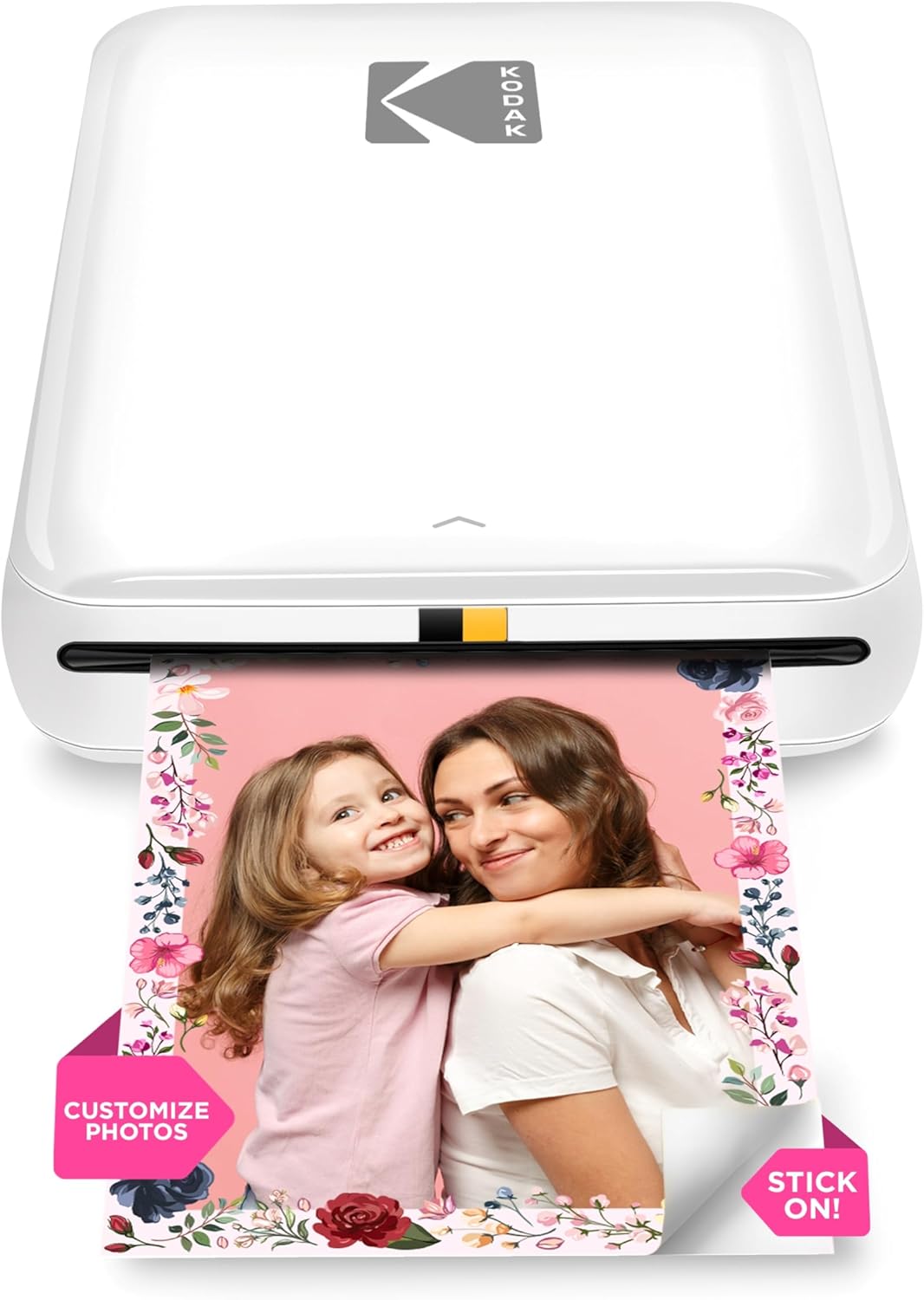
The KODAK Step Instant Smartphone Photo Printer is a game-changer for anyone who captures moments on their phone but wants tangible keepsakes. Tailored for travelers, social influencers, scrapbookers, and casual photographers, this mini device turns digital snaps into physical 2x3-inch sticky-back prints effortlessly.
Powered by ZINK zero-ink technology, it delivers full-color photos in under 60 seconds via Bluetooth or NFC, no computer needed. The KODAK app elevates the experience with pro-level editing: adjust brightness, apply filters, add stickers or frames, create collages from up to four images, or even draw directly on photos. Real-world performance shines in its speed and vibrancy, making social media posts or selfies instantly shareable.
Design-wise, its palm-sized build under one pound slips into pockets or bags, with a rechargeable lithium-ion battery handling 25 prints per charge. Prints boast a protective layer against water, smudges, and tears, ensuring longevity. Made with quality components, it feels sturdy for portable use.
Drawbacks include the mandatory app dependency and compact print size, which suits casual prints but not enlargements. ZINK paper costs add up over time, though its USA-made quality justifies it.
Overall, the KODAK Step excels as a fun, creative companion for mobile printing, earning high marks for convenience and output quality. Buy it if you crave instant, customizable photo fun on the go.
Experience inkless printing with ZINK technology embedding color crystals in 2x3-inch sticky-back paper for vivid, durable results. Wireless Bluetooth or NFC pairs seamlessly with iOS and Android devices.
The app provides advanced tools: collages, filters, borders, stickers, text, and drawing for personalized prints. Portable at under a pound with a battery for 25 prints.
Includes starter ZINK paper, micro USB cable, quick start guide, and warranty. Prints resist moisture and damage for lasting memories.
Step 1: Open the paper tray, insert ZINK paper with the blue calibration sheet at the bottom. Step 2: Press and hold the power button until the light turns on.
Step 3: Download the KODAK STEP PRINTS app from the App Store or Google Play. Step 4: Connect via Bluetooth, edit your photo, and print instantly.
Access social media photos directly in the app for easy editing and printing. Recharge via included cable after 25 prints.

Pros
- Exceptional color vibrancy and print durability
- Innovative AR video feature for interactive photos
- Reliable WiFi connection outperforms Bluetooth
- Compact and lightweight for easy portability
- User-friendly app with editing tools
Cons
- Ink ribbon limited to 40-50 prints per cartridge
- Requires separate purchases for refills after initial supply
- Potential for paper jams if not handled carefully
The YOTON YP01 is a portable dye-sublimation photo printer designed for anyone wanting high-quality 4x6 prints on the go, from social media users to event planners and families. It connects seamlessly via built-in WiFi to iPhones, Android devices, or laptops, bypassing the need for external networks, and comes ready with 54 sheets of paper and one ink ribbon.
Standout features include advanced dye-sublimation for sharp, vibrant colors that last, and the exclusive AR video printing that embeds up to 15 seconds of motion into a still photo, viewable by scanning with the HeyPhoto app. Real-world tests from YouTube creators highlight its quick setup, clear prints of various styles, and fun AR effects, with stable connections ensuring reliable performance even outdoors.
Build quality shines in its sleek, compact 7.1 x 4.9 x 2.2-inch frame weighing under 2 pounds, perfect for backpacks or desks. The app enhances usability with free editing, collages, and ID photo tools. Minor issues like securing the ink ribbon properly or clearing jams with power off are easily managed.
Drawbacks include the ink ribbon's 40-50 print limit and need for refills, plus keeping it dust-free when stored. Overall, the YP01 delivers impressive value for creative, portable printing, earning strong recommendation for tech-savvy users craving innovative features.
Compact design for portability; dye-sublimation for vivid, durable prints; built-in WiFi for direct phone/laptop connection; AR video printing for animated photos; HeyPhoto app with editing, collages, and ID tools; includes 54 sheets 4x6 paper and 1 ink ribbon (40-50 prints).
Pros
- Superior 4PASS dye-sublimation for durable, high-quality prints
- Ultra-portable design fits in hand or bag
- Simple Bluetooth setup with no wires needed
- Compatible with both iPhone and Android via app
- Quick printing speed suits spontaneous use
Cons
- Requires proprietary Kodak 4PASS cartridges, which add ongoing costs
- Small 2x3 print size limits larger photo needs
- App required for editing and optimal functionality
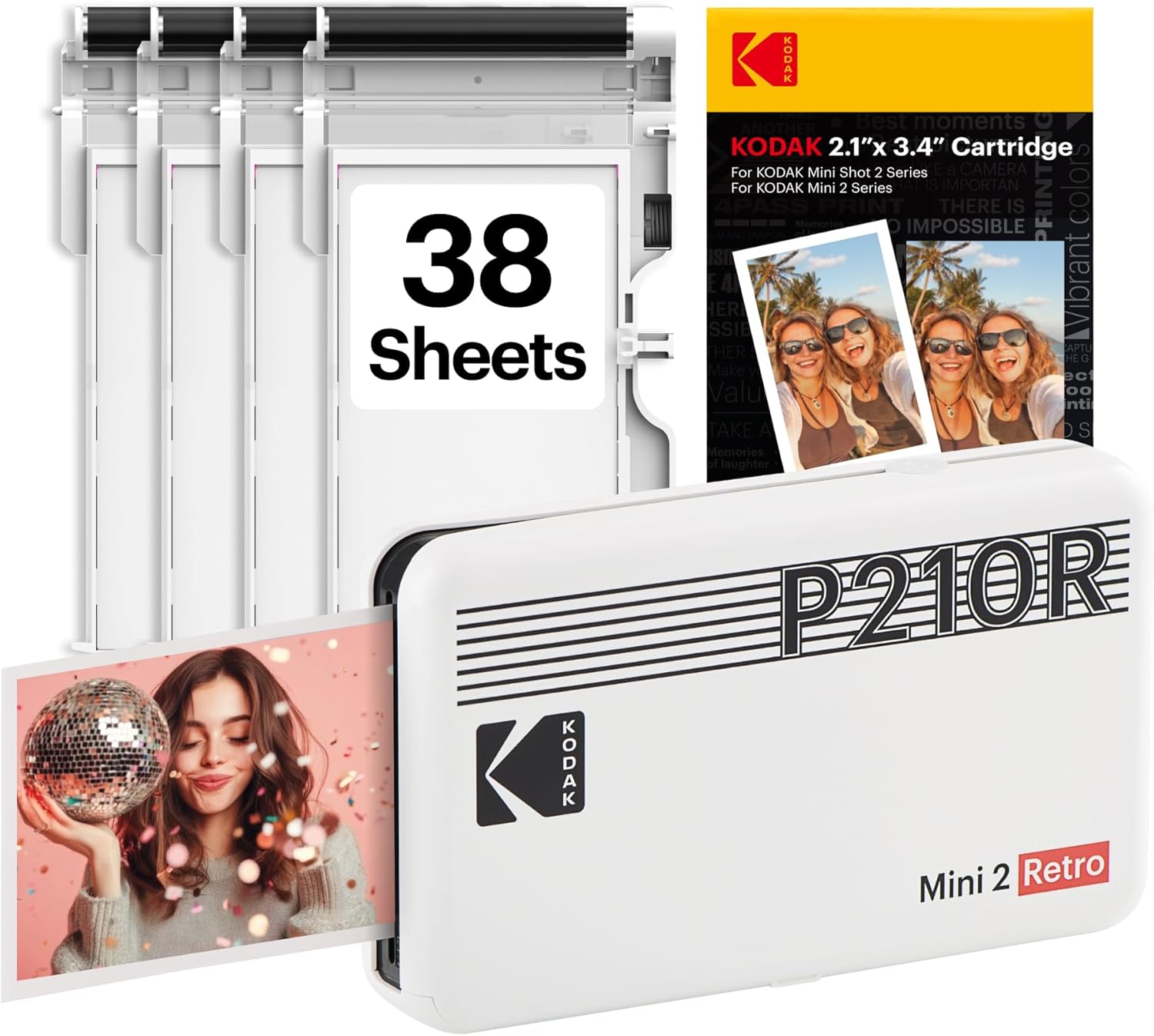
The KODAK Mini 2 Retro is a pocket-sized portable photo printer tailored for smartphone users who want instant physical prints without bulky equipment. Ideal for travelers, party-goers, students, and crafters, it turns digital photos into tangible 2.1x3.4-inch keepsakes using Bluetooth connectivity from iOS or Android devices.
Standout features include genuine 4PASS dye-sublimation technology, which layers colors and seals prints with protective lamination for smudge-proof, water-resistant results that last. Real-world performance shines in quick 55-second prints via the intuitive Kodak Photo Printer app, allowing edits, filters, and collages before printing. Users praise the vibrant colors and sharp details for scrapbooking, photo booths, and daily memories.
Design emphasizes portability with a retro white finish small enough for pockets or purses, powered simply via USB-C. Build quality feels sturdy for everyday handling, though it relies on cartridge packs for both paper and ink. Setup is hassle-free: pair via Bluetooth, load the cartridge, and print.
Drawbacks include dependency on specific Kodak cartridges, which can raise refill expenses, and the compact print size that may not suit group shots. Battery life isn't built-in, so it needs a power source for extended use.
Overall, the Mini 2 Retro excels as a fun, reliable instant printer for casual, mobile needs, earning its solid reputation among on-the-go creators seeking quality without complexity.
Print Technology: 4PASS Dye-Sublimation
Print Size: 2.1 x 3.4 inches
Connectivity: Bluetooth (iOS & Android compatible)
Print Speed: Approximately 55 seconds per photo
Included: Printer, 38-sheet cartridge pack, USB-C cable, user guide
Cartridge Compatibility: Kodak 4PASS all-in-one only
App: Kodak Photo Printer (free on App Store/Google Play)

Pros
- Ultra-portable design fits in pockets or bags
- Supports multiple simultaneous connections for groups
- Fun AR features enhance the printing experience
- Sticky-backed prints double as stickers
- Reliable Bluetooth 5.0 connectivity
Cons
- Prints limited to small 2x3-inch size
- Requires proprietary Zink photo paper
- App-dependent for full functionality
The HP Sprocket 2nd Edition Luna Pearl is a smartphone-sized portable photo printer ideal for adventurers, partygoers, and anyone wanting instant physical copies of digital photos. It prints vibrant 2x3-inch sticky-backed photos using Zink technology, perfect for quick snapshots from iOS or Android devices without needing ink cartridges.
Standout features include multi-device Bluetooth 5.0 connectivity, allowing friends to print simultaneously while personalized LED lights indicate whose job is printing. The companion app adds AR fun by scanning the printer to view a virtual queue, plus tools for personalizing prints with stickers, frames, and borders, and sharing custom albums. Real-world performance shines in social settings, delivering smudge-proof, peel-and-stick results quickly.
Design-wise, its pearl finish and compact build slip easily into pockets or purses, with sleep mode preserving battery life. It feels sturdy for portable use and comes with 10 sheets to start printing right away. Compatibility spans Android 5+ and iOS 10+, backed by a one-year warranty.
Drawbacks include the small print size, which suits stickers more than large displays, and reliance on app features and special paper for best results. Overall, it excels for fun, on-the-go printing.
Verdict: A top pick for spontaneous photo sharing; buy if you value portability and creativity over large prints.
Instant 2x3-inch sticky-backed prints from your smartphone.
Multi-device Bluetooth 5.0 for group printing with LED indicators.
HP Sprocket app with AR queue view, customization, and album sharing.
Pocket-sized Luna Pearl design with sleep mode for battery efficiency.
Includes 10 sheets of Zink paper; compatible with Android 5+ and iOS 10+.

Pros
- High 600 DPI resolution for detailed, realistic photos
- Ultra-portable rechargeable design weighs just 0.6 pounds
- Versatile app editing tools enhance creativity
- Sticky-back paper ideal for crafts and memories
- Compatible with iOS and Android via Bluetooth
Cons
- Prints limited to small 2x3 inch size
- Requires Nelko app and Bluetooth pairing
- Potential paper jams if overloading tray
The Nelko PP01 is a mini portable inkjet photo printer designed for smartphone users who want to turn digital photos into physical, sticky-back prints on the spot. Targeted at families celebrating holidays like Christmas and Valentine's, travelers, students, crafters, and small event hosts, it excels in creating personalized mementos without needing a full-sized printer.
Standout features include Bluetooth connectivity to the Nelko app for iOS and Android, enabling quick edits with filters, text, stickers, and collages before printing in under 60 seconds. The 600 DPI resolution produces clear, vibrant 2x3-inch photos on smudge-proof, water-resistant paper with adhesive backing. Real-world performance shines in versatile scenarios like party favors, travel journals, and DIY projects, with each cartridge yielding up to 80 prints.
Build quality is solid for its pocket-sized form, weighing only 0.6 pounds and rechargeable via USB. The white design is sleek and durable, with easy paper and ink loading. App-guided setup is straightforward, though first-time users benefit from tutorials.
Drawbacks include the small print size, which may not suit larger photo needs, and occasional issues like paper jams from overloading or ink recognition that require simple troubleshooting like cleaning cycles.
Overall, the Nelko PP01 delivers reliable, fun instant printing for casual and creative users, earning high marks for portability and quality in everyday memory-making.
Download the Nelko app from App Store or Google Play. Load 2x3 photo paper smooth side down, install ink cartridge with power on, pair via Bluetooth, edit, and print.
For best results, avoid loading over 10 sheets to prevent jams. Run a cleaning cycle for ink issues and wipe cartridge contacts with alcohol if needed. Charge fully after idle periods to avoid clogs.
Best Instant Photo Printers Buying Guide
Print Technology: Zink vs. Dye-Sublimation
Dye-sublimation printers like many in our list produce lab-quality 4×6-inch prints with rich colors and protective laminates that resist water and fingerprints, ideal for framing or albums. Zink models offer sticky-backed 2×3-inch outputs without ink cartridges, great for quick scrapbooking. According to PCMag reviews, dye-sub excels in longevity for family events, while Zink suits spontaneous daily use.
Choose based on your needs: larger prints for home displays or compact ones for portability. This ensures vibrant results across streaming-shared photos or on-site event captures.
Connectivity and App Features
Bluetooth and Wi-Fi hotspots enable seamless printing from iOS or Android without cables, supporting multiple devices for group sharing. Apps let you edit, add filters, and crop before printing, enhancing user experience for productivity like ID photos or creative projects. CNET notes stable connections prevent dropouts during busy gatherings.
| Feature | Bluetooth | Wi-Fi Hotspot | App Editing |
| Best For | Quick Pairing | Multi-Device | Customization |
Portability, Battery, and Running Costs
Compact designs with rechargeable batteries support all-day printing at events, while desktop docks offer unlimited power for home use. Factor in paper/ribbon packs for cost per print; dye-sub yields durable results worth the investment. TechRadar highlights models balancing build quality and long-term reliability for travel or office setups. Explore more in our Calculators & Shredders category.
Final Thoughts
The Kodak Dock Plus stands out as Best Overall for its 4PASS dye-sub prints and docking convenience, delivering pro-level quality for family albums. For Best Value, the YOTON Photo Printer offers AR features at entry-level accessibility. The KODAK Dock Plus excels for home stations. Grab yours now and relive moments instantly—see our Office Electronics for more.
FAQs
What makes the Best Instant Photo Printers stand out in 2026?
These printers prioritize vibrant dye-sub or Zink tech for fade-resistant prints, plus intuitive apps for editing. They’re portable yet reliable for real-world use like events or travel, outperforming older models in speed and connectivity.
Do Best Instant Photo Printers require special paper?
Yes, each model uses proprietary Zink or dye-sub paper with ribbons for optimal quality. Stock up on bundles to keep costs low and prints consistent. Check compatibility in the app for hassle-free operation.
Are they good for group printing?
Wi-Fi models connect up to 5 devices simultaneously, perfect for parties. Bluetooth options work great one-on-one. Upgrade to a multi-user pick from our list today.
How long do prints last?
Dye-sublimation provides 100+ years of fade resistance per lab tests, while Zink handles fingerprints well. Store in albums for best longevity, ensuring memories endure.
Which is best for travel?
Compact, battery-powered options like the HP Sprocket shine for portability. Review our Calculators & Shredders page for portable gear tips.
Sources
This article was researched and written with reference to expert reviews and testing data from trusted sources including PCMag, TechRadar, CNET, Wirecutter, Digital Trends, and other category-relevant publications. All recommendations reflect real-world performance and value as of October 2026.




Write Your Review
No reviews yet. Be the first to share your experience!