

In today’s demanding home offices, unreliable printing can derail your workflow, from missing deadlines on reports to wasting time on ink refills. That’s why we’ve reviewed the 7 Best Home Office Printers of 2026 from leading brands like , prioritizing real-world speed, cost savings, and multifunction ease for everyday tasks like document printing, scanning contracts, and copying invoices. Check out our in-depth Calculators & Shredders category guide for complementary office tools. Find your ideal match below and upgrade your setup today.

Pros
- Easy wireless setup and mobile printing compatibility
- High-quality color prints for photos and documents
- Automatic duplex printing reduces paper use
- User-friendly OLED display for simple navigation
- Compact size ideal for small home offices
Cons
- No automatic document feeder for multi-page scanning
- Best for occasional use, not high-volume printing
- Lacks advanced features like larger displays or ADF
The Canon PIXMA TS6520 is a compact wireless all-in-one inkjet printer designed for home users, families, and students who need reliable printing, scanning, and copying without advanced office features. It balances affordability with essential functions like auto duplex printing, making it perfect for school projects, recipes, and casual photo prints.
Standout features include crisp, vibrant output from its two-cartridge hybrid ink system, effortless setup via Wi-Fi or mobile apps like Canon PRINT and AirPrint, and dual-band connectivity for smooth performance. In real-world use, it delivers sharp documents and colorful photos up to 8.5 x 11 inches, with the 1.42-inch OLED display providing clear status updates and easy controls.
Its sleek white design and small footprint integrate seamlessly into any home workspace, while automatic two-sided printing optimizes efficiency. Build quality feels solid for the price, with reliable wireless operation that minimizes frustrations.
Drawbacks include the absence of an automatic document feeder, limiting multi-page scans, and its focus on occasional rather than heavy-duty tasks. It skips extras like larger trays but excels where simplicity matters.
Overall, the PIXMA TS6520 earns high marks for value-driven performance, making it a smart pick for budget-conscious households seeking hassle-free printing.
Affordable versatility for home and hybrid work with printing, scanning, and copying.
Crisp prints via hybrid ink system; auto duplex saves paper.
Dual-band Wi-Fi and mobile printing with Canon PRINT, AirPrint, Mopria.
1.42-inch OLED display for intuitive control; compact white design.
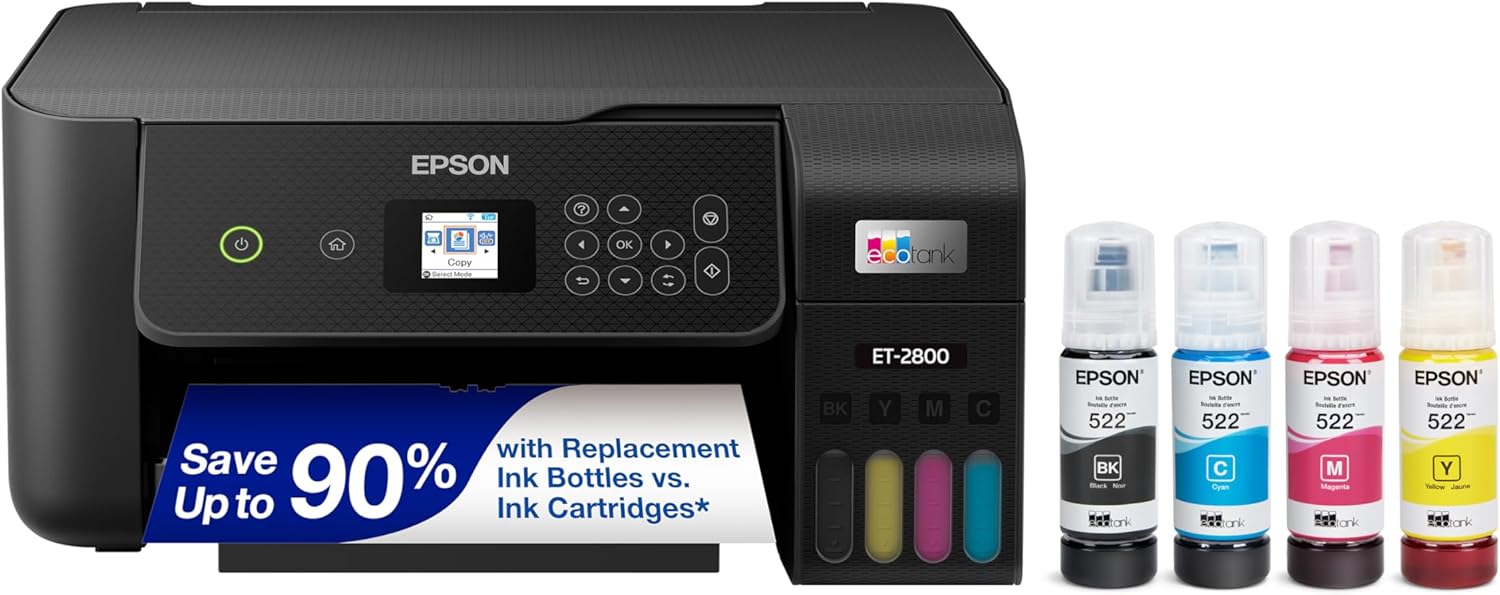
Pros
- Dramatic long-term ink savings
- Generous initial ink supply lasts up to 2 years
- High-quality prints on various paper types
- Eco-friendly design minimizes plastic waste
- Simple setup and user-friendly operation
Cons
- Lacks automatic two-sided printing
- No fax or auto document feeder for advanced tasks
- Basic display without touchscreen
The Epson EcoTank ET-2800 is a wireless color all-in-one printer designed for basic home use, offering print, scan, and copy functions without traditional cartridges. It targets families and casual users who want an affordable, low-maintenance printer that handles everyday documents and photos reliably.
Standout features include high-capacity refillable ink tanks with up to 2 years of ink in the box, delivering up to 4,500 black or 7,500 color pages, and replacement sets that save up to 90% versus cartridges. PrecisionCore Heat-Free Technology ensures sharp text and impressive colors, while easy-fill EcoFit bottles and wireless setup make it convenient for real-world performance without frequent interruptions.
Build quality is solid for a home printer, with a compact design, flatbed scanner, and color display for straightforward operation. It supports voice-activated printing and app integration, enhancing usability around the house.
Drawbacks include no auto duplexing, fax, or ADF, limiting it for heavier office workloads. Infrequent printing may reduce yields due to maintenance use.
Overall, the ET-2800 excels as a cost-effective, eco-conscious choice for light home printing, earning strong recommendation for budget-savvy households prioritizing savings and simplicity.
Innovative cartridge-free Supertank system with refillable ink tanks.
Up to 2 years of ink included; replacements equivalent to 90 cartridges.
Wireless printing, scanning, and copying with voice activation support.
PrecisionCore technology for professional-quality output.
Zero cartridge waste for environmental benefits.

Pros
- Exceptional print speed and sharp monochrome quality
- Versatile connectivity for multiple devices
- Generous paper capacity reduces refills
- Eco-friendly features like duplex and ENERGY STAR rating
- Free online support for life of printer
Cons
- Limited to black and white printing only
- Toner subscription pushes ongoing costs
- No built-in fax functionality
The Brother DCP-L2640DW is a 3-in-1 monochrome laser printer designed for small businesses and home offices needing efficient print, copy, and scan capabilities. It excels in high-volume black and white tasks, making it perfect for users who prioritize speed and reliability over color output in a compact package.
Standout features include 36 ppm printing, a 50-page auto document feeder for quick multi-page jobs, and a 250-sheet tray to minimize interruptions. Real-world performance shines with crisp documents, fast scanning up to 23.6 ipm in black, and flexible connectivity like dual-band wireless and Ethernet. The Brother Mobile Connect app adds convenience for mobile printing and supply tracking.
Build quality feels solid with a streamlined desktop design that fits tight spaces, plus eco perks like automatic duplexing and Toner Save Mode. Advanced security protects data during connections. Drawbacks include no color printing and a subscription model for toner savings that may not appeal to all.
Overall, this printer delivers professional results and operational efficiency, earning its spot as a smart choice for productivity-focused users seeking long-term value.
Print speed up to 36 ppm; scan speeds up to 23.6/7.9 ipm black/color. 250-sheet tray and 50-page ADF. Connectivity: dual-band WiFi, Ethernet, USB. Automatic duplex print. Compatible with Brother Genuine TN830/TN830XL toner. ENERGY STAR and EPEAT Silver rated.

Pros
- HP AI ensures precise, waste-free prints from digital sources
- Reliable wireless connectivity with self-fixing Wi-Fi
- Generous paper handling for busy workflows
- Mobile-friendly HP app simplifies multifunction tasks
- Includes Instant Ink trial for hassle-free supplies
Cons
- Instant Ink requires subscription after 3-month trial with ongoing fees
- As an inkjet, long-term ink costs can add up for high-volume printing
- New model with limited user feedback available
The HP OfficeJet Pro 8125e is a wireless all-in-one color inkjet printer designed for home offices needing professional-quality output. It handles printing, scanning, copying, with auto duplex printing and an ADF, making it perfect for users creating business documents, reports, presentations, and flyers without office-level equipment.
Standout features include HP AI that intelligently formats web pages and emails for precise prints, removing unwanted elements to avoid wasted paper. Print speeds reach 20 ppm in black and 10 ppm in color, supported by a 225-sheet input tray. Dual-band Wi-Fi ensures reliable connections, and the HP app enables easy control from smartphones, PCs, or tablets. The 3-month Instant Ink trial with HP+ activation delivers ink automatically, simplifying maintenance.
Build quality feels robust for home use, with security updates keeping it protected. It adapts intuitively to workflows, though as an inkjet, it suits moderate volumes best. Wireless setup is straightforward, and the ADF speeds up multi-page tasks.
Potential drawbacks include post-trial Instant Ink fees and typical inkjet consumable costs for heavy use. Lack of extensive reviews means real-world longevity is still emerging.
Overall, the HP OfficeJet Pro 8125e excels for home professionals seeking AI smarts, speed, and convenience in a compact multifunction printer. Strong buy for efficient color printing needs.
Print speeds: Up to 20 ppm black, 10 ppm color. Paper capacity: 225 sheets. Features: Wireless dual-band Wi-Fi, auto duplex printing, ADF, HP AI formatting, HP app support. Includes 3-month Instant Ink trial with HP+.

Pros
- Easy wireless setup and connectivity
- Compact footprint for small spaces
- Vibrant print quality for documents and photos
- Automatic two-sided printing
- Supports diverse media up to 8.5x11 inches
Cons
- No built-in display screen
- Lacks automatic document feeder
- Suited only for light occasional use
The Canon PIXMA TS4320 is an affordable wireless color inkjet all-in-one printer designed for home users needing basic printing, scanning, and copying. It excels for light tasks like school projects, recipes, and family photos, offering great value without advanced features like a display or ADF.
Standout features include crisp vibrant prints from its two-cartridge hybrid ink system, automatic two-sided printing to save paper, and reliable dual-band Wi-Fi for seamless connectivity. Real-world performance shines in quick setup from smartphones or computers, with mobile support via Canon PRINT app, AirPrint, and Mopria, delivering smooth operation for everyday needs.
Its compact and stylish white design has a small footprint that blends into any home office or kitchen counter, maintaining functionality without bulk. Build quality feels solid for the price, with eco-certifications like EPEAT Silver and ENERGY STAR for reduced environmental impact.
Potential drawbacks include the absence of a display screen, which means relying on device apps for controls, and no ADF for multi-page scanning. It is best for occasional use rather than high-volume printing.
Overall, the PIXMA TS4320 is a dependable choice for budget-conscious users seeking simplicity and reliability in a home printer. Highly recommended for beginners or light users prioritizing ease and compactness.
Affordable versatility for printing, scanning, and copying with auto duplex.
Crisp documents and vibrant photos via hybrid ink system.
Dual-band Wi-Fi and mobile printing apps for easy connectivity.
Compact design supports up to 8.5x11 media, bordered or borderless.
Eco-friendly with EPEAT Silver and ENERGY STAR certifications.

Pros
- AI-powered printing delivers precise, waste-free outputs
- Versatile all-in-one functions with ADF and duplex for efficiency
- Reliable wireless connectivity resolves issues automatically
- User-friendly app and touchscreen simplify operation
- Enhanced security protects sensitive office data
Cons
- Requires HP+ activation and Instant Ink for full trial benefits, with ongoing fees
- Blocks non-HP cartridges due to chip requirements and firmware updates
- Moderate user ratings suggest occasional reliability concerns
The HP OfficeJet Pro 9125e is a wireless all-in-one inkjet printer designed for small offices and home businesses needing professional color prints, scans, copies, and faxes. It stands out with AI-enabled features that adapt to workflows, ensuring crisp documents like brochures and presentations without wasted paper.
Key features include fast print speeds up to 22 ppm black and 18 ppm color, a 250-sheet input tray, auto duplex printing and scanning, and an ADF for multi-page jobs. Real-world performance shines in wireless printing via dual-band Wi-Fi that auto-resolves issues, plus the HP app for mobile control. Security is robust with HP Wolf Pro tools guarding against threats.
Build quality features a sustainable design using over 40% recycled plastic and a intuitive 2.7-inch touchscreen. However, it mandates genuine HP cartridges and periodic firmware updates, which may limit flexibility and tie users to subscriptions like Instant Ink.
Drawbacks include the cartridge restrictions and potential for connectivity hiccups noted in reviews. Overall, it earns a strong recommendation for offices prioritizing speed, security, and AI smarts, delivering reliable multifunction performance.
Discover the standout capabilities: HP AI for flawless web and email printing, upgraded all-in-one functions with duplex and ADF, reliable wireless connectivity, 3-month Instant Ink trial, HP app for easy mobile use, advanced data security, user-friendly touchscreen, and eco-friendly materials.
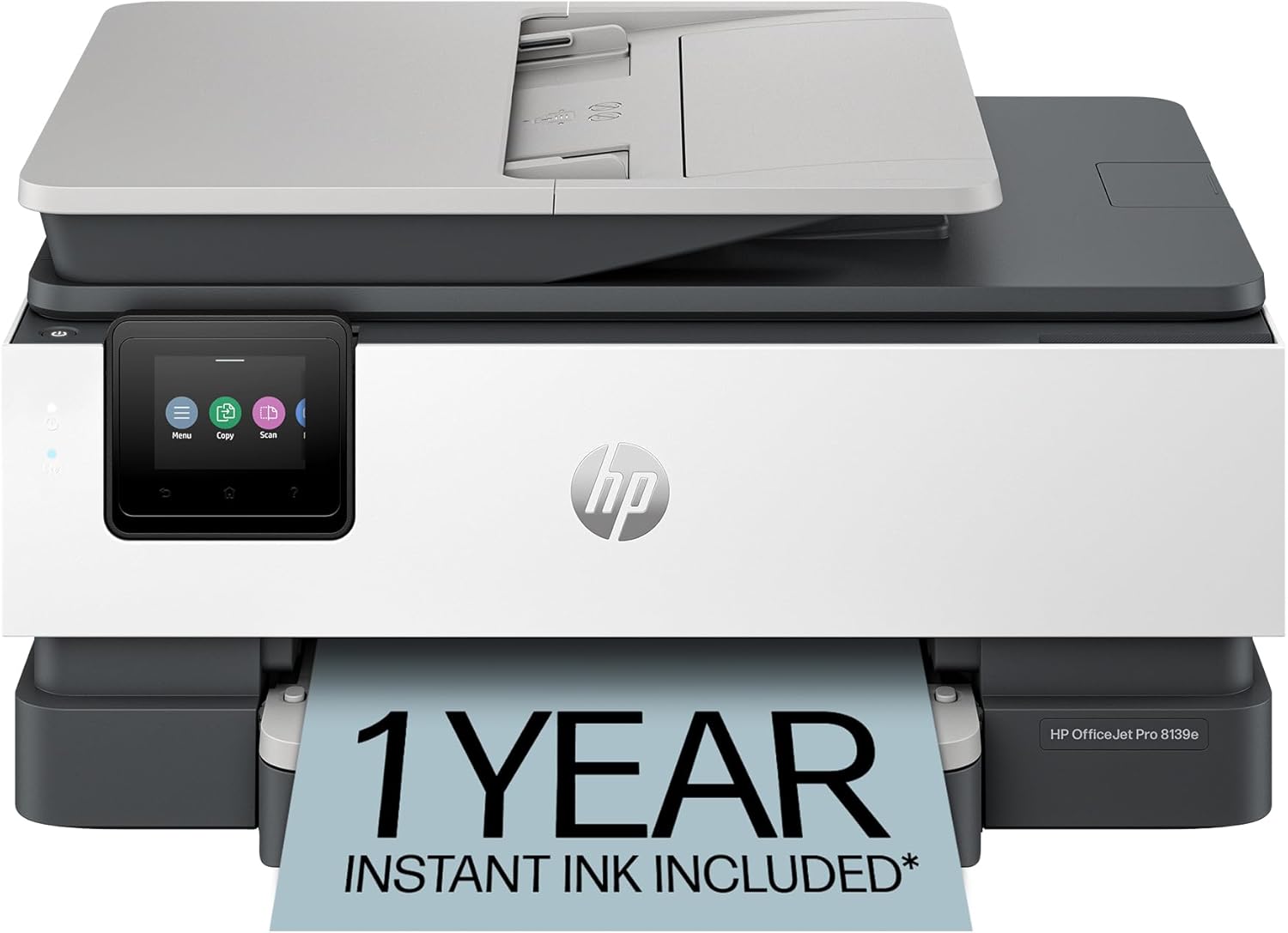
Pros
- AI-powered printing delivers precise, waste-free outputs
- Comprehensive all-in-one functions including auto duplex and ADF
- Reliable wireless connectivity with self-resolving issues
- User-friendly app and touchscreen for quick operations
- Eco-friendly design using recycled materials
Cons
- Blocks non-HP cartridges via firmware updates
- Instant Ink requires ongoing subscription after trial
- Limited long-term user feedback as a newer model
The HP OfficeJet Pro 8139e is a versatile wireless all-in-one inkjet printer designed for home offices that demand professional color output for documents, reports, and flyers. It combines print, scan, copy, and fax functions with an automatic document feeder and duplex printing, supporting up to 225 sheets for efficient workflows.
Standout features like HP AI ensure perfectly formatted prints by intelligently removing unwanted content from web pages and emails, while speeds reach 20 ppm in black and 10 ppm in color. Dual-band Wi-Fi provides rock-solid connectivity, and the HP app enables mobile printing. Security is bolstered by HP Wolf Essential, and the 2.7-inch touchscreen offers intuitive navigation.
Build quality shines with a sustainable design using over 45% recycled plastic, and the setup is straightforward as shown in product videos. Real-world performance suits moderate home office needs, though it requires HP cartridges and HP+ activation for full Instant Ink benefits.
Drawbacks include mandatory HP chip cartridges and a subscription model post-trial, which may add costs for heavy users. Overall, it excels for those prioritizing AI smarts, speed, and security in a compact package.
Verdict: A strong choice for home offices seeking an all-in-one with smart printing tech, earning high marks for functionality despite cartridge restrictions.
Discover the core capabilities: AI-enhanced printing for perfect layouts, fast duplex color output, wireless connectivity, HP app control, touchscreen interface, Instant Ink trial, and advanced security.
Additional perks include a 225-sheet tray, ADF for multi-page scanning, and eco-conscious materials for sustainable printing.
Best Home Office Printers Buying Guide
Print Speed and Quality
Focus on printers that balance speed and crisp output for home office demands. Laser models like those from Brother excel at 36 ppm black-and-white for high-volume documents, while inkjets from HP and Canon deliver vibrant colors for reports and photos. In our reviews, consistent quality across paper types ensures professional results without smudges.
Real-world tip: For streaming-heavy workflows paired with printing labels or photos, prioritize models with Micro Piezo technology for detailed, fade-resistant prints. This saves time during busy days.
Ink and Toner Efficiency
Running costs matter most in home offices; cartridge-free supertanks like Epson’s EcoTank slash expenses by up to 90% with high-yield bottles lasting thousands of pages. Subscription services from HP Instant Ink or Brother Refresh deliver auto-refills, minimizing downtime. PCMag notes these cut long-term ownership costs dramatically for frequent users.
Choose based on volume: Light users benefit from hybrid ink systems in Canon PIXMA for affordable color pops, while heavy text printers favor laser toners for reliability. Link up with our Office Electronics hub for more productivity gear.
Connectivity and Smart Features
Seamless wireless setup with dual-band Wi-Fi and mobile apps is essential for printing from Smartphones or Laptops anywhere. ADF trays and duplex printing in HP OfficeJet Pro models streamline multi-page scans and copies, ideal for contracts or receipts. AI features auto-format web pages, per TechRadar reviews.
Build quality shines in compact designs that fit tight desks, with touchscreens for intuitive control. Ensure compatibility with Alexa or app ecosystems for voice-activated jobs in hybrid setups.
Final Thoughts
The Brother DCP-L2640DW stands out as Best Overall for its blazing 36 ppm speed, duplex scanning, and toner efficiency in small business use. For Best Value, the Canon PIXMA TS4320 offers duplex printing and wireless versatility at entry-level costs. The Epson EcoTank ET-2800 wins Best for Ink Savings with supertank tech. Grab the Epson EcoTank ET-2800 for frustration-free printing, and explore our office electronics for full setups.
FAQs
What should I prioritize in the 7 Best Home Office Printers of 2026?
Seek fast print speeds, low ink costs, and wireless connectivity for home offices. Models with ADF and duplex handle daily scanning and copying efficiently, ensuring smooth productivity.
Are inkjet or laser better for home office Best Home Office Printers?
Inkjet printers like HP and Canon suit color documents and photos with vibrant output, while laser options from Brother dominate black-and-white volume printing. Choose based on your mix of tasks.
How do supertank printers save money?
Supertanks replace cartridges with refillable bottles, yielding thousands of pages per set. Epson’s models, as reviewed by Wirecutter, reduce costs by 90% over traditional inks—perfect for frequent use. Upgrade today for long-term value.
Do these Best Home Office Printers support mobile printing?
Yes, all feature dual-band Wi-Fi, app integration, and AirPrint for seamless Smartphone or Tablet printing. CNET highlights HP’s app for quick scans from anywhere in your home.
What’s the build quality like for daily home office use?
These printers boast compact, durable designs with recycled materials in HP models. Reliable connectivity and easy maintenance ensure years of service; check our category pages for matching shredders.
Sources
This article was researched and written with reference to expert reviews and testing data from trusted sources including PCMag, TechRadar, CNET, Wirecutter, Tom’s Guide, and Digital Trends. All recommendations reflect real-world performance and value as of October 2026.




Write Your Review
No reviews yet. Be the first to share your experience!