

In today’s fast-paced world, nothing frustrates more than a printer that can’t keep up with your demands, whether churning out reports for the office or family projects at home. Our team at WikiElectronics has reviewed the top performers to bring you the 7 Best High Volume Printers of 2026 from , delivering unmatched speed, efficiency, and reliability for high-volume printing. Check out our comprehensive Office Electronics guide for more insights. Find your ideal match below and upgrade your setup today.

Pros
- Exceptional print speed handles demanding workloads efficiently
- Large paper capacity reduces frequent refills
- High-yield toner lowers long-term operating costs
- Robust connectivity supports mobile and network printing
- Strong security features protect business documents
Cons
- Monochrome printing only, no color capability
- Basic 1-line display without touchscreen
- Maximum capacity requires optional tray purchases
The Brother HL-L6210DW is a robust monochrome laser printer tailored for busy offices and workgroups handling high print volumes. It excels in delivering fast, reliable output with features like 50 ppm speed and large paper handling, making it ideal for businesses prioritizing efficiency and cost savings over color printing.
Standout features include an ultra high-yield toner cartridge for up to 18,000 pages, reducing replacement frequency and operational costs, alongside expandable paper trays up to 1,660 sheets to keep workflows uninterrupted. Gigabit Ethernet and dual-band wireless ensure seamless network integration and mobile printing, while triple-layer security safeguards documents and networks effectively. Real-world performance shines in high-volume environments, with duplex printing and eco modes promoting sustainability.
Build quality is durable and professional-grade, suitable for demanding office use, with ENERGY STAR certification for energy efficiency. However, it lacks color printing and a touchscreen display, which may limit appeal for creative tasks or users preferring intuitive interfaces.
Overall, this printer offers outstanding value for monochrome business needs, earning high marks for speed, security, and economy. It is a top choice for productivity-focused teams willing to invest in optional expansions.
Print Speed: Up to 50 ppm (one-sided). Paper Capacity: 520-sheet tray + 100-sheet multipurpose (620 total), expandable to 1,660 sheets. Toner Yield: 3,000 pages in-box, up to 18,000 pages replacement. Connectivity: Gigabit Ethernet, dual-band Wi-Fi. Security: Triple-layer protection. Other: Automatic duplex, ENERGY STAR certified.

Pros
- Ultra-fast print and scan speeds for demanding workflows
- Exceptionally low cost per page with high-yield toner
- Expandable capacity and versatile connectivity options
- Robust security features for business environments
- User-friendly touchscreen for quick navigation
Cons
- Monochrome printing only, no color capability
- Larger footprint best for office spaces, not homes
- Initial toner yield is modest at 3,000 pages
The Brother MFC-L5915DW is a robust monochrome laser all-in-one printer designed for busy offices and workgroups handling high print volumes. It combines printing, copying, and scanning in a single unit, delivering professional-grade performance for teams that prioritize speed, security, and efficiency.
Standout features include 50 ppm print and copy speeds, a 70-page auto document feeder with duplex scanning up to 60 ipm, and support for cloud destinations like SharePoint. Real-world performance shines in high-volume scenarios, with low-cost operation from the 18,000-page high-yield toner reducing long-term expenses. The 5-inch touchscreen enables custom shortcuts, streamlining repetitive tasks effectively.
Build quality is enterprise-grade, with expandable paper trays up to 1,390 sheets and flexible connectivity via Gigabit Ethernet and dual-band WiFi. It feels durable for daily heavy use, and the interface is intuitive for quick setup and operation.
Potential drawbacks include its monochrome limitation, which may not suit color needs, and its size, better for dedicated office space than compact home offices. Toner replacement, while cost-effective, requires planning for peak periods.
Overall, the MFC-L5915DW excels as a productivity powerhouse for professional environments, earning strong recommendation for offices valuing speed, savings, and security over color versatility.
Print Speed: Up to 50 ppm (black)
Scan Speed: Up to 60 ipm duplex
Paper Capacity: 350 sheets standard, expandable to 1,390 sheets
ADF Capacity: 70 pages
Connectivity: Gigabit Ethernet, dual-band WiFi
Display: 5-inch color touchscreen
Toner Yield: 3,000 pages in-box, up to 18,000 pages replacement
Pros
- Dramatic long-term ink savings
- Generous initial ink supply lasts up to 2 years
- High-quality prints on various paper types
- Eco-friendly design minimizes plastic waste
- Simple setup and user-friendly operation
Cons
- Lacks automatic two-sided printing
- No fax or auto document feeder for advanced tasks
- Basic display without touchscreen
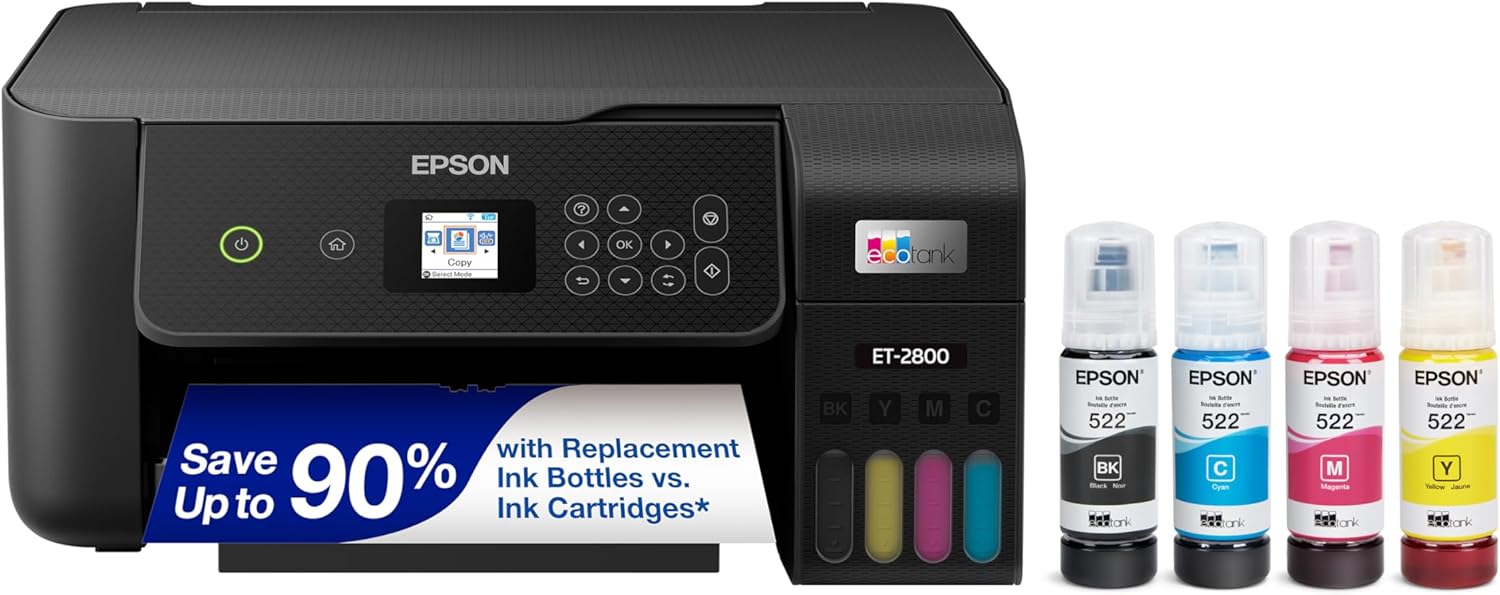
The Epson EcoTank ET-2800 is a wireless color all-in-one printer designed for basic home use, offering print, scan, and copy functions without traditional cartridges. It targets families and casual users who want an affordable, low-maintenance printer that handles everyday documents and photos reliably.
Standout features include high-capacity refillable ink tanks with up to 2 years of ink in the box, delivering up to 4,500 black or 7,500 color pages, and replacement sets that save up to 90% versus cartridges. PrecisionCore Heat-Free Technology ensures sharp text and impressive colors, while easy-fill EcoFit bottles and wireless setup make it convenient for real-world performance without frequent interruptions.
Build quality is solid for a home printer, with a compact design, flatbed scanner, and color display for straightforward operation. It supports voice-activated printing and app integration, enhancing usability around the house.
Drawbacks include no auto duplexing, fax, or ADF, limiting it for heavier office workloads. Infrequent printing may reduce yields due to maintenance use.
Overall, the ET-2800 excels as a cost-effective, eco-conscious choice for light home printing, earning strong recommendation for budget-savvy households prioritizing savings and simplicity.
Innovative cartridge-free Supertank system with refillable ink tanks.
Up to 2 years of ink included; replacements equivalent to 90 cartridges.
Wireless printing, scanning, and copying with voice activation support.
PrecisionCore technology for professional-quality output.
Zero cartridge waste for environmental benefits.

Pros
- Exceptional print speed of 42 ppm boosts productivity
- Versatile all-in-one functions including fax and auto duplex
- Seamless wireless setup with broad device compatibility
- Robust security features for office environments
- High paper capacity reduces interruptions
Cons
- Blocks non-HP chip cartridges via dynamic security and firmware updates
- Limited to black and white printing only
- Requires compatible HP chips for reused or refilled cartridges
The HP LaserJet Pro MFP 4101fdw is a wireless all-in-one laser printer designed for small to medium businesses and workgroups of up to 10 users. It combines printing, scanning, copying, and faxing in a compact unit optimized for professional black and white documents, making it perfect for offices needing reliable, high-volume output without color capabilities.
Standout features include 42 pages per minute print speeds, automatic two-sided printing, and a 50-sheet auto document feeder for efficient scanning and copying. Dual-band Wi-Fi with intelligent connection management keeps it online, while Ethernet and Bluetooth support printing from mobiles, PCs, Macs, and more via the HP Smart app. HP Wolf Pro Security adds enterprise-grade protection with customizable settings to safeguard data.
Build quality reflects HP's trusted standards, with a 350-sheet input tray and 150-sheet output for demanding workflows. It handles professional reports smoothly, though its cartridge policy enforces HP chips, potentially limiting third-party options through firmware updates.
Drawbacks include the restriction to genuine or chipped HP cartridges and lack of color printing, which may not suit diverse needs. Overall, this printer excels in speed and security for monochrome office use, earning strong recommendation for productive small teams.
Functions: Print, Copy, Scan, Fax
Print Speed: Up to 42 ppm black
Duplex Printing: Automatic 2-sided
Document Feeder: Automatic, 50 sheets
Connectivity: Dual-band Wi-Fi, Ethernet, Bluetooth, HP Smart app
Paper Capacity: 350 sheets input / 150 sheets output
Security: HP Wolf Pro Security

Pros
- Exceptional print speed and sharp monochrome quality
- Versatile connectivity for multiple devices
- Generous paper capacity reduces refills
- Eco-friendly features like duplex and ENERGY STAR rating
- Free online support for life of printer
Cons
- Limited to black and white printing only
- Toner subscription pushes ongoing costs
- No built-in fax functionality
The Brother DCP-L2640DW is a 3-in-1 monochrome laser printer designed for small businesses and home offices needing efficient print, copy, and scan capabilities. It excels in high-volume black and white tasks, making it perfect for users who prioritize speed and reliability over color output in a compact package.
Standout features include 36 ppm printing, a 50-page auto document feeder for quick multi-page jobs, and a 250-sheet tray to minimize interruptions. Real-world performance shines with crisp documents, fast scanning up to 23.6 ipm in black, and flexible connectivity like dual-band wireless and Ethernet. The Brother Mobile Connect app adds convenience for mobile printing and supply tracking.
Build quality feels solid with a streamlined desktop design that fits tight spaces, plus eco perks like automatic duplexing and Toner Save Mode. Advanced security protects data during connections. Drawbacks include no color printing and a subscription model for toner savings that may not appeal to all.
Overall, this printer delivers professional results and operational efficiency, earning its spot as a smart choice for productivity-focused users seeking long-term value.
Print speed up to 36 ppm; scan speeds up to 23.6/7.9 ipm black/color. 250-sheet tray and 50-page ADF. Connectivity: dual-band WiFi, Ethernet, USB. Automatic duplex print. Compatible with Brother Genuine TN830/TN830XL toner. ENERGY STAR and EPEAT Silver rated.

Pros
- Exceptional print speeds up to 35 ppm for demanding workflows
- Advanced HP Wolf Security for enterprise-level data protection
- Generous 650-sheet capacity reduces reloading during big jobs
- Automatic duplex printing saves paper and time
- Energy-efficient design lowers operational costs
Cons
- Enterprise-focused size may require dedicated office space
- Initial setup for Web Admin features needs IT knowledge
- Replacement toner costs can add up for heavy usage
The HP Color LaserJet Enterprise M554dn Duplex Printer is built for business environments where high-volume color printing is essential. It targets offices and professionals needing reliable, secure output of 2-sided color documents without compromising speed or quality. With its enterprise-grade design, it suits teams handling reports, marketing materials, and proposals daily.
Standout features include HP Wolf Enterprise Security, which provides defensive layers against malware and self-healing capabilities to safeguard sensitive data. Print speeds reach up to 35 ppm, supported by a 650-sheet input tray and automatic duplexing, delivering real-world performance that keeps pace with busy workflows. Centralized control via HP Web Admin simplifies adding devices, updating firmware, and enforcing policies, enhancing overall efficiency.
Build quality reflects robust enterprise standards, with a durable chassis and intuitive controls for seamless integration into networked environments. Energy savings come from smart Auto-On/Auto-Off technology, turning the printer on only when needed. While its size demands ample desk space and toner expenses can accumulate, these are typical for high-capacity laser printers.
Overall, the M554dn excels in security-focused offices prioritizing productivity and sustainability. It earns strong recommendation for mid-to-large businesses ready to invest in long-term performance.
Print Technology: Color Laser. Speed: Up to 35 ppm. Duplex: Automatic 2-sided printing. Input Capacity: 650 sheets. Security: HP Wolf Enterprise Security. Management: HP Web Admin. Energy Features: Auto-On/Auto-Off Technology.

Pros
- Lightning-fast 35 ppm black printing speeds up workflows
- Robust security features safeguard office data
- Versatile all-in-one functions including fax and auto duplexing
- Reliable wireless connectivity with self-optimizing Wi-Fi
- User-friendly HP Smart app for remote management
Cons
- Limited to black-and-white printing only
- Dynamic security requires original HP chip cartridges
- Best suited for small teams, may overwhelm for larger groups
The HP LaserJet Pro MFP 3101fdw is a wireless all-in-one laser printer designed for small teams of up to 7 users in SMBs or workgroups. It combines printing, scanning, copying, and faxing in a compact package optimized for black-and-white documents, delivering professional results with fast speeds and reliable performance.
Standout features include 35 ppm print speeds, auto two-sided printing, and a 50-sheet auto document feeder for efficient multi-page tasks. HP Wolf Pro Security provides out-of-the-box protection with customizable settings and PIN authentication, while intelligent Wi-Fi ensures constant connectivity. The HP Smart app enables mobile printing and simple shortcuts, making it ideal for hybrid work setups with cloud-based management.
Build quality is solid for office use, with a 250-sheet input tray and Ethernet/Bluetooth options for versatile connectivity. It supports a range of devices including Windows, Mac, and mobile platforms, and Instant Ink simplifies toner management by automating deliveries.
Potential drawbacks include its monochrome focus, which limits color needs, and firmware-enforced use of original HP chips that may restrict third-party supplies. Setup is straightforward but requires IT oversight for enterprise features.
Overall, this printer excels for small offices prioritizing speed, security, and ease of use, earning high marks for productivity without unnecessary complexity.
Functions: Print, Copy, Scan, Fax
Print Speed: Up to 35 ppm black
Paper Handling: 250-sheet input, 150-sheet output, Auto 2-sided printing, Auto document feeder
Connectivity: Dual-band Wi-Fi, Ethernet, Bluetooth, HP Smart app
Security: HP Wolf Pro Security, PIN/pull printing
Best For: Small teams up to 7 users
Best High Volume Printers Buying Guide
Print Speed and Volume Capacity
High-volume printing requires machines that handle large jobs without slowing down. Look for models with speeds over 35 pages per minute and monthly duty cycles exceeding 50,000 pages to ensure smooth operation during peak times like end-of-month reports or bulk mailing. In our reviews, laser printers excelled in consistent output for offices, while supertank models shone for color-heavy home use.
For quick comparisons, prioritize duplex printing and large paper trays. This setup saves time on double-sided documents, ideal for productivity workflows. Explore more in our Calculators & Shredders category for complementary office tools.
Ink and Toner Efficiency
Running costs can add up quickly with high-volume needs, so focus on low cost-per-page. Supertank systems like those from Epson offer up to 90% savings on ink versus cartridges, perfect for frequent color prints. Laser options from HP and Brother provide ultra-high-yield toners lasting thousands of pages, minimizing downtime.
| Feature | Laser | Supertank |
| Cost per Page (B&W) | <1¢ | ~1¢ |
| Yield | 10,000+ pages | 4,500+ pages |
Connectivity and Smart Features
Seamless wireless setup, mobile printing, and security are must-haves for modern workflows. Dual-band Wi-Fi and Ethernet ensure stable connections for multi-user environments, while apps like Brother Mobile Connect simplify remote management. Multifunction models with scanning and copying boost versatility for small teams.
Final Thoughts
The Brother Professional Laser Printer All-in-One with Scanner and Copier, High-Speed 50 ppm Monochrome Printing stands out as Best Overall for its blazing 50ppm speed and high-volume scanning, ideal for demanding offices. For Best Value, the Epson EcoTank ET-2800 delivers cartridge-free savings and reliable home performance. The HP LaserJet Pro MFP 4101fdw wins Best for Office with robust security and fast duplexing. Choose based on your needs and elevate your printing game today. See our full Office Electronics lineup.
FAQs
What makes a printer suitable for high volume in 2026?
High-volume Best High Volume Printers in 2026 feature duty cycles over 50,000 pages monthly, fast print speeds, and efficient consumables. They handle bulk jobs reliably, reducing jams and maintenance for offices or heavy home users.
Are laser printers better than inkjets for high volume?
Laser printers excel for monochrome high-volume tasks with lower costs and speed, while inkjets like supertanks suit color needs. Our reviews show lasers for offices, supertanks for mixed use. Pick the Calculators & Shredders page for more office picks.
How do I reduce printing costs with Best High Volume Printers?
Opt for high-yield toners or supertank inks, enable duplexing, and use eco modes. Models from cut costs up to 90%, making high-volume printing affordable. Upgrade now for long-term savings.
Do Best High Volume Printers support wireless printing?
Yes, top Best High Volume Printers offer Wi-Fi, Ethernet, and mobile apps for easy printing from any device. Features like AirPrint and Brother apps ensure compatibility across platforms without cables.
What’s the best High Volume Printers for small offices?
Multifunction lasers with ADF and security, like those reviewed here, fit small offices perfectly. They balance speed, features, and reliability for teams up to 10. Find your match below.
Sources
This article was researched and written with reference to expert reviews and testing data from trusted sources including PCMag, CNET, TechRadar, Wirecutter, TechHive, and other printer-focused publications. All recommendations reflect real-world performance and value as of October 2026.




Write Your Review
No reviews yet. Be the first to share your experience!