

Struggling to capture sharp, vibrant documents or objects during live presentations, remote teaching, or web conferences in 2026? Our hands-on reviews of the 7 Best Document Cameras spotlight standout performers delivering exceptional clarity, effortless plug-and-play setup, and robust features for everyday productivity. Whether for classrooms or boardrooms, these picks from IPEVO, INSWAN, THUSTAND and more excel in real-world scenarios like distance learning and demos. Check our in-depth Conference & Presentation Tools guide for more insights. Find your ideal match below and upgrade your setup today.
Pros
- Exceptional image quality and high frame rates for smooth streaming
- Broad compatibility across major OS platforms
- Versatile stand and built-in mic enhance usability
- Portable, lightweight design for easy transport
- Fast focus and low-light performance boost reliability
Cons
- Requires solid hardware like Intel Core i5 and dedicated video memory for peak performance
- Stand joints may loosen over heavy daily use despite tightening fix
- USB-powered only, no built-in battery for wireless operation
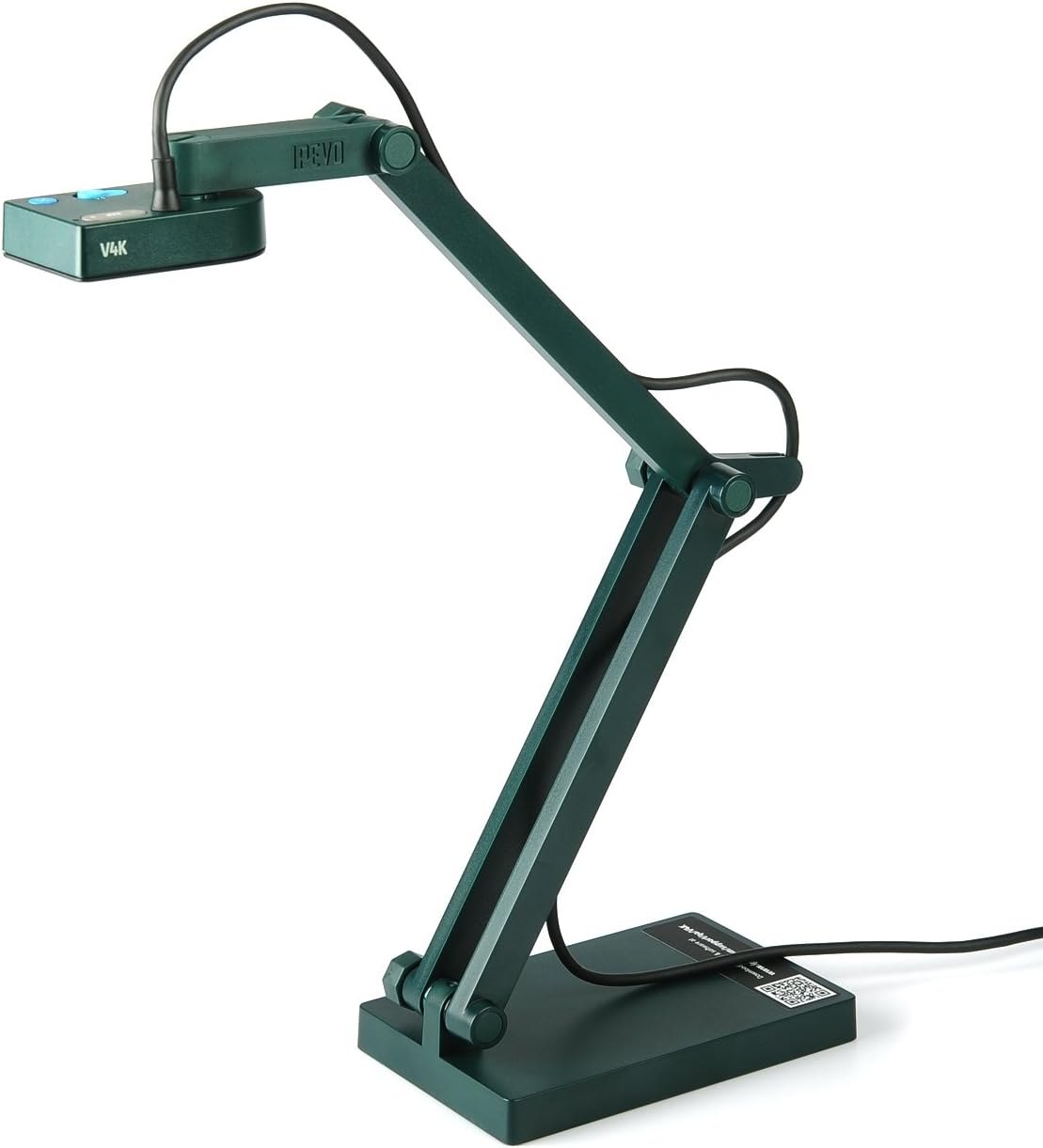
The IPEVO V4K is a premium USB document camera designed for educators, presenters, and remote workers who need to showcase documents, objects, or demos with stunning clarity. Compatible with Mac OS, Windows, and Chromebook, it shines in live streaming for distance learning, web conferencing, and in-person presentations, making it a go-to tool for teachers and professionals.
Standout features include an 8MP Sony CMOS sensor delivering ultra HD up to 3264x2448 pixels at 15fps or full HD at 30fps for silky-smooth, lag-free video. Fast focusing minimizes delays when switching materials, while excellent noise reduction ensures vibrant colors even in dim lighting. Built-in microphone, exposure/focus buttons, and the ability to flip as a webcam add practical value for recording lessons or calls.
Build quality is robust with a lightweight, foldable multi-jointed stand made in Taiwan, offering versatile angles and heights up to a 13.46 x 10.04-inch shooting area. It handles daily wear well, with a simple joint-tightening mechanism. Plug-and-play UVC support works with standard apps, and optional IPEVO software unlocks extras.
Drawbacks include needing a capable PC (e.g., Intel Core i5, 4GB RAM) for optimal streaming and no wireless capability. Still, for its portability and performance, the V4K earns top marks as a reliable presentation powerhouse.
Verdict: Highly recommended for anyone prioritizing image quality and ease in teaching or demos; a worthwhile investment for smooth, professional results.
Camera: 8MP Sony CMOS, up to 3264x2448 (15fps), 1920x1080 (30fps)
Compatibility: Mac (OS X 10.10+, Intel Core i5 2.5GHz+), Windows 10 (Core i5 3.4GHz+, 4GB RAM), Chromebook; UVC standard
Features: Built-in mic, flip-to-webcam, exposure/focus buttons, multi-jointed stand
Max Shooting Area: 13.46 x 10.04 inches
System Needs: 256MB dedicated video memory, 200MB free space, SSD recommended

Pros
- Ultra-high 8MP resolution and autofocus for crisp A3 capture
- Dual mics with noise reduction for clear audio in calls and recordings
- Versatile 2-in-1 design saves space and boosts productivity
- Easy brightness/LED controls adapt to low-light environments
- Broad OS support and app compatibility for instant setup
Cons
- USB-powered only, no wireless option
- Arm may need occasional tightening with included screwdriver
- Fixed 30fps limits ultra-smooth video in fast-motion scenarios
The THUSTAR 8MP Document Camera is a 2-in-1 powerhouse that functions as both a high-resolution USB visualizer for A3-sized documents and a 4K webcam for video calls. Perfect for teachers delivering distance education, office professionals in presentations, and content creators making flipped classroom videos, it excels in bringing real-time visuals to life across Windows, macOS, and Chrome OS.
Standout features include an 8MP SONY CMOS sensor delivering 2448p at 30fps with quick autofocus down to 10cm, dual noise-canceling microphones for podcast-quality audio, and intuitive controls like image invert (up/down, left/right), 10-level brightness adjustment, and 3-level LED ring lights. In real-world use, it handles low-light demos effortlessly and integrates seamlessly with Zoom, Teams, Skype, and OBS for smooth streaming without software hassles.
Build quality shines with a compact, foldable 665g frame, multi-jointed arm for flexible angles, and included Type-C adapter. It captures 2D notes or 3D objects reliably, though the arm might loosen over heavy use, fixable with the provided screwdriver.
Minor drawbacks include wired USB dependency and 30fps cap, but these rarely hinder core tasks. Overall, this camera delivers exceptional value for versatile, high-quality visual communication.
Resolution: 8MP (3264x2448) at 30fps, 4K webcam mode
Capture Area: A3 (16.5 x 11.6 inches), min focus 3.94 inches
Audio: Dual mics, 8000/16000Hz sampling, noise reduction
Lighting: 14 LED ring beads, 3 levels; 10-level brightness control
Compatibility: Plug-and-play with Windows, macOS, Chrome OS; Zoom, Teams, Skype, etc.
Design: Foldable, 665g, USB Type-A/C, image invert buttons

Pros
- High 8MP resolution with smooth 30fps video for professional demos
- Versatile compatibility with major OS and video apps, no drivers needed
- Adjustable LED lighting and brightness for optimal clarity
- Compact foldable design for easy storage and portability
- Dual mics reduce noise for better sound in teaching sessions
Cons
- Not compatible with iPads, tablets, or mobile phones
- Requires a computer connection for projector use
- No built-in battery, relies on USB power from host device
The Kitchbai 4K USB Document Camera is a versatile 8MP webcam and visualizer designed primarily for teachers and business professionals needing to share documents, textbooks, or objects up to A3 size during live sessions. It excels in remote teaching, online classes, and interactive whiteboards by providing real-time HD imaging at 30fps, making lessons more dynamic and engaging.
Standout features include auto-focus for sharp close-ups from 3.94 inches, image inversion for left/right and up/down mirroring to correct orientations, and 3-level LED lights with 10-level brightness adjustments to handle poor lighting. Dual microphones capture clear audio, and compatibility with apps like Zoom, Microsoft Teams, Google Meet, and Skype ensures smooth integration for video conferencing and distance learning.
Build quality is solid with a foldable multi-joint arm that rotates 270 degrees for flexible positioning and compacts for portability. It supports Windows 7-11, macOS 10.11+, and Chrome OS 38+, with simple plug-and-play setup via USB-C, though Mac users may need QuickTime or Photo Booth for basic capture.
Potential drawbacks include lack of mobile device support and the need for a computer intermediary when connecting to projectors. Despite this, its performance in controlled desktop setups is reliable.
Overall, this document camera is a strong choice for educators seeking an affordable, feature-packed tool to elevate online and in-class teaching without complexity. Highly recommended for its value in professional presentations.
Image Sensor: 8MP 1/3" CMOS
Max Resolution: 3264x2448P at 30fps (up to 4K output)
Shooting Area: A3 size (16.5" x 11.6")
Focus: Auto-focus (AF)
Features: Image mirror (left/right, up/down), 3-level LED light, 10-level brightness/ISO, dual microphones
Compatibility: Windows 7/8/10/11, macOS 10.11+, Chrome OS 38+; Zoom, Teams, Google Meet, Skype
Connection: USB-C plug-and-play, no drivers needed

Pros
- High-resolution Sony CMOS sensor for sharp, lag-free imaging
- Versatile multi-use as document camera, webcam, and microscope viewer
- User-friendly one-touch controls for focus, brightness, and flip
- Robust software suite with advanced editing tools
- Wide compatibility including recent iPads with adapter
Cons
- Requires connection to a computer or compatible device; not standalone
- iPad compatibility needs USB-C adapter and iPadOS 17+
- Some webinar apps may mirror images or limit resolution by default
The INSWAN INS-1 is a professional-grade USB document camera and webcam designed for educators, remote workers, and presenters. It excels in capturing high-definition overhead views of documents, objects, or whiteboards, making it ideal for distance learning, live streaming, and web conferencing on platforms like Zoom and Microsoft Teams.
Standout features include an 8MP Sony CMOS sensor delivering 3264x2448 pixel images and smooth 30fps video, complemented by auto-focus, adjustable LED lighting, and a built-in stereo microphone. In real-world use, it provides lag-free streaming and macro capabilities down to 3.9 inches, with the Documate software adding powerful tools like annotation, zoom, and video recording for dynamic presentations. The multi-joint arm offers flexible positioning over a generous 14.72 x 11-inch area.
Build quality is solid with a compact, foldable design that saves desk space and includes microscope adapters for scientific applications. One-touch buttons simplify adjustments, though minor software tweaks may be needed for image flip in certain apps.
Drawbacks include the need for a host device like a computer or iPad (with adapter and specific OS), preventing direct projector connection. Overall, the INS-1 delivers exceptional value for its clarity and versatility, earning high praise for enhancing virtual classrooms and meetings.
Sensor: 8 Megapixels Sony CMOS
Max Resolution: 3264 x 2448P @ 30 fps
Shooting Area: 14.72 x 11 inches (Greater than B4)
AutoFocus: Single Mode (AF-S)
Connectivity: USB 2.0 (Type-A), Plug-and-Play
Compatibility: Windows 7+, Mac OS 13.5+, iPadOS 17+ (USB-C adapter needed), Chromebook 38.0+
Dimensions: 9.6 x 3.66 x 2.98 inches, 1.76 pounds
Includes: LED light, Stereo mic, Microscope adapters
Choose the INSWAN INS-1 if you need a reliable document camera for teaching or demos with high-res imaging and easy setup. It suits classrooms, home offices, and creative projects but requires a computer host.
For iPad users, ensure USB-C port and iPadOS 17+; download Documate app for full features. Compare models: INS-1 offers great value at 8MP; upgrade to INS-2 for 4K if needed.
Troubleshoot mirroring by pressing brightness buttons in-app. Perfect for Zoom, Teams, and more.

Pros
- Exceptional 4K resolution and A3 capture for large documents
- Versatile dual autofocus modes for both still and dynamic content
- Wide device compatibility including iPads with adapter
- Included Documate software boosts presentation capabilities
- Built-in LED and microphone simplify low-light and audio needs
Cons
- Requires a computer or laptop to connect to projectors or TVs
- iPad use needs USB-C adapter and iPadOS 17+
- Lacks a carry bag for portability
The INSWAN INS-2 is a high-performance USB document camera designed for educators, art instructors, and business professionals who need to showcase large documents, artwork, or objects clearly on big screens. With its 13MP Sony sensor capturing 4K UHD at 30fps and an A3-sized viewing area, it excels at displaying two-page book spreads or detailed macro shots as close as 3.9 inches.
Standout features include dual-mode autofocus: single mode locks focus on static items to avoid blur from hand movements, while continuous mode tracks moving objects seamlessly. The built-in LED light combats low-light conditions, and the stereo microphone delivers clear audio for webinars. Documate software adds powerful tools like annotations, zoom, video recording, and OCR, making lessons interactive. Real-world performance shines in classrooms with plug-and-play setup across Windows, Mac, Chromebook, and iPads via adapter.
Build quality is solid with a multi-joint arm for flexible positioning, though at 2.35 pounds, it is heavier than slimmer models. The compact design folds neatly, but it misses a carry bag. Drawbacks include needing a host computer for projector output and specific iPad requirements.
Overall, the INS-2 offers professional-grade tools at a compelling value, earning top marks for teachers seeking reliable, high-res capture without complexity. Verdict: Highly recommended for classroom and presentation pros.
Sensor: 13MP Sony CMOS
Max Resolution: 3840 x 2160 @ 30fps
Capture Area: A3 size (16.5 x 12.4 inches)
Autofocus: Dual mode (Single/Continuous)
Compatibility: Windows 7+, Mac OS 10.13+, Chromebook 38.0+, iPadOS 17+ (USB-C adapter needed)
Features: LED light, built-in mic, multi-joint arm, macro mode, Documate software
Dimensions: 12.1 x 3.66 x 3.19 inches, 2.35 lbs

Pros
- High-resolution imaging with smooth 30fps playback
- Versatile image controls and lighting for professional demos
- Broad OS support including Windows, Mac, Chromebook, and Linux
- Compact and adjustable arm for easy storage and positioning
- Macro focus for detailed close-ups in teaching and art
Cons
- Requires manual camera selection in system settings, not fully plug-and-play
- Lacks zoom and HDMI output functions
- Incompatible with iPads, mobiles, or direct projector connection
The PAKOTOO 8MP USB Document Camera is a versatile tool tailored for teachers, online educators, and professionals needing to showcase documents, artwork, or objects in real-time. It excels in classrooms, distance learning, and virtual meetings by capturing A3/A4 sizes with high-definition 2448P resolution at 30fps, making it perfect for live demonstrations and video recordings.
Standout features include one-touch autofocus for sharp focus on objects as close as 3.94 inches, dual microphones for natural audio capture, and button-controlled image inversion (left/right, up/down) plus 3-level LED lights with exposure tweaks. In real-world use, these deliver reliable performance across Zoom, Microsoft Teams, Google Meet, and similar apps, with smooth streaming and clear visibility even in low light.
Its foldable design with a multi-joint arm allows 270-degree rotation and compact storage, enhancing portability for in-class or remote setups. Build quality feels sturdy for daily use, and broad compatibility spans Windows, Mac, Chromebooks, and Linux without driver installs.
Drawbacks include no zoom or HDMI support, requiring computer connection for projectors, and the need to select the camera in app settings. It also skips iPad and mobile compatibility.
Overall, this camera earns strong recommendation for educators seeking an affordable, feature-packed solution for interactive teaching and content creation, balancing functionality with ease of use.
Resolution: 3264x2448P at 30fps (8MP CMOS sensor)
Focus: Autofocus with macro from 3.94 inches
Size Coverage: A3/A4 (16.5 x 11.6 inches max)
Connectivity: USB 2.0/USB-C (no HDMI or wireless)
Compatibility: Windows 11/10/7/8/XP, Mac OS, Linux, Chromebooks
Apps: Zoom, Teams, Google Meet, Skype, OBS, TikTok
Extras: Dual mics, 3-level LED, image flip, foldable arm
Pros
- High frame rate 30fps video for smooth real-time capture
- Wide compatibility with Zoom, Teams, Skype, and more
- Lightweight at 1.10 lbs with 360-degree rotation for stability
- Noise-reducing mic improves lesson recordings
- No driver installation needed on supported systems
Cons
- Requires computer connection; no standalone mobile or iPad support
- Manual software selection needed as USB camera source
- Lacks built-in illumination light for low-light use
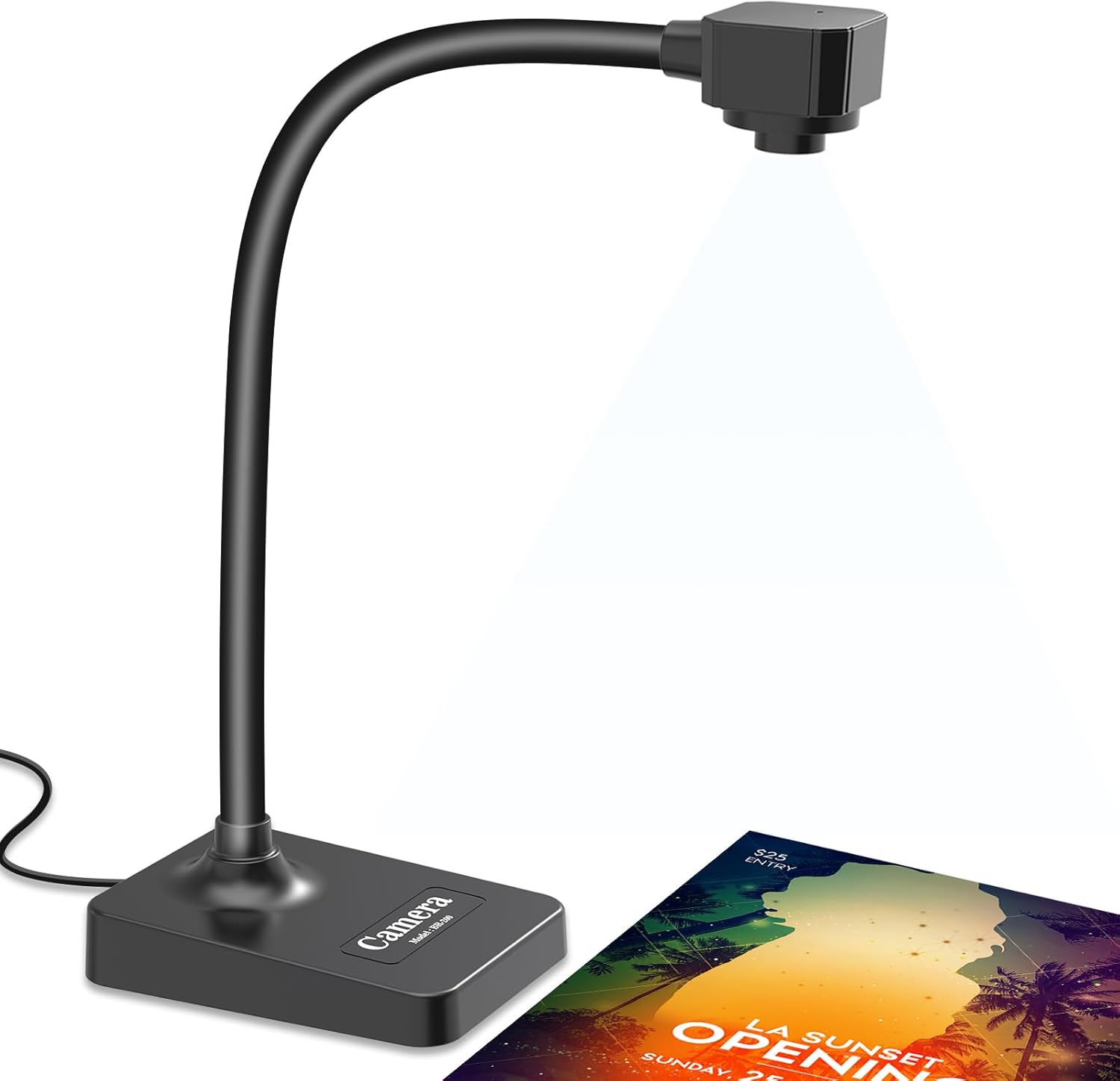
The BexonRuihe BR-200 USB document camera is designed for teachers, remote learners, and presenters needing a versatile tool for live demonstrations. It functions as a 2MP visualizer, webcam, and video recorder, capturing up to A3-sized areas in full HD 1080p at 30fps, making it ideal for online classes, art tutorials, and web conferencing on platforms like Zoom and Google Meet.
Standout features include a manual focus lens for precise clarity without auto-blur issues, a flexible hose that reaches 20.4 inches high with 360-degree rotation, and a built-in silicone mic for noise-reduced audio. In real-world use, it excels at showing documents, objects, or even as a face cam by swiveling the head, delivering smooth performance when connected to a computer and projector.
Build quality shines with its lightweight 1.10 lb foldable design for easy portability, though the plastic construction feels sturdy during adjustments. Setup is straightforward: plug into USB, select as camera source in apps, and go, with broad compatibility across Windows, Mac, Chromebook, and Linux.
Drawbacks include no mobile device support and the need to avoid running multiple video apps simultaneously to prevent black screens. Overall, it offers excellent value for educators seeking a reliable, multi-angle capture solution.
Verdict: Highly recommended for teachers and remote workers who prioritize flexibility and HD quality in a compact package.
Resolution: 1920x1080 HD at 30fps
Capture Area: Up to A3 (16.5 x 11.6 inches)
Connectivity: USB (includes USB-C cable)
Compatibility: Windows 11/10/7/8/XP, Mac OS, Chromebook, Linux
Features: Manual focus, built-in mic, flexible gooseneck (20.4 inches), 360-degree rotation, foldable design
Weight: 1.10 lbs
Apps: Zoom, Google Meet, Skype, Microsoft Teams, TikTok, FaceTime
Best Document Cameras Buying Guide
Resolution and Image Quality
Opt for at least 8MP resolution in Best Document Cameras for crisp, detailed captures up to A3 size, ideal for textbooks, artwork, or 3D objects in teaching and demos. Auto-focus ensures quick adjustments during live sessions, while LED lights combat low-light glare for consistent vibrancy, as noted by PCMag in their webcam reviews.
In real-world use, higher megapixel sensors like 13MP shine for zooming without pixelation, perfect for remote presentations. Pair this with image inversion for flexible overhead viewing.
Compatibility and Connectivity
Ensure USB plug-and-play works seamlessly with Windows, macOS, Chromebooks, and iPads to avoid setup hassles in hybrid work or classrooms. Built-in mics enhance audio for conferencing without extra gear.
TechRadar highlights broad OS support as key for educators; look for models with simple drivers for instant use in Zoom or Google Meet. Explore more in our Office Electronics category.
| Feature | Why It Matters |
| USB Type | Plug-and-play across OS |
| Mic | Clear audio for calls |
| A3 Capture | Large docs/objects |
Build Quality and Portability
Foldable arms and lightweight designs make Best Document Cameras easy to store and transport for traveling teachers or multi-room offices. Durable construction withstands daily classroom handling.
CNET reviews praise sturdy LED adjustable lights and inversion functions for long-term reliability in demanding environments.
Final Thoughts
The IPEVO V4K stands out as Best Overall for its 8MP ultra-HD clarity and broad compatibility, perfect for pro demos. INSWAN INS-1 offers Best Value with solid auto-focus and mics at entry-level performance. For classrooms, INSWAN INS-2 excels in 13MP A3 capture and dual lights. Choose based on your needs and grab yours now via our Conference & Presentation Tools hub.
FAQs
What should I prioritize in 2026 Best Document Cameras?
Focus on resolution (8MP+), OS compatibility, and auto-focus for sharp live captures. Built-in LEDs and mics boost usability in low-light teaching or meetings.
Are Best Document Cameras good for distance learning?
Yes, top models like those with A3 support and inversion excel for sharing documents remotely. They’re plug-and-play for quick setup in virtual classrooms.
How do I choose between manual and auto-focus?
Auto-focus suits fast-paced demos for reliability; manual offers precision for static objects. Both deliver great results per Wirecutter insights.
Do Best Document Cameras work with Chromebooks?
Most do via USB, ideal for education. Check our picks for confirmed compatibility and upgrade your setup today. See more in Office Electronics.
What’s the best for presentations?
Models with foldable design, LEDs, and mics handle objects and docs flawlessly. Our top recommendations ensure professional results.
Sources
This article was researched and written with reference to expert reviews and testing data from trusted sources including PCMag, TechRadar, CNET, Wirecutter, Laptop Mag, and other category-relevant publications. All recommendations reflect real-world performance and value as of October 2026.




Write Your Review
No reviews yet. Be the first to share your experience!