

In today’s hybrid work environment of 2026, blurry video and echoey audio can derail important meetings, but the right webcam turns your setup into a professional studio. We’ve reviewed the 7 Best Conference Webcams including standout options from NexiGo, WyreStorm, ACTIONSGLOBALUSINC and more, prioritizing real-world clarity, tracking accuracy, and effortless connectivity for streaming, Zoom calls, and team collaborations. Check our in-depth Conference & Presentation Tools guide for more insights. Find your ideal match below and upgrade your setup today.

Pros
- AI features simplify group and presenter focus
- Wide angle and strong mics suit small conference spaces
- Easy USB connection for quick hybrid meetings
- App control for customizable video settings
- Zoom certified for reliable compatibility
Cons
- Advanced controls require downloading the app
- Digital 8x zoom may lose quality at maximum
- Optimized for small rooms, not large spaces
The WyreStorm Focus 210 is a 4K AI-powered conference webcam tailored for small meeting rooms and huddle spaces. It excels in hybrid work environments, automatically detecting and framing participants or tracking the active presenter to keep everyone in view without manual adjustments. Ideal for teams using Zoom, Teams, or Webex, its plug-and-play USB design eliminates complex IT setups.
Standout features include AI auto framing for group discussions, real-time presenter tracking for presentations, and a 120° wide-angle lens that covers the entire room. Dual noise-cancelling microphones capture clear voices up to 5m away, reducing background distractions. The 8x digital zoom and app controls for brightness, contrast, and more allow precise customization, delivering professional 4K video performance in real-world meetings.
Build quality feels solid with a privacy shutter for security in shared offices. The compact design mounts easily on monitors or tripods, and the intuitive app enhances functionality on the latest versions. It provides core capabilities of pricier systems at a fraction of the hassle.
Potential drawbacks include reliance on the app for full adjustments and digital zoom limitations at higher levels. It shines best in small spaces rather than large conference rooms.
Overall, the Focus 210 earns high marks for transforming small meeting setups into professional hybrid solutions. Buy it if you need reliable AI-driven video and audio for team collaboration.
Perfect for small conference rooms or huddle spaces with 2-6 people. Use for hybrid meetings, presentations, or training where clear visibility and audio matter.
Compatible with Zoom (certified), Teams, Webex via USB. No drivers needed; app optional for tweaks.
Compares favorably to expensive room systems by offering AI framing, tracking, and mics in a simple webcam form.
Pros
- Superior 4K resolution and Sony sensor for sharp, vibrant images
- Remote control simplifies zoom, mute, and image adjustments
- Dual omnidirectional mics deliver clear sound from all angles
- Wide device compatibility with USB-A and USB-C cables included
- Adjustable FOV and low-light correction enhance versatility
Cons
- Fixed focus requires precise positioning for optimal sharpness
- Digital zoom may soften image quality at maximum levels
- Limited to 30fps at 4K resolution
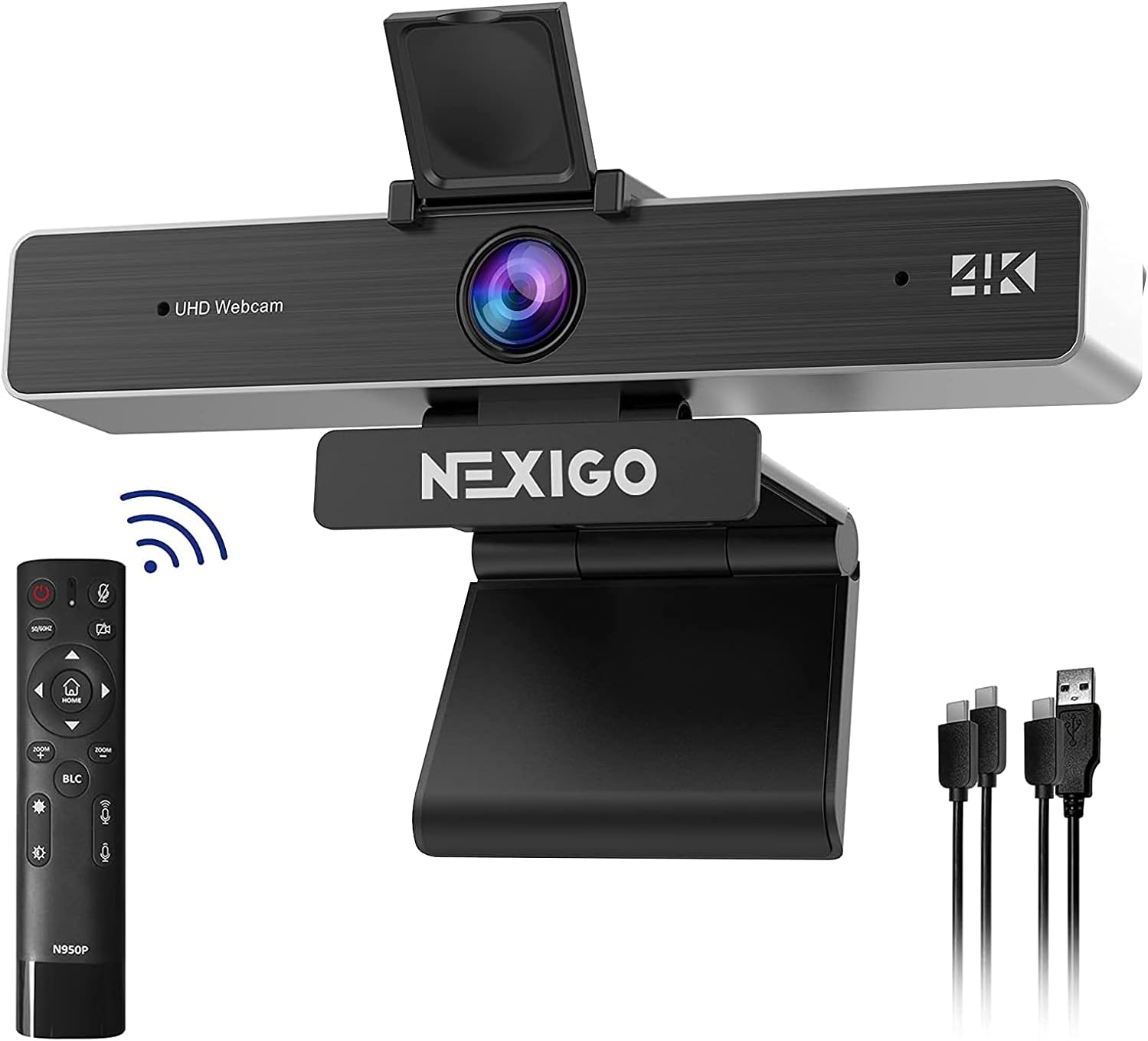
The NexiGo N950P is a high-end 4K webcam designed for professionals, streamers, and remote workers who demand top-tier video quality in apps like Zoom, Teams, Skype, and Twitch. With its Sony Starvis sensor capturing 3840x2160 resolution at 30fps, it delivers crisp, detailed images that stand out in virtual meetings or live broadcasts.
Standout features include 5X digital zoom and full control via an included remote, allowing you to adjust zoom, volume, mirror image, and power without touching the webcam. Dual stereo mics with noise cancellation provide clear audio, while adjustable field of view (35-90 degrees) and low-light correction ensure reliable performance in varied lighting. Real-world use shows smooth plug-and-play setup across platforms, making it ideal for dynamic video needs.
Build quality impresses with a sturdy adjustable clip, threaded base for tripods, and dual USB-A/C compatibility. The privacy cover adds peace of mind, and the overall design feels premium yet practical for desk setups.
Drawbacks include fixed focus, which demands careful alignment, and potential quality loss in digital zoom at extremes. Frame rate caps at 30fps in 4K, which may not suit ultra-smooth motion enthusiasts.
Overall, the N950P excels as a versatile, feature-packed webcam for serious users, earning high marks for image quality and convenience in professional settings.
Resolution: 8.5MP 4K UHD (3840x2160) at 30fps
Sensor: Sony Starvis
Zoom: 5X Digital
Field of View: 35-90° Adjustable
Focus: Fixed
Mics: Dual Stereo with Noise Cancellation
Connectivity: USB-A & USB-C
Compatibility: Windows, Mac, Linux, Chrome OS, Android

Pros
- Exceptional Full HD video quality with smooth autofocus
- Effective low-light correction for consistent performance
- Clear stereo audio from built-in dual mics
- Wide compatibility including major apps and Nintendo Switch 2
- Includes background removal software trial
Cons
- Lacks a built-in privacy shutter
- Fixed 78-degree field of view may feel narrow for some setups
- No tripod mount included out of the box
The Logitech C920x HD Pro Webcam is a versatile USB camera designed for anyone needing reliable video for calls, streaming, or recording on PC, Mac, tablets, or even Nintendo Switch 2's GameChat mode. It targets professionals in video conferencing, content creators, gamers, and remote workers who want pro-level quality without complexity.
Standout features include Full HD 1080p video at 30fps powered by a five-element glass lens with autofocus, delivering razor-sharp, vibrant images. HD light correction automatically adjusts to low-light or harsh conditions for consistent clarity, while dual omni-directional mics provide natural stereo audio. The included 3-month XSplit VCam license lets you blur or swap backgrounds easily, enhancing streams or calls without a green screen. Real-world performance shines in apps like Teams, Zoom, and Google Meet, with fluid 720p or 1080p output.
Build quality feels solid with a clip-on mount for laptops or monitors, plus a universal USB connection for plug-and-play setup across Windows 11, macOS, Chrome OS, and Android. The compact black design blends into most setups, though it lacks a privacy shutter.
Drawbacks include no physical privacy cover and a 78-degree field of view that might require repositioning for group shots. Still, for solo use, these are minor.
Overall, the C920x excels as a budget-friendly workhorse for high-quality video, earning its spot as a top pick for everyday professional and creative needs.
Video Quality: Full HD 1080p/30fps
Field of View: 78 degrees
Lens: Premium glass with autofocus
Audio: Dual omni-directional mics
Light Correction: RightLight 2
Compatibility: Windows 7+, macOS 10.6+, Chrome OS, Android 5.0+, USB port; Works with Teams, Zoom, Meet, Switch 2 GameChat
Software: 3-month XSplit VCam license

Pros
- Superior light correction for better video in dim environments
- Simple USB-A plug-and-play setup on multiple OS
- Integrated privacy shutter for effortless protection
- Clear built-in microphone for reliable calls
- Broad app and device compatibility including gaming
Cons
- Fixed focus without autofocus limits close-up sharpness
- Narrow 58-degree field of view may crop group shots
- No tripod mount for flexible positioning
The Logitech Brio 101 is a compact Full HD 1080p webcam tailored for video meetings, streaming, and casual gaming via Nintendo Switch 2's GameChat mode. It targets remote professionals, students, and home users who prioritize ease of use, clear visuals, and privacy without advanced features like autoframing.
Key strengths shine in real-world performance: 1080p at 30fps delivers sharp images, while RightLight 2 automatically balances light for up to 50% brighter output compared to older models, reducing shadows effectively. The built-in mic captures voice clearly, and compatibility spans Windows, macOS, ChromeOS, Zoom, Microsoft Teams, and Google Meet for seamless integration.
Design emphasizes simplicity with a 5-foot USB-A cable, sliding privacy shutter, and stylish color options made from at least 34% post-consumer recycled plastic. The Logi Options+ app adds customization for zoom and framing, enhancing versatility on desktops or laptops.
Drawbacks include fixed focus, which may blur at varying distances, a narrower 58-degree field of view unsuitable for wide group views, and no tripod support. These make it less ideal for dynamic setups.
Verdict: The Brio 101 excels as an entry-level Logitech webcam offering essential quality and reliability for everyday video needs, earning its solid reputation among budget-conscious users.
Resolution: 1080p at 30fps
Field of View: 58 degrees diagonal
Focus: Fixed focus
Light Correction: RightLight 2
Microphone: 1 omni-directional
Connection: USB-A, 5 ft (1.5m) cable
Privacy: Integrated shutter
Software: Logi Options+ app
Compatibility: Windows, macOS, ChromeOS, Zoom, Teams, Google Meet, Nintendo Switch 2 GameChat

Pros
- Superior low-light performance with AI enhancements
- Advanced image customization via Logi Options+
- Versatile Show Mode for productivity
- Integrated privacy shutter and noise-canceling mics
- Broad platform certification including Nintendo Switch 2
Cons
- Full customization requires Logi Options+ software download
- Premium build may feel bulky for compact setups
- USB-C connection needs compatible ports or adapters
The Logitech MX Brio is a high-end 4K webcam designed for professionals, streamers, and gamers who demand top-tier video quality in video calls, content creation, or Nintendo Switch 2 GameChat. It stands out with its massive sensor, AI-powered enhancements, and unique features like Show Mode, making it ideal for remote workers and creators seeking an edge over standard webcams.
Key features shine in real-world use: the 70% larger pixels and AI deliver twice the face visibility and detail in dim lighting, while fine controls let users adjust ISO, shutter speed, tint, and vibrance for polished results. Dual beamforming mics with noise reduction keep voices clear amid distractions, and 4K at 30fps or 1080p at 60fps ensures smooth, sharp footage across adjustable fields of view.
Build quality feels premium with a sturdy design, glass lens, top-mount clip, and tripod compatibility. The rotating privacy shutter adds peace of mind, and integration with Logitech peripherals enhances workflows for setups with MX keyboards or mice.
Potential drawbacks include the need for Logi Options+ software to unlock advanced tweaks and its larger size due to the sensor, which might not suit ultra-minimal desks. USB-C limits direct plug-and-play on older devices without adapters.
Overall, the MX Brio elevates video presence for demanding users, earning its spot as a go-to for collaboration and streaming with unmatched low-light prowess and versatility.
Resolution/Frame Rate: 4K Ultra HD 2160p/30fps, 1080p/60fps
Field of View: 65°, 78°, 90° adjustable
Microphones: Dual beamforming with AI noise reduction
Connectivity: USB-C
Mount: Top-of-screen clip with tilt, tripod compatible
Features: HDR, glass lens, privacy shutter, Logi Options+ customization
Software: Logi Options+, G Hub, Logi Tune
Certified for Zoom, Microsoft Teams, Google Meet, Chromebook, and Streamlabs. Works with Windows, macOS, Chrome OS, Linux. Supports Nintendo Switch 2 GameChat mode. Pairs with Logitech MX peripherals like MX Keys S, MX Master 3S for enhanced control.
Pros
- Exceptional 4K resolution with 8.29MP sensor for crisp, detailed images
- Plug-and-play USB setup works instantly with Windows, Mac, and major apps like Zoom and Teams
- Privacy cover and adjustable mounting for secure, flexible use
- Wide 118° FOV option captures full rooms effortlessly
- Comprehensive remote control enhances user convenience
Cons
- Digital zoom may slightly reduce image quality at maximum 5X
- Requires line-of-sight for IR remote functionality
- USB-powered only, no standalone battery option
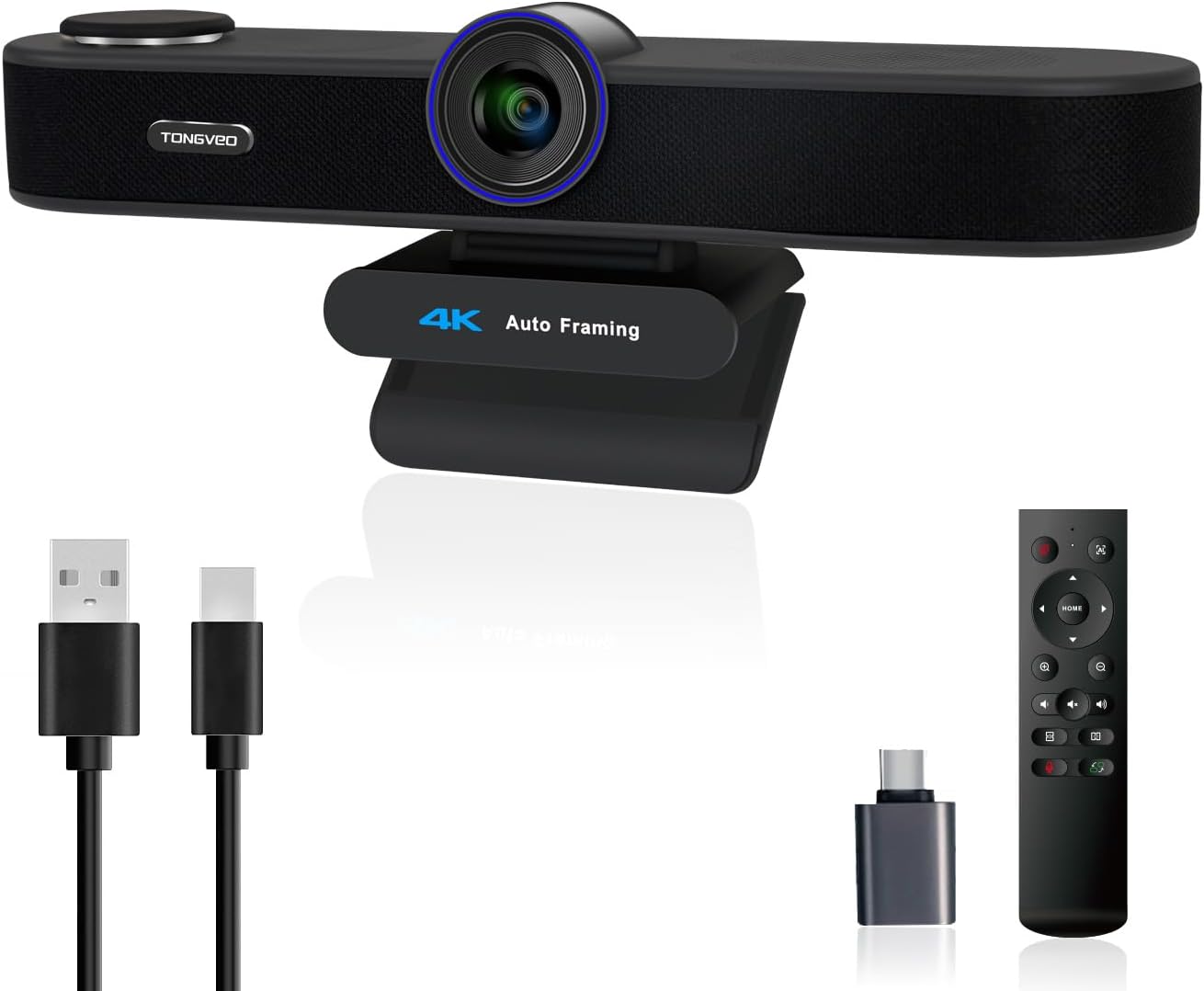
The TONGVEO 3-in-1 4K webcam is a versatile all-in-one solution for video calls, online teaching, live streaming, and professional meetings. Designed for users who need high-quality video and audio without multiple devices, it features a 4K lens, dual noise-cancelling microphones, and a built-in 3W speaker, making it ideal for professionals, educators, and content creators on PC or Mac.
Standout features include AI auto-framing that detects and centers attendees, voice tracking that follows the active speaker within seconds, and 5X digital zoom paired with three adjustable FOV modes (118°, 100°, 88°) controllable via IR remote. In real-world use, these deliver smooth, focused video even in group settings, with mics capturing clear audio up to 16.8ft and the speaker providing balanced playback for natural conversations.
Build quality is solid with a plug-and-play USB design, privacy cover, and flexible mounting. The compact form attaches easily to laptops or monitors, though the remote needs line-of-sight and max zoom softens details slightly. Overall, it offers premium performance for seamless hybrid work.
Verdict: Highly recommended for anyone seeking an integrated 4K webcam that simplifies setups and elevates call quality, especially where AI smarts matter most.
Resolution: 4K UHD (3840x2160) at 30fps, 1/2.8-inch 8.29MP sensor
Audio: Dual noise-cancelling mics (16.8ft pickup), 3W built-in speaker
Features: AI auto-framing, voice tracking, 5X digital zoom, 3 FOV modes (118°/100°/88°), IR remote, privacy cover
Connectivity: USB 2.0/3.0 plug-and-play
Compatibility: Windows 7+, Mac OS, Zoom, Teams, Google Meet, WebEx, etc.

Pros
- Advanced AI features like individuals gallery and tracking enhance meeting inclusivity
- Wide 120° FOV captures groups effortlessly in compact spaces
- Gesture control and ePTZ 5X zoom provide intuitive, touchless operation
- Strong compatibility with major video platforms for reliable plug-and-play use
- Built-in noise reduction ensures professional audio quality
Cons
- Digital zoom only, which may reduce clarity at maximum 5X
- Microphone range limited to about 3 meters, better for small rooms
- No built-in speakerphone, requiring separate audio solutions for full setups
The AV Access BizEye P30 is a feature-packed 4K conference room camera designed for small teams and professionals hosting video calls on platforms like Zoom and Teams. It excels in hybrid work environments where clear, inclusive visuals are essential, automatically handling framing so you can focus on content rather than camera adjustments.
Standout AI capabilities include auto framing, presenter tracking, and individuals gallery mode, which detect and highlight up to four participants clearly, switching to group view as needed. Gesture control allows hands-free zoom and mode switches, while the 120° wide-angle lens with no distortion captures entire rooms. In real-world use, these deliver smooth, professional performance, with 4K at 30fps providing sharp details and noise-canceling mics ensuring voices cut through cleanly up to 3 meters.
Build quality is solid with a flexible mounting clip for monitors, laptops, or tripods, plus USB plug-and-play simplicity across Windows and macOS. The ePTZ 5X zoom offers precise control without mechanical parts. Drawbacks include digital-only zoom that softens at extremes and a mic range suited mainly to small spaces, lacking Bluetooth or daisy-chaining for larger setups.
Overall, the BizEye P30 earns high marks for innovative AI and ease of use, making it a top pick for conference rooms or home offices seeking smart, hassle-free video solutions.
Video: 4K UHD at 30fps, backward compatible with 1080p/720p, 120° diagonal FOV, 5X digital zoom, ePTZ.
Audio: Dual noise-canceling microphones, effective up to 3 meters.
AI Features: Auto framing, presenter tracking, individuals gallery (up to 4 people), gesture control.
Connectivity: USB plug-and-play, compatible with Zoom, Teams, OBS, Webex, Skype.
Mounting: Universal clip for monitors, laptops, tripods; privacy cover included.
Best Conference Webcams Buying Guide
Video Quality and Field of View
Look for at least Full HD 1080p resolution with 4K options for sharper details in group settings or low-light rooms. Wide-angle lenses (120° or more) capture entire conference tables without distortion, ideal for hybrid team meetings where everyone needs to be seen clearly.
In our reviews, models with AI auto-framing dynamically adjust to focus on speakers, reducing manual tweaks during presentations. This ensures professional-grade video for daily use, much like Office Electronics that excel in productivity scenarios.
Audio Performance and Noise Cancellation
Dual or beamforming mics with AI noise reduction pick up voices up to 16 feet away while muting background chatter, crucial for open offices or home setups with kids and pets. Test in real calls to confirm natural sound without echo.
According to CNET reviews, integrated speakers on some units enhance versatility for small huddles, delivering clear playback without external gear.
Smart Features and Connectivity
Prioritize USB plug-and-play compatibility with Zoom, Teams, and Google Meet, plus privacy shutters for security. Gesture controls and presenter tracking shine in dynamic presentations, following movement seamlessly for engaging remote training.
Tom’s Guide highlights how auto-light correction maintains vibrancy in varied lighting, ensuring reliable performance across use cases from quick daily check-ins to all-day conferences.
Final Thoughts
The WyreStorm 4K AI Tracking Conference Webcam stands out as Best Overall for its room-filling 120° view, presenter tracking, and noise-canceling mics that excel in small meeting rooms. For Best Value, the Logitech Brio 101 offers solid 1080p clarity and privacy features at entry-level performance. Choose the Logitech MX Brio for premium 4K streaming with Show Mode. WYRESTORM 4K AI Tracking Conference Webcam Ready to enhance your calls? Explore more in our category pages and pick yours now.
FAQs
What should I look for in the Best Conference Webcams of 2026?
Focus on 4K resolution, wide FOV, AI framing, and Zoom/Teams certification for seamless hybrid work. These ensure crisp video and clear audio in real-world scenarios like group brainstorming or client pitches.
Do I need 4K for conference webcams?
Not always, but 4K provides future-proof detail for large displays or recordings. 1080p suffices for most calls, as reviewed by PCMag, balancing quality and bandwidth.
Are AI features worth it in Best Conference Webcams?
Yes, auto-framing and tracking save time in multi-person meetings, per TechRadar tests. They adapt dynamically, improving user experience without constant adjustments. Upgrade today for pro results.
How do I mount a conference webcam?
Most clip to monitors or tripods via standard threads. Position at eye level for natural angles, enhancing presence in video calls.
What’s the best Conference Webcams for small teams?
Options with 120° FOV and dual mics, like those with presenter tracking, fit huddle rooms perfectly. See our Conference & Presentation Tools for tailored picks.
Sources
This article was researched and written with reference to expert reviews and testing data from trusted sources including TechRadar, CNET, Tom’s Guide, PCMag, Wirecutter, and other category-relevant publications. All recommendations reflect real-world performance and value as of October 2026.




Write Your Review
No reviews yet. Be the first to share your experience!