

Struggling with faded labels, bulky printers, or uninspired DIY projects in 2026? Our hands-on reviews of the 7 Best Sticker Printers from Memoking, Phomemo, Joyberg and more deliver pocket-sized portability, inkless thermal printing, and smart app integration for seamless sticker creation, shipping, and crafting. Whether for journaling, small business packaging, or fun gifts, these picks maximize real-world convenience and durability. Dive into our Office Electronics hub for more insights. Find your ideal match below and upgrade your setup today.

Pros
- Seamless print-and-cut integration saves time over separate machines
- High-resolution thermal dye-sublimation yields vibrant, durable outputs
- User-friendly app with AI features requires no design experience
- Broad creative options including ID photos and phone personalizations
- Compatible with multiple devices for flexible workflow
Cons
- Requires Liene brand paper only for optimal performance
- Best adhesion on smooth surfaces despite improved paper
- Must remove each sheet before next print to avoid cutting errors
The Liene PixCut S1 is an innovative all-in-one device that combines thermal dye-sublimation printing with AI-powered cutting, perfect for DIY crafters, label makers, and gift creators who want professional stickers without complex setups. Targeted at hobbyists and small business owners, it turns photos into custom stickers, phone skins, and labels via a Bluetooth-connected app.
Standout features include 300 DPI high-resolution prints with true-to-life colors, AI image extraction for flawless subject isolation, and automatic lamination for waterproof, scratch-resistant results. Real-world performance shines in quick 2-minute cycles, with the AI Lab enabling fun transformations like turning selfies into anime characters. The app offers thousands of free templates, making creativity accessible even for beginners.
Build quality feels solid and compact, with simple cartridge installation and paper loading. Multi-device support enhances usability, though it relies on proprietary paper. Drawbacks include occasional cutting issues if sheets are not removed promptly and limited adhesion on rough surfaces.
Overall, the PixCut S1 excels for efficient, high-quality sticker making, earning strong recommendation for anyone prioritizing speed and ease in personal projects.
All-in-one print and cut saves time and space. AI extraction ensures precise edges on every sticker.
300 DPI thermal dye-sublimation delivers vibrant, laminated outputs that resist water and scratches.
Free app unlocks 2000+ templates and AI styles with no subscriptions. Supports 4x6 and 4x7-inch Liene paper.

Pros
- High-resolution 203 DPI prints crisp black-and-white results on sticker or regular paper
- Quick Bluetooth setup via FunnyPrint app compatible with iOS and Android
- Lightweight at 0.26 lbs and compact dimensions for on-the-go convenience
- Includes practical tools like drag, zoom, and text editing in the app
Cons
- Bluetooth reconnection works best by powering on printer before opening app
- Optimal performance requires genuine refill rolls for smooth feeding
- Limited to black-and-white printing only
The PrintJoyShareLove AHM2 Mini Sticker Printer is a versatile, pocket-sized thermal device designed for anyone who enjoys creativity and organization, from kids making DIY crafts to adults labeling home items or printing study notes. It connects seamlessly via Bluetooth to the FunnyPrint app on iOS or Android smartphones, allowing instant printing of stickers, photos, journals, to-do lists, and more without any ink or preheating.
Standout features include advanced thermal technology delivering sharp 203 DPI prints on self-adhesive or regular paper, with three rolls included for right-out-of-the-box fun. The app enhances usability with OCR scanning, templates, drag-and-zoom editing, and sticker overlays, making it a productivity booster for kitchens, bedrooms, offices, or travel. Real-world performance shines in quick, hassle-free sessions, though following the power-on-first tip ensures smooth reconnections.
Build quality feels sturdy yet toy-like and approachable, weighing just 0.26 pounds in a 3.3 x 3.1 x 1.4-inch body, complete with a built-in sawtooth for precise tearing. It handles colorful paper rolls well but performs best with genuine refills to avoid feeding issues.
Drawbacks include occasional manual Bluetooth pairing if the app opens first and the black-and-white limitation, which suits most labeling but not full-color photos.
Overall, this printer earns high marks for portability, ease, and fun, making it an excellent choice for creative gifts or daily use, backed by a 2-year guarantee.
For best Bluetooth results: Power on the printer first (long press until light flashes), then open the FunnyPrint app for automatic reconnection. Pair via the app, not phone settings. Download app, connect to AH-M2, and start printing templates or custom designs.
Use the built-in sawtooth for straight, clean tears. Stick to genuine rolls for optimal quality and device longevity.

Pros
- Quick Bluetooth connection in seconds via Phomemo app
- Comes with three rolls of thermal paper for immediate use
- Supports unlimited label lengths for flexible sizing
- Compatible with various paper types including color and clear
- Compact palm-sized build for easy portability
Cons
- Photos may show print noise and lack ultra-high definition
- Blurry prints possible without proper app adjustments like rotation
- Some advanced fonts require app subscription
The Memoking T02 is a versatile mini thermal sticker printer designed for students, teachers, crafters, and small business owners who need quick, portable labeling and printing solutions. Paired with the Phomemo app on iOS or Android devices, it enables Bluetooth printing of study notes, custom stickers, photos, and labels without ink, making it a practical tool for schoolwork, organization, and DIY projects.
Standout features include the Scan & Print function for capturing and enlarging graphics clearly, support for image-text labels to identify storage contents, and compatibility with white, color, and clear thermal papers. Real-world performance shines in creating planner stickers, bookmarks, and reminders with hundreds of fonts and effects, though photos have some noise and are not high-definition. The app's AI tools add fun customization, and printing is fast with adjustable lengths up to 50-53mm width.
Build quality is solid for its mini size, with a protective case option and easy paper holder installation. It stores easily in a pocket and includes three paper rolls to start. Drawbacks include occasional blurry prints if graphics are not rotated vertically in the app, blank outputs from misalignment, and no computer connectivity.
Overall, the T02 excels as an affordable, creative printing companion for everyday use, earning praise for its portability and versatility. Ideal for back-to-school or gifting, it delivers reliable results with minimal setup for focused users.
Bluetooth connectivity via Phomemo app for iOS/Android (no PC support). Inkless thermal printing with 50-53mm width and customizable lengths. Scan & Print for study graphics. Hundreds of fonts, themes, and filters (some subscription-based). Supports white, color, clear papers; DIY coloring compatible. Includes 3 paper rolls.
Best for students printing notes/flashcards, teachers for diagrams, or crafters for stickers. Pair with T02 color papers for vibrant options or protective case for travel. Fix blurry prints by rotating graphics vertically in app; ensure proper paper holder alignment to avoid blanks. Not for high-res photos.
Pros
- Wireless Bluetooth connectivity for mobile printing freedom
- High-speed 203 DPI printing reduces wait times
- Broad platform compatibility including major carriers and marketplaces
- User-friendly app and web tools with OCR and multi-language support
- Compact and portable design in stylish colors
Cons
- Best performance with genuine Munbyn thermal labels; third-party may cause issues
- Requires USB for desktops without Bluetooth
- Limited to monochrome thermal printing only
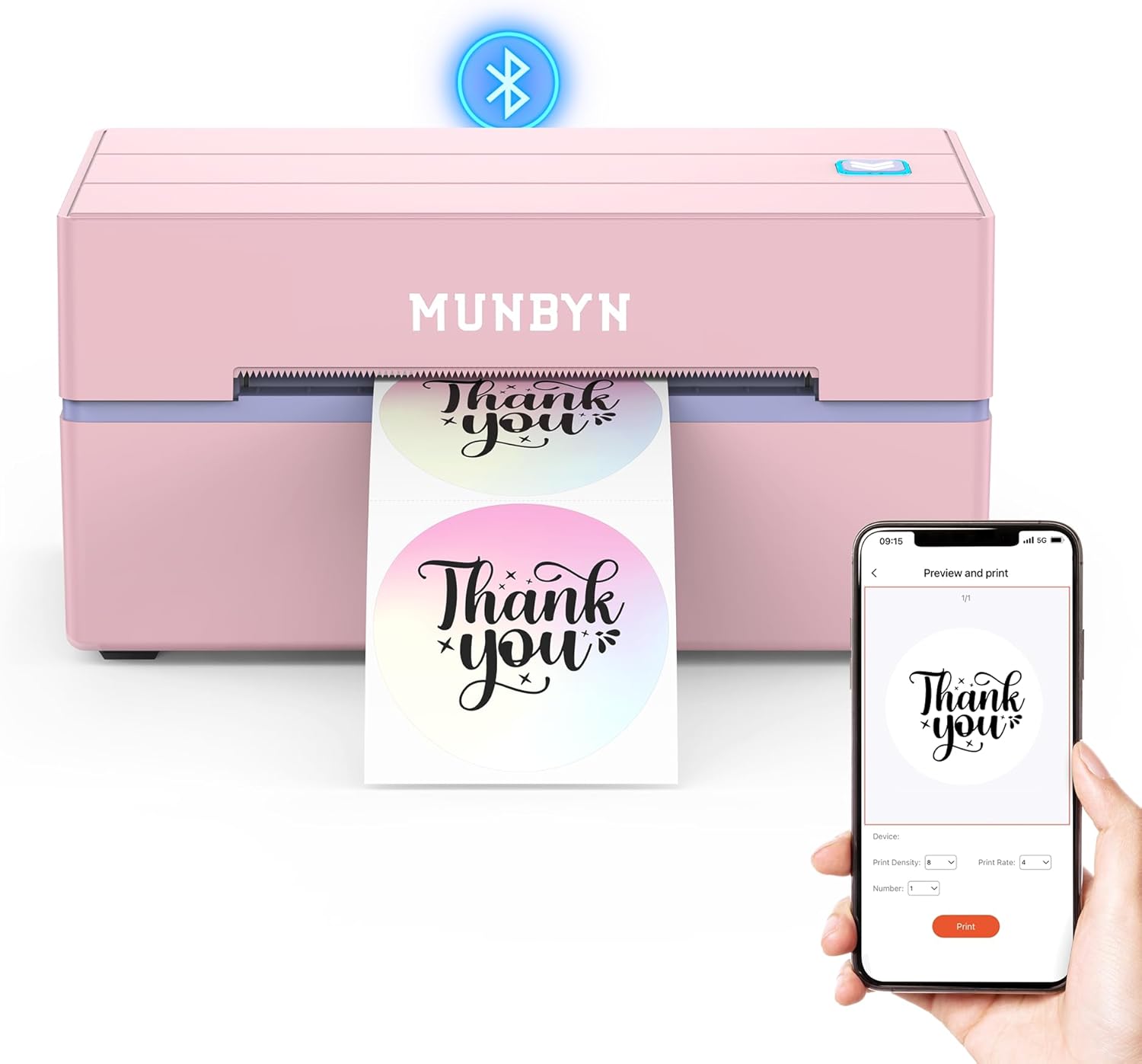
The MUNBYN 130B Bluetooth Thermal Label Printer is a compact, wireless solution designed for small businesses, home offices, and frequent shippers handling packages via platforms like Etsy, eBay, Amazon, and Shopify. It excels at producing professional 4x6 shipping labels without the hassle of ink or toner, making it perfect for entrepreneurs who need quick, cost-effective printing on the go.
Standout features include lightning-fast printing at up to 72 pages per minute with 203 DPI resolution for sharp barcodes and text, plus effortless setup through the MUNBYN Print app for mobile devices or a web-based editor for desktops. Real-world performance shines in seamless integration with major carriers like FedEx, UPS, and USPS, while the vast library of 3500+ design elements allows unlimited customization for branding, pricing, or organization tasks.
Build quality feels solid and portable, available in appealing colors like pink and lavender purple, with support for label widths from 1.57 to 4.3 inches. Compatibility spans iOS, Android, Windows, macOS, and ChromeOS, ensuring versatility across devices.
Potential drawbacks include optimal results only with genuine Munbyn labels, as some third-party papers can lead to smudging or feeding issues, and non-Bluetooth desktops need a USB connection.
Overall, the MUNBYN 130B delivers exceptional value for reliable, high-volume label printing, earning strong recommendation for anyone scaling their shipping operations efficiently.
Bluetooth and USB connectivity with 203 DPI resolution. Prints at up to 72 PPM on thermal labels 1.57-4.3 inches wide, no ink required. Compatible with iOS, Android, Windows, macOS, ChromeOS, and platforms like Etsy, eBay, Amazon, Shopify, FedEx, UPS, USPS.
Supports 4x6 shipping labels and custom designs via app or web editor with 3500+ elements. Portable design fits small business and home use.

Pros
- Universal compatibility with most inkjet and laser printers
- Fast-drying matte finish ideal for handwriting and printing
- Strong, reliable adhesive that sticks to various surfaces
- Generous 40-sheet pack with user-friendly peel aids
- High-quality 100gsm paper resists tearing
Cons
- Full sheets require manual or tool-based cutting to size
- Matte finish only, no glossy option available
- Backing print guides may slightly limit edge-to-edge printing
Joyberg printable sticker paper is a pack of 40 full-sheet 8.5x11 inch matte labels designed for inkjet and laser printers, perfect for crafters, teachers, home organizers, and small businesses needing custom stickers. Made from thickened 100gsm paper, it supports easy cutting into any shape or size with tools like electronic cutters, making it ideal for personalized labels, warnings, or decorative projects.
Standout features include jam-free printing with vibrant colors and no curled edges, plus a fast-drying matte surface compatible with pens, pencils, and markers. The strong self-adhesive backing peels off effortlessly thanks to printed guides and an orange reminder label, sticking securely to glass, metal, cardboard, envelopes, and plastics without smudging or yellowing over time.
Build quality shines with seamless liner design and durable paper that handles real-world use well, from school crafts to office sorting. While it excels in versatility and printer-friendliness, users must cut sheets themselves, and the matte finish lacks gloss for shiny effects.
Overall, this sticker paper delivers reliable performance for everyday creative and organizational needs, earning high marks for quality and ease of use. Crafters and label makers will find it a worthwhile, budget-friendly choice.
40 sheets of 8.5x11 inch full-sheet matte sticker paper, 100gsm thickness for durability.
Compatible with inkjet and laser printers; no jams, crisp prints, vibrant colors.
Fast-drying surface works with pens, markers; easy-peel backing with guides.
Strong adhesive for multiple surfaces; cut to custom sizes and shapes.

Pros
- Compact and lightweight for easy portability
- User-friendly app with AI tools like background removal and text recognition
- Comes with three paper rolls ready to use
- Sharp, high-definition black-and-white prints
- Versatile for study, work, and DIY applications
Cons
- Prints in monochrome only, no color support
- App-based printing excludes computer compatibility
- Charging adapter not included
The TYPONOS PM290 Mini Sticker Printer is a pocket-sized thermal printer designed for anyone who loves customizing labels, notes, and DIY projects. Targeted at students, planners, office workers, and craft enthusiasts, it connects via Bluetooth to iOS or Android devices through the Labelnize app, making it a fun, practical tool for quick printing without needing ink or toner.
Standout features include the app's AI capabilities such as text-to-image generation, one-click background removal, and OCR text recognition, alongside hundreds of templates and fonts. In real-world use, it excels at producing crisp monochrome stickers for to-do lists, study aids, or personalized gifts, with easy paper loading and one-click printing that saves time. The included three rolls of 54mm x 3.2m adhesive paper in white, pink, and green allow for immediate creativity, and prints are durable for everyday sticking.
Build quality is solid with a cute, compact design measuring about 7 x 5.2 x 2.44 inches, feeling sturdy yet lightweight for portability. Setup is straightforward: power on, pair via app, and load paper. It performs reliably for short sessions, handling images, text, and scans efficiently.
Drawbacks include monochrome-only output and lack of computer support, limiting it to mobile use, plus no included charger. Still, for its size and features, these are minor for the intended audience.
Overall verdict: A top pick for portable sticker making with smart app integration. Highly recommended for back-to-school, birthdays, or anyone needing fun, functional labeling on a budget.
Brand: TYPONOS
Model: PM290
Color: Green
Dimensions: 6.97 x 5.2 x 2.44 inches
Paper: 3 rolls, 54mm x 3.2m (white/pink/green)
Connectivity: Bluetooth (iOS 13+/Android via Labelnize app)
Print Technology: Thermal, monochrome
Compatibility: Mobile app only, no PC

Pros
- Bluetooth connectivity for cable-free mobile printing
- No toner or ink required, reducing long-term expenses
- High-speed printing with clear 203 DPI resolution
- Broad compatibility across iOS, Android, Windows, macOS
- Easy app-based setup for quick start
Cons
- Mobile printing requires Labelife app pairing, not direct Bluetooth
- Limited to black-and-white unless using special color thermal paper
- PC or Mac USB printing needs driver download and installation
The Phomemo 241BT is a versatile Bluetooth thermal label printer designed for small business owners, e-commerce sellers, and home users who need to print 4x6 shipping labels quickly. It connects wirelessly to iPhones, Android devices, Windows PCs, and Macs, making it perfect for platforms like Shopify, Amazon, eBay, Etsy, UPS, and USPS. With support for label widths up to 4.6 inches, it handles everything from packages to clothing tags and gifts.
Standout features include high-speed printing at 150mm/s, producing up to 72 sheets per minute with sharp 203 DPI clarity for barcodes and text. The ink-free thermal technology saves money and hassle, while the free Labelife app offers easy design tools and templates. Real-world performance shines in busy shipping scenarios, delivering reliable results without jams or fading, as evidenced by its strong user feedback on setup and output quality.
Build quality is solid for a portable unit, with a compact pink design that's lightweight and desk-friendly. It includes USB for wired printing and Bluetooth for mobility, though the plastic exterior feels budget-oriented rather than premium. Operations are straightforward once set up, with intuitive app controls enhancing usability for non-tech-savvy users.
Potential drawbacks include the need for the Labelife app on mobile devices and driver installation for computers, which adds a setup step. It prints black-and-white only, so color requires separate paper. These are minor for most users focused on efficiency.
Overall, the Phomemo 241BT earns high marks as a time-saving tool for labeling needs, offering excellent value for small-scale operations. It's a smart buy if you prioritize speed, compatibility, and cost savings over advanced color printing.
Print Technology: Direct thermal (no ink required). Resolution: 203 DPI. Speed: 150 mm/s (up to 72 labels/min for 4x6). Label Width: 1-4.6 inches. Connectivity: Bluetooth, USB. Compatibility: iOS, Android (via Labelife app), Windows 7+, macOS 10+, ChromeOS. Dimensions: Compact portable design.
For phones/tablets: Download Labelife app, enable Bluetooth, connect via app printer icon, select file and print. For PC/Mac: Download driver from labelife.net/pm241, connect via USB or Bluetooth after install. ChromeOS: Add Labelife extension. Always verify OS compatibility before starting.
Best Sticker Printers Buying Guide
Printing Technology and Quality
Focus on thermal direct technology for inkless operation, which ensures crisp, smudge-free stickers ideal for daily use like labeling jars or shipping packages. Higher DPI, such as 300, provides vibrant details for photos and crafts, while standard 203 DPI suits text and barcodes. In our reviews, these deliver reliable output without fading over time.
Consider resolution and speed for your needs: mini printers excel in quick photo pods for journals, while shipping models handle high-volume black-and-white labels efficiently. Pair with compatible paper for waterproof results.
Portability, Connectivity, and App Features
Portable designs under pocket size with Bluetooth pairing to smartphones make on-the-go printing effortless for students, crafters, or travelers. Smart apps offer AI editing, templates, and auto-cutting, enhancing user experience for custom designs without a PC.
| Feature | Ideal For |
| Bluetooth | Mobile DIY |
| USB | Office Productivity |
| AI App | Creative Projects |
Check our Calculators & Shredders category for related office tools that complement these printers.
Compatibility and Long-Term Value
Ensure multi-platform support for iOS, Android, Windows, and Mac, plus label sizes from mini pods to 4×6 inches. Inkless tech cuts ongoing costs, making them reliable for home organization or e-commerce shipping.
Prioritize durable builds and app updates for sustained performance across productivity and creative tasks.
Final Thoughts
The Liene PixCut S1 stands out as Best Overall for its color printing, AI cutting, and app creativity, perfect for pro-level DIY. Phomemo 241BT wins Best Value with fast wireless shipping labels and broad compatibility. For budget mini prints, Memoking T02 excels in portability. Choose based on your crafting or business needs and elevate your projects today. Explore more in Office Electronics.
FAQs
What are the 7 Best Sticker Printers for 2026?
Top picks include portable thermal models from Memoking, Phomemo, Joyberg and more for inkless sticker making, emphasizing Bluetooth ease, sharp output, and app smarts for crafts or labels. Our reviews prioritize real-world reliability.
Are thermal Best Sticker Printers good for color printing?
Most are black-and-white for cost savings, but premium options like Liene offer dye-sublimation for vibrant colors and durability. Ideal for photos; check app compatibility first.
How do I choose a portable sticker printer?
Look for Bluetooth, battery life, and paper rolls included. Review our buying guide above for tips on matching to journaling, shipping, or gifts. Find your match now.
Do Best Sticker Printers require ink?
No, thermal tech uses heat on special paper, slashing costs and mess. Expect long-term savings for frequent use. Pair with quality paper for best results.
What’s the best for small business shipping?
Phomemo models shine with 4×6 support, fast speeds, and e-commerce app integration. See our top list and upgrade your workflow today.
Sources
This article was researched and written with reference to expert reviews and testing data from trusted sources including PCMag, TechRadar, CNET, Tom’s Guide, Wirecutter, and TechHive. All recommendations reflect real-world performance and value as of October 2026.




Write Your Review
No reviews yet. Be the first to share your experience!