

Struggling with complex equations, trigonometric functions, or statistical analysis in your engineering projects? In 2026, the top engineer calculators empower you with lightning-fast processing, intuitive displays, and robust features tailored for real-world demands like coursework, fieldwork, and professional design. We’ve reviewed the 7 Best Engineer Calculators from leading brands including CalculatedIndustries, Texas Instruments, Casio and more, focusing on calculation speed, display clarity, battery reliability, and long-term durability to bring you unbeatable value. Check our Calculators & Shredders guide for more insights. Find your ideal match below and upgrade your setup today.
Pros
- Responsive keys and large screen reduce input errors during long calculations
- Comprehensive construction-specific functions like roof pitch and stair layout
- Rugged build with protective cover suits demanding job sites
- Energy-saving auto-shutdown preserves battery life
- No-paper writing pad boosts convenience and sustainability
Cons
- Steep learning curve for accessing all 200+ functions initially
- Auto-shutdown after 8-12 minutes may interrupt ongoing work
- Lacks full graphing or advanced scientific calculator capabilities
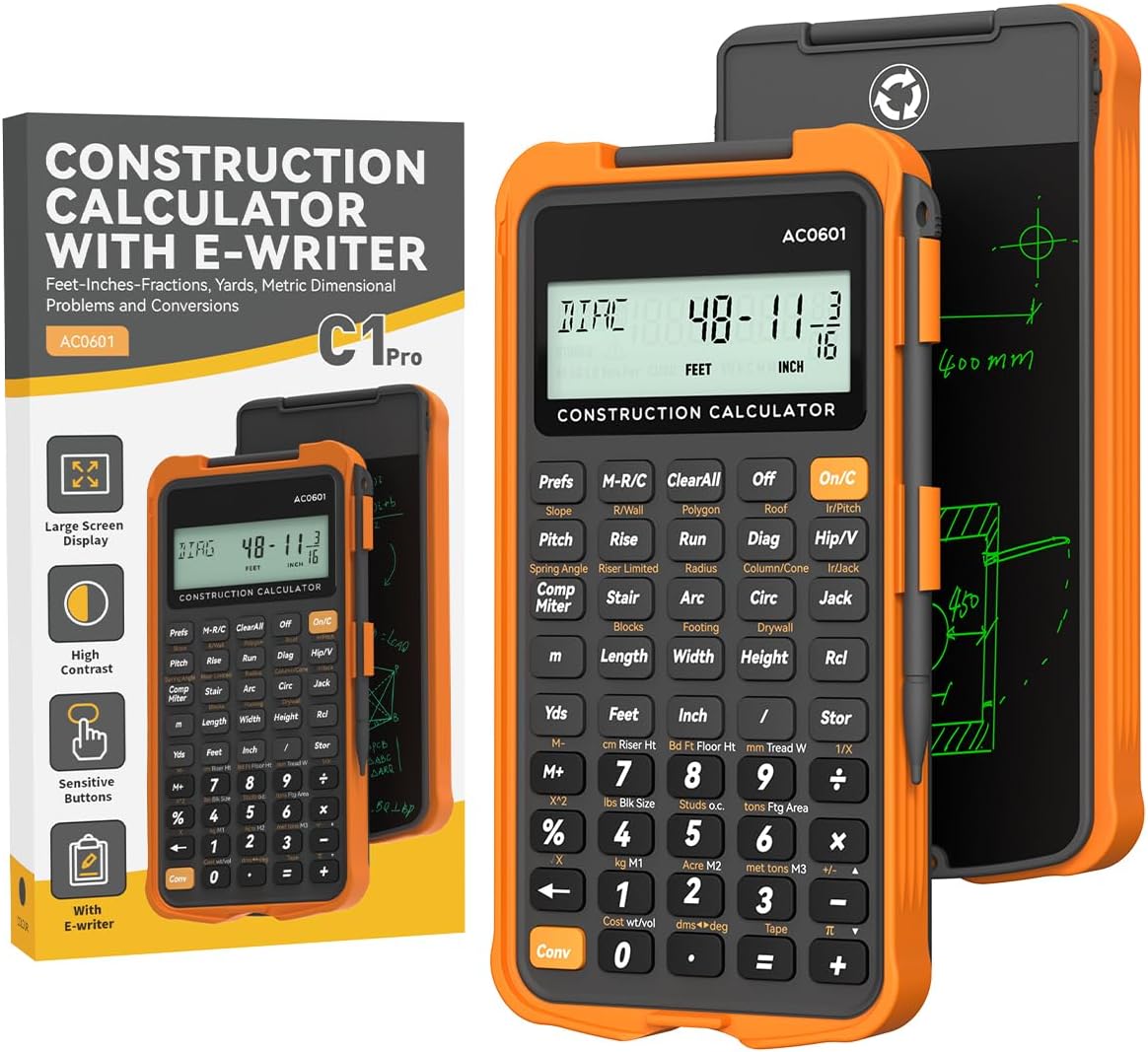
The ROATEE Construction Calculator is a specialized tool for builders, carpenters, contractors, framers, remodelers, roofers, and engineering students handling feet-inch-fraction measurements. It stands out with over 200 engineering functions tailored to real-world tasks like stair layout, roof truss calculations, concrete estimation, and polygon tiling, making complex job-site math fast and accurate.
Key features include a flip-page writing tablet for quick, paperless notes, an electronic tape measure that recalls the last 20 entries with running totals, and three memory slots for custom workflows. The 3-inch 12-digit screen delivers clear readability, while responsive PC buttons minimize errors. In practice, it excels at conversions like roof pitch to angles and compound miters, saving time on projects from foundations to finishing.
Build quality impresses with a thick TPU protective case offering drop resistance akin to a smartphone, ideal for dusty, rugged environments. It arrives fully ready with batteries, a manual, and reference stickers, supporting customizable settings for personalized use.
Potential drawbacks include a learning curve for its extensive functions and auto-shutdown after inactivity, which could pause work. It focuses on construction over general scientific use.
Overall, this calculator earns high marks for professionals needing reliable, on-site computation and note-taking. It is a smart investment for anyone in construction seeking precision without hassle.
Discover the ROATEE calculator's standout capabilities designed for construction pros: flip-page writing pad for eco-friendly notes, 200+ functions covering area, volume, roofing, stairs, and more in feet-inch-fractions.
Benefits include phone-like drop protection, large clear screen, entry recall, and instant readiness with included batteries and guides.
Perfect for contractors, carpenters, concrete workers, roofers, framers, remodelers, architects, estimators, and DIY renovators tackling precise measurements daily.
Ideal if you need rugged, specialized math tools without carrying notebooks or fragile devices.

Pros
- Versatile unit conversions and built-in construction functions boost on-site productivity
- Industry-standard tool trusted for over 30 years in training programs
- Includes batteries, protective cover, and bilingual guide for immediate use
- Prevents errors with dedicated keys for pitches, angles, and material takeoffs
Cons
- Advanced trigonometric functions require the separate Trig model
- Learning curve for new users unfamiliar with specialized construction keys
- Relies on replaceable batteries rather than rechargeable option
The Calculated Industries 4065 Construction Master Pro is a powerhouse handheld calculator tailored for professionals in construction, including contractors, estimators, builders, framers, remodelers, and carpenters. It excels at handling complex dimensional math in real-world units like feet-inch-fractions, yards, decimal feet, and metric, making it indispensable for accurate fieldwork without constant conversions.
Standout features include built-in solutions for right angles, rafters, stairs, pitches, and material estimates for roofing, drywall, and lumber, delivering quick results that minimize errors and waste. In real-world use, it supports everything from square-ups and rake walls to compound miters and arcs, allowing users to complete plans and bids faster directly on the job site.
Build quality is robust with a protective Armadillo Gear cover, tool-secured battery compartment for safety, and an auto shut-off to preserve battery life. The paperless tape recalls up to 20 entries, and four memory slots store key figures, enhancing efficiency in demanding environments.
Potential drawbacks include a short learning period for its specialized keys and the lack of trigonometric functions found in upgraded models. Overall, the Construction Master Pro earns high marks for reliability and precision, making it a smart investment for anyone serious about construction math.
Supports full metrics (m, cm, mm), decimal feet, feet-inch-fractions, yards. Includes complete right angle and rafter calculations, pitch keys for slope and grade, 4 memory locations. Handheld with auto shut-off, LR-44/A76 batteries included, protective cover, and English/Spanish guide.

Pros
- Exceptional 2-line display shows entries and results simultaneously
- Memory retention preserves data even after power off
- Handles fractions, stats, and trig in multiple modes
- Solar and battery powered for uninterrupted use
- Affordable durability with protective cover
Cons
- No graphing capabilities for advanced calculus needs
- Plastic keys may wear with very heavy use
- Learning curve for statistical data editing
The Texas Instruments TI-30X IIS is a robust scientific calculator designed for students tackling general math, algebra 1 and 2, geometry, trigonometry, statistics, and science. Its two-line display lets you see entries on the top line and results below, making it easier to explore concepts without losing track of your work.
Standout features include memory retention for previous entries and stats, entry line scrolling to review patterns, and support for fractions, logs, antilogs, and angle conversions in degrees, radians, or grads. In real-world use, it excels at quick edits to statistical data and mixed number operations, helping users build confidence in complex calculations.
Build quality features durable plastic keys, a protective cover, and solar-plus-battery power for reliability. The menu system simplifies settings selection, though the interface requires some familiarity.
Potential drawbacks include the lack of graphing functions and a slight learning curve for advanced stats editing. Overall, it delivers excellent value for classroom and study needs with a strong verdict for high school and early college students.
Two-line LCD display for simultaneous entry and result viewing.
Solar and battery powered with 1-year limited warranty.
Supports 1- and 2-variable statistics, three angle modes, and fraction/decimal conversions.
Entry editing, scrolling, and memory retention for efficient workflows.
Durable design with protective cover and quick reference guide.
Model: TI-30XIIS
Display: 10-digit LCD, 2-line
Power: Solar and battery
Functions: Scientific, statistics, trigonometry, logarithms, fractions
Angle Modes: Degrees, radians, grads
Color: Black with blue accents
Includes: Protective cover and guide

Pros
- Four-line MultiView display enhances visibility of multiple steps
- Solar-powered for reliable use without batteries in most conditions
- Comprehensive functions for stats, trig, and calculus meet high-level needs
- Compact design fits easily in backpacks for students
Cons
- Lacks graphing capabilities for visual function plotting
- Display can be hard to read when laid flat on a desk
- Single-line view in some modes limits complex expression scrolling
The Texas Instruments TI-36X Pro is a robust scientific calculator designed for students and professionals in fields like algebra, geometry, trigonometry, statistics, calculus, and engineering. It excels in environments where graphing calculators are prohibited, offering powerful computation without visual plotting.
Standout features include the MultiView display, which shows multiple calculations at once, and MathPrint, which renders expressions, symbols, and stacked fractions just like in textbooks. Users can perform one- and two-variable statistics, solve equations with numeric, polynomial, and system solvers, and work with vectors, matrices, derivatives, and integrals. Real-world performance shines in handling fractional equations, unit conversions, and angle modes for trig functions, making complex problems manageable.
Build quality is solid with a sleek black design measuring 9.7 inches, solar-powered operation, and selectable modes for degrees/radians or floating/fix formats. The four-line LCD provides clear visibility when held upright, though readability drops if placed flat on a desk.
Drawbacks include the absence of graphing and occasional challenges with display angles. Overall, it delivers exceptional value for high-level math and science needs.
Verdict: Highly recommended for students from high school to college seeking a versatile, exam-friendly calculator that punches above its weight.
Four-line MultiView display for simultaneous calculations.
MathPrint for textbook-style expressions and stacked fractions.
Built-in solvers for numeric, polynomial, and linear equations.
Vector and matrix entry with numeric derivatives and integrals.
Unit conversions, fraction/decimal/Pi representations, and angle modes.
High school and college curricula: Algebra 1 & 2, Geometry, Trigonometry, Statistics, Calculus, Biology.
Engineering students needing non-graphing computation tools.
Exams prohibiting graphing technology.

Pros
- Intuitive Natural Textbook Display matches textbook format for quick comprehension
- Multi-replay function allows easy editing and verification of calculations
- Solar plus battery ensures reliable power in any lighting
- Covers extensive functions for trig, calculus, stats, and engineering
- Compact 4-line display fits complex expressions clearly
Cons
- No graphing capabilities, so pair with a separate tool for visual plots
- Advanced functions may require a learning curve for beginners
- Plastic build feels standard, not premium for heavy daily use
The Casio fx-115ES Plus 2nd Edition is a powerhouse scientific calculator tailored for high school and college students tackling general math, trigonometry, statistics, algebra, calculus, engineering, and physics. With over 280 functions, it supports everything from basic operations to advanced topics like complex numbers, integration, and matrix calculations, making it a versatile tool for academic success.
Standout features include the Natural Textbook Display, which renders fractions, integrals, and equations precisely as they appear in textbooks, reducing confusion during exams or homework. The multi-replay function lets you backtrack, edit, and recalculate step-by-step, ideal for verifying work and mastering problem-solving. In real-world use, it handles simultaneous equations and statistical regressions swiftly, boosting confidence in demanding classes.
Design-wise, the 16-digit, 4-line LCD is sharp and readable, powered reliably by solar energy with battery backup for all-day performance. The keys offer responsive feedback, though the lightweight plastic construction suits portability over ruggedness. It fits easily in a backpack for classroom or study sessions.
Potential drawbacks include the lack of graphing functions, which may require a companion device for visual analysis, and a slight learning curve for its full feature set. Beginners might overlook some capabilities initially.
Overall, this calculator delivers exceptional value for students needing precision and power without unnecessary frills. It earns top marks for academic reliability and ease of use.
Display: 16-digit, 4-line LCD with Natural Textbook Display
Functions: Over 280, including complex numbers, integration, summation, permutations, matrix operations, and equation solving
Power: Solar Plus with battery backup
Ideal For: High school and college math, science, engineering, statistics

Pros
- Exceptional color backlit screen for clear, engaging visuals
- Versatile for pre-algebra through AP calculus and physics
- Ample memory and preloaded tools for immediate productivity
- Rechargeable power source adds convenience
- High user satisfaction from extensive real-world testing
Cons
- No CAS for advanced symbolic math operations
- Less memory than higher-end Nspire models
- Rechargeable battery needs occasional charging unlike disposable ones
The Texas Instruments TI-84 Plus CE Color Graphing Calculator is a powerhouse for students from middle school to college, excelling in math, science, and standardized testing. Approved for PSAT, SAT, ACT, AP, and IB exams, it handles everything from algebra to calculus and physics with ease.
Standout features include a high-resolution full-color backlit display that brings graphs and data to life, making it simpler to spot patterns and trends. The MathPrint functionality displays equations naturally, while split-screen views let users compare graphs and tables side-by-side. Preloaded apps and fourteen zoom options accelerate learning and exploration in real-world scenarios like statistics and trigonometry.
Build quality is solid with a slim profile and rechargeable battery that lasts through extended study sessions. Available in fun colors, it appeals to younger users while maintaining professional reliability. The LED display ensures visibility in various lighting conditions.
Drawbacks include the absence of a Computer Algebra System for symbolic manipulation, positioning it below CAS models for engineering. Storage is adequate but trails premium options, and the rechargeable battery requires planning around charging.
Overall, the TI-84 Plus CE earns top marks for students needing a reliable, exam-approved graphing calculator that balances power, usability, and affordability. Ideal for high school and college prep.
Key Specs:
- Display: High-resolution, full-color backlit LED
- Battery: Rechargeable
- Memory: 3.0MB ROM / 154K RAM
- Graph Styles: Seven different styles
- Zoom Features: Fourteen interactive
- Screen Options: Horizontal and vertical split-screen
- Preloaded: Apps and images
Versatile for pre-algebra, algebra, trigonometry, statistics, geometry, precalculus, calculus, physics, biology, and chemistry.
Officially approved for major exams including PSAT, SAT, ACT college entrance tests, AP exams requiring graphing calculators, and IB exams. Ensures compliance without surprises on test day.

Pros
- Extra-large HD display for simultaneous graph and formula viewing
- Over 360 advanced functions including complex numbers and variable solving
- Tailored for high school and college subjects like trig, calculus, and stats
- Balanced ergonomic build for extended use
- Dedicated customer support and warranty
Cons
- Advanced features may have a learning curve for beginners
- Battery-powered without solar option mentioned
- Larger size compared to basic pocket calculators
The CATIGA CS-229 is a powerful scientific graphing calculator designed for students from high school through college. It excels in handling complex math tasks like plotting functions, analyzing intersections, and solving equations, making it a go-to tool for subjects including algebra, geometry, trigonometry, calculus, statistics, biology, chemistry, physics, finance, and economics.
Standout features include an extra-large high-definition display that is 3.25 times bigger than standard calculators, allowing multi-line calculations and clear graph visualization. With over 360 built-in functions and three operating modes (Angle, Calculation, Display), it delivers real-world performance for exam prep and coursework, enabling precise corrections and in-depth analysis without squinting or switching screens.
The ergonomic design features a sleek body, tactical buttons for quick input, and a dedicated reset button for easy troubleshooting. This setup ensures comfort during long study sessions and reliable daily use.
Potential drawbacks include a learning curve for its advanced capabilities and reliance on batteries rather than solar power, plus its larger size may not suit those needing an ultra-compact device.
Overall, the CS-229 stands out as a comprehensive academic companion, offering exceptional value for students serious about math and science success.
Best Engineer Calculators Buying Guide
Key Features to Prioritize
When selecting Best Engineer Calculators, focus on function depth like multi-line displays, natural textbook views, and graphing capabilities. Models with over 280 functions handle integrals, matrices, and complex numbers effortlessly, ideal for algebra, calculus, and engineering simulations. According to CNET reviews, calculators with solar-plus-battery power ensure uninterrupted use during long study sessions or exams.
Look for ergonomic designs with responsive keys for precise input in high-pressure scenarios. Explore our Office Electronics section for complementary tools that enhance your productivity setup.
| Feature | Why It Matters |
| Natural Textbook Display | Shows equations as in textbooks for easier verification |
| Graphing Functions | Visualizes data for engineering analysis |
| Solar Power | Reliable for extended fieldwork |
Real-World Performance and Use Cases
For engineering students and pros, prioritize calculators excelling in stats, trigonometry, and vector operations during streaming lectures, gaming-inspired simulations, or productivity workflows. Tom’s Guide highlights how high-contrast screens reduce eye strain for prolonged use in dimly lit labs or classrooms.
Graphing models shine for plotting functions in physics or economics, while scientific ones offer value for daily computations. Choose based on your needs: compact for portability or advanced for heavy-duty tasks.
Battery Life, Build Quality, and Reliability
Opt for durable builds with protective cases and hybrid power sources for all-day reliability in fieldwork or exams. Wirecutter notes that reinforced keyboards withstand daily wear, ensuring years of accurate performance without glitches.
Connectivity like USB for data transfer adds versatility for modern engineering workflows. These factors deliver the best user experience across streaming tutorials, productivity apps, and precise calculations.
Final Thoughts
The Casio fx-115ES Plus 2nd Edition stands out as Best Overall for its 280+ functions and natural display, perfect for engineering and stats. For Best Value, grab the Texas Instruments TI-36X Pro with pro-level accuracy at an accessible price. The TI-84 Plus CE excels as Best for Graphing with color screens and rechargeable battery. Our top pick, the Casio fx-115ES Plus 2nd Edition, wins for versatile, reliable performance. Ready to calculate smarter? Dive into our Calculators & Shredders for more options.
FAQs
What are the 7 Best Engineer Calculators for 2026?
Our top Best Engineer Calculators include advanced scientific and graphing models from CalculatedIndustries, Texas Instruments, Casio and more and trusted names, reviewed for precision in engineering tasks. They offer features like multi-replay and solar power for students and pros.
Which Best Engineer Calculators is best for engineering students?
Graphing calculators like the TI-84 Plus CE provide visual aids for calculus and physics, approved for exams. Pair with our Office Electronics guides for a full setup and boost your grades today.
How do I choose between scientific and graphing Best Engineer Calculators?
Scientific ones suit basic to advanced math; graphing excels for visualization. Consider your coursework: stats-heavy? Go multi-function. Find your match in our list above.
Are solar-powered Best Engineer Calculators reliable for long sessions?
Yes, hybrid solar-battery models ensure uptime in any light, as PCMag reviews confirm. Ideal for fieldwork or marathons without replacements.
What’s the warranty on top Best Engineer Calculators?
Most offer 1-year limited warranties, with some up to 365 days. Check specifics and upgrade your toolkit now for peace of mind.
Sources
This article was researched and written with reference to expert reviews and testing data from trusted sources including CNET, PCMag, Tom’s Guide, Wirecutter, TechRadar, and calculator-focused sites like CalculatorSoup and EdTech Magazine. All recommendations reflect real-world performance and value as of October 2026.




Write Your Review
No reviews yet. Be the first to share your experience!