

Struggling with washed-out colors or inaccurate hues that ruin your photo edits? In 2026, the right monitor transforms your workflow, delivering true-to-life shades for precise adjustments in Lightroom or Photoshop. We’ve reviewed the 10 best monitors for photo editing from BenQ, Dell, prioritizing Calman Verified calibration, wide color gamuts, and real-world reliability for photographers and designers. Check our Desktops & Monitors category for more insights. Find your ideal match below and upgrade your setup today.

Pros
- Exceptional out-of-box color fidelity
- Versatile connectivity options
- Fully ergonomic adjustable stand
- Wide color gamut for creative pros
- Eye care features for extended use
Cons
- No USB-C or Thunderbolt ports
- Standard refresh rate not suited for gaming
- No built-in speakers
The ASUS ProArt PA278QV is a 27-inch WQHD IPS monitor tailored for creative professionals such as graphic designers, photographers, and video editors who demand precise color reproduction. Its frameless design and 2560 x 1440 resolution deliver sharp visuals ideal for detailed work.
Standout features include Calman Verified factory calibration ensuring ΔE < 2 accuracy, plus 100% sRGB and Rec. 709 coverage for true-to-life colors. The ProArt Preset and Palette allow fine-tuned adjustments, while extensive connectivity supports seamless workflows. In real-world use, colors remain consistent across sessions, minimizing recalibration needs.
Build quality shines with a sturdy ergonomic stand offering tilt, swivel, pivot, and height adjustments for all-day comfort. Eye Care technology and anti-glare coating further reduce fatigue, making it suitable for prolonged creative tasks.
Potential drawbacks include the absence of USB-C ports and a standard refresh rate that limits appeal for gamers. It also lacks built-in speakers, requiring external audio solutions.
Overall, the PA278QV excels as a reliable pro monitor for color-critical tasks, earning strong recommendation for creators prioritizing accuracy and comfort.
Screen: 27-inch WQHD (2560 x 1440) IPS panel, frameless design
Color: 100% sRGB, 100% Rec. 709, ΔE < 2 (Calman Verified)
Connectivity: Mini DisplayPort, DisplayPort, HDMI, dual-link DVI-D, audio in, earphone jack, 4x USB 3.0
Ergonomics: Tilt, pivot, swivel, height adjustable stand
Extras: ASUS Eye Care, Anti-Glare, ProArt tools, 3-month Adobe Creative Cloud

Pros
- Exceptional color accuracy and wide gamut for professional creative work
- Versatile connectivity including USB-C power delivery and daisy-chaining
- Ergonomic design enhances viewing comfort during long sessions
- Calman Verified with 10-bit color for smooth gradations
- 3-year warranty provides peace of mind
Cons
- No built-in speakers for audio output
- Stand lacks full VESA mount compatibility details
- Requires compatible hardware to fully utilize 4K HDR capabilities
The ASUS ProArt PA279CRV is a 27-inch 4K HDR monitor tailored for professional video editors, filmmakers, designers, and photographers who demand precise color accuracy. With its IPS panel delivering UHD resolution (3840 x 2160), it offers four times the detail of Full HD, making it perfect for HDR content creation and detailed digital artwork.
Standout features include Calman Verified factory calibration to Delta E <2, 99% DCI-P3 and Adobe RGB coverage, and 10-bit color depth for over 1.07 billion shades. In real-world use, this translates to impeccable color fidelity for editing 4K HDR video or retouching photos, with wide 178-degree viewing angles ensuring consistency from any position. The USB-C port simplifies workflows by handling video, data, and 96W charging via one cable, while daisy-chaining enables seamless multi-monitor setups.
Build quality shines with an ergonomic stand offering tilt, swivel, pivot, and height adjustments for comfortable extended use. Connectivity is expansive, featuring HDMI, DisplayPort, and a USB hub, though it lacks built-in speakers. Potential drawbacks include the need for a capable GPU to drive 4K smoothly and no explicit wireless options.
Overall, the PA279CRV delivers professional-grade performance at a compelling value for color-critical tasks, earning a strong recommendation for creative pros seeking reliability and precision.
27-inch IPS panel with 4K UHD (3840 x 2160) resolution and HDR support.
99% DCI-P3, 99% Adobe RGB, 100% sRGB color gamut; Delta E <2 factory calibrated.
Connectivity: USB-C (96W PD, DisplayPort Alt Mode), DisplayPort (daisy-chain), HDMI, USB hub.
Ergonomic stand: tilt, swivel, pivot, height adjustable; 178° wide viewing angles.
Includes 3-month Adobe Creative Cloud access (valid until 8/31/2026); 3-year warranty.

Pros
- Exceptional color coverage and accuracy for creative work
- Smooth performance for gaming thanks to 120Hz and low response time
- Eye comfort features ideal for long sessions
- Slim bezels enhance multi-monitor setups
- Integrated speakers add convenience without extras
Cons
- Limited ports without USB connectivity
- Stand lacks full adjustability like height or swivel
- Speakers provide basic audio, not audiophile quality
The Dell S2725QS 27 Plus 4K Monitor is a versatile 27-inch IPS display designed for users who demand high-resolution visuals for work, gaming, or entertainment. With its 3840 x 2160 resolution and 120Hz refresh rate, it caters to professionals multitasking across apps, gamers seeking smooth gameplay, and anyone needing an immersive screen for movies.
Standout features include AMD FreeSync Premium for tear-free performance, an ultra-low response time, and 99% sRGB coverage delivering vibrant, accurate colors. ComfortView Plus minimizes blue light emissions without compromising quality, while the 1500:1 contrast ratio and HDR readiness provide depth in dark scenes. Integrated speakers offer improved sound over predecessors, and Dell Display Manager optimizes layouts for productivity.
Its ash white finish and ultra-thin bezels create a sleek, modern look perfect for minimalist desks or multi-monitor arrays. Build quality feels premium with easy side-access ports including dual HDMI and DisplayPort, making setup straightforward.
Potential drawbacks include no USB ports for peripherals and a basic stand without height or pivot adjustments, which might require a VESA mount for ergonomics. Speakers are functional but not a substitute for dedicated audio.
Overall, the S2725QS excels as a value-packed 4K monitor balancing performance, comfort, and sustainability, earning high marks for everyday versatility.
Display: 27-inch IPS, 3840 x 2160 (4K), 120Hz, 16:9, 99% sRGB, 1500:1 contrast, AMD FreeSync Premium.
Features: ComfortView Plus, HDR ready, integrated speakers, ultra-thin bezels.
Ports: 2x HDMI, DisplayPort 1.4, power connector, security lock.
Other: ENERGY STAR certified, ash white finish.

Pros
- Exceptional color accuracy and contrast for creative and media tasks
- Versatile USB-C hub simplifies connectivity and charging
- High refresh rate excels in gaming and fast-paced content
- Built-in eye comfort features reduce fatigue
- Sustainable build meets high energy efficiency standards
Cons
- Stand offers limited ergonomic adjustments like no height or swivel
- Integrated speakers are improved but not a substitute for dedicated audio
- HDR readiness without full certification may limit peak performance
The Dell S2725QC is a 27-inch 4K USB-C monitor designed for users who demand sharp visuals, smooth performance, and eye-friendly features. Ideal for gamers, content creators, remote workers, and media enthusiasts, it delivers a 3840x2160 resolution at 120Hz with AMD FreeSync Premium for tear-free experiences in both productivity and play.
Standout features include 99% sRGB color coverage and a 1500:1 contrast ratio for vivid, lifelike images via in-plane switching technology. ComfortView Plus minimizes blue light to 35% while preserving accuracy, earning TUV Rheinland 4-star certification. The single USB-C port handles 65W power delivery, display, and data, paired with quick-access ports for hassle-free setups. Integrated speakers offer richer sound with deeper bass and higher volume than prior generations.
Build quality shines in its slim Ash White design and sustainable packaging from 100% renewable materials, meeting ENERGY STAR standards. Real-world performance impresses with fluid motion for gaming and multitasking via Dell Display Manager's app tiling and auto-adjustments. Connectivity includes dual HDMI, USB-A, and USB-C downstream ports for peripherals.
Drawbacks include a basic stand lacking full adjustability and speakers that suit casual use but not audiophiles. HDR readiness adds future-proofing but isn't peak-certified.
Overall, the S2725QC excels as a versatile, comfort-focused 4K monitor, earning strong recommendation for balanced daily use.
Display: 27-inch 4K UHD (3840 x 2160), 120Hz refresh rate, 16:9 aspect ratio, IPS panel, 99% sRGB, 1500:1 contrast, AMD FreeSync Premium.
Features: ComfortView Plus (low blue light ≤35%), integrated speakers, HDR ready, 4ms response time.
Connectivity: USB-C (65W PD, DP 1.4 Alt Mode), 2x HDMI, USB-A downstream (BC 1.2), USB-C downstream (15W).
Other: TUV 4-star eye comfort, ENERGY STAR certified, Kensington lock.

Pros
- Outstanding color accuracy and high contrast for realistic visuals
- Smooth high-refresh-rate performance ideal for work and play
- Convenient USB-C connectivity keeps desk clutter-free
- Eye comfort features support extended use without fatigue
- HDR-ready for future-proof depth and detail
Cons
- VA panel may show color shifts at wide viewing angles
- Large 34-inch size demands ample desk space
- Integrated speakers solid but lack premium audio depth
The Dell S3425DW is a 34-inch curved ultrawide monitor tailored for professionals, gamers, and content creators who crave expansive screen real estate. With its 3440 x 1440 resolution and 21:9 aspect ratio, it excels at splitting workflows across multiple windows or delivering cinematic immersion in games and media.
Standout features include a 120Hz refresh rate paired with AMD FreeSync Premium for buttery-smooth visuals free of tearing or stutter, even in fast-paced action. The VA panel shines with 99% sRGB and 95% DCI-P3 coverage, delivering punchy colors and a 3000:1 contrast ratio that brings deep blacks and vivid details to life. ComfortView Plus cuts harmful blue light while preserving accuracy, and the 0.03ms response time ensures crisp motion handling. USB-C with 65W power delivery streamlines connections, while upgraded speakers provide clearer, more spacious sound.
Build quality feels premium with a sleek curved design that enhances focus and reduces eye strain during long sessions. The stand offers basic tilt adjustment, and edge-to-edge bezels maximize the viewing area, though full ergonomic options like height or swivel are absent.
Potential drawbacks include narrower viewing angles typical of VA panels, which could affect shared viewing, and the monitor's footprint requires a spacious desk. Speakers improve on predecessors but won't replace dedicated audio setups.
Overall, the S3425DW delivers exceptional value for immersive productivity and gaming, earning strong recommendation for anyone upgrading to ultrawide excellence.
Screen Size: 34-inch curved, 21:9 aspect ratio, 3440 x 1440 resolution.
Panel: VA with 3000:1 contrast, 99% sRGB, 95% DCI-P3, HDR-ready.
Performance: 120Hz refresh, AMD FreeSync Premium, 0.03ms response time.
Connectivity: USB-C (65W PD), integrated speakers, ComfortView Plus for blue light reduction.
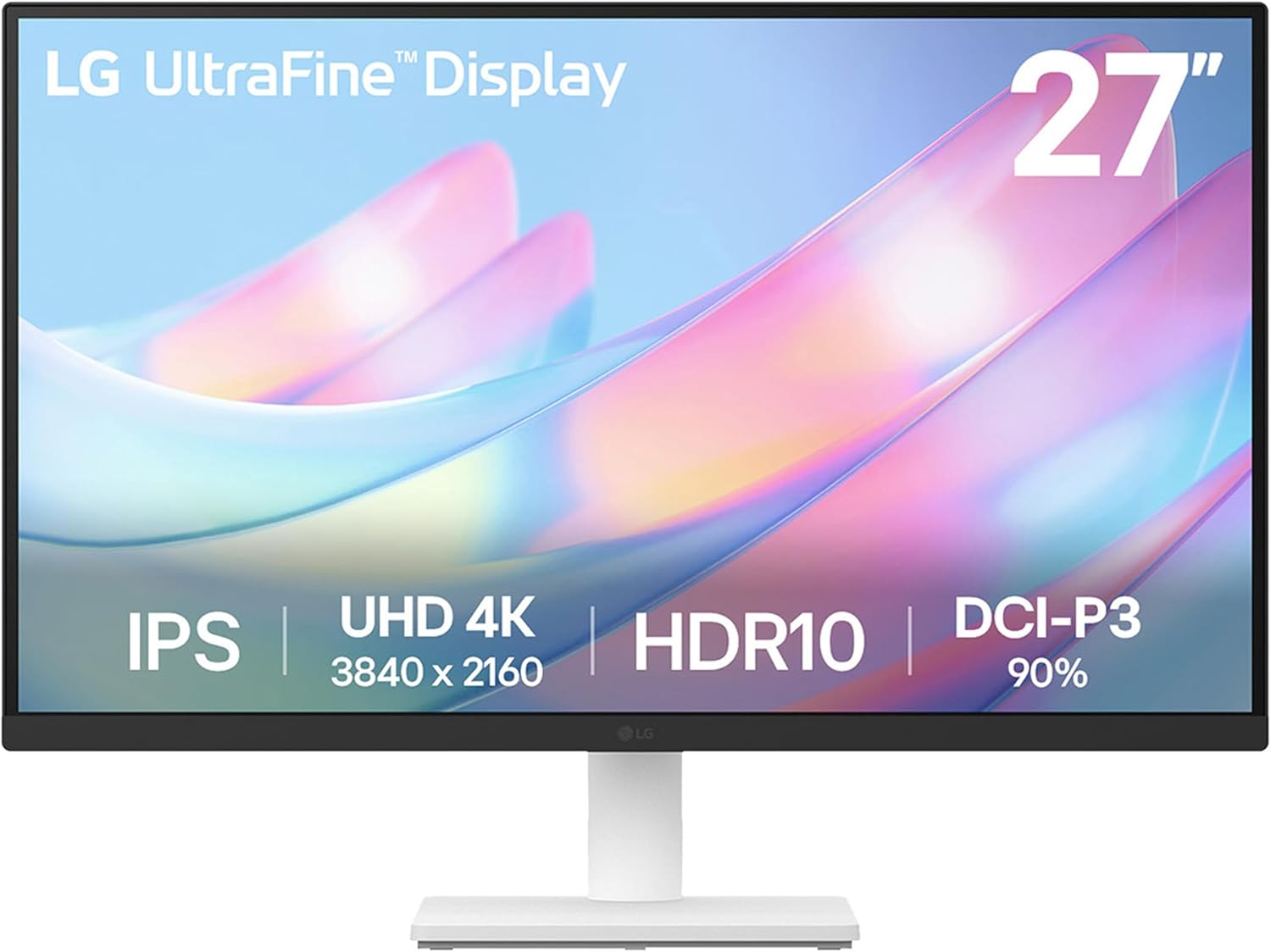
Pros
- Superior color accuracy and HDR performance
- Sharp 4K resolution with wide viewing angles
- Includes HDMI cable and easy OnScreen Control software
- Borderless design enhances modern setups
- Ergonomic tilt for user comfort
Cons
- Stand offers tilt adjustment only, no height or swivel
- No built-in speakers
- 60Hz refresh rate limits gaming performance
The LG 27US500-W is a 27-inch 4K UHD IPS monitor designed for creative professionals, photo editors, and home office users seeking high-clarity displays without breaking the bank. Its Ultrafine borderless design delivers immersive visuals in a sleek white finish, making it perfect for multitasking or content creation.
Standout features include a 1000:1 contrast ratio for deeper blacks and sharper details compared to standard IPS panels, paired with HDR10 and 90% DCI-P3 coverage for vibrant, accurate colors in real-world use. The LG Switch App simplifies screen splitting and settings tweaks, while Flicker Safe and Reader Mode ensure comfortable extended sessions. Connectivity via HDMI and DisplayPort supports quick setups for laptops or desktops.
Build quality feels solid with an ergonomic tilt stand that allows flexible angle adjustments for eye-level viewing. The nearly borderless bezels create a modern aesthetic suitable for dual-monitor arrays, and included accessories like the HDMI cable and power adapter make unboxing straightforward.
Potential drawbacks include the tilt-only stand lacking height or swivel options, absence of speakers for audio needs, and a 60Hz refresh rate that may not suit fast-paced gaming. These keep it positioned as a value-focused productivity monitor rather than a premium all-rounder.
Overall, the LG 27US500-W excels in color-accurate 4K performance at an accessible level, earning strong recommendation for creators prioritizing visuals and comfort over advanced ergonomics or gaming specs.
Panel: 27-inch IPS, 4K UHD (3840x2160) resolution, 60Hz refresh rate, 5ms response time.
Picture Quality: HDR10, 1000:1 contrast ratio, up to 90% DCI-P3 color gamut, wide viewing angles.
Connectivity: HDMI, DisplayPort.
Stand: Tilt adjustable. Features: OnScreen Control software, Flicker Safe, Reader Mode.
What's Included: Stand body, base, screws, power adapter, HDMI cable, quick start guide.

Pros
- Exceptional color fidelity with factory Calman verification
- Fully adjustable ergonomic stand enhances comfort
- Wide connectivity options for seamless device integration
- Anti-glare surface ideal for bright environments
- 16:10 resolution optimized for professional tasks
Cons
- WUXGA resolution lacks the pixel density of 4K displays
- Standard refresh rate suits work but not fast gaming
- No built-in speakers or USB hub for expanded peripherals
The ASUS ProArt PA248QV is a 24-inch WUXGA (1920 x 1200) 16:10 IPS monitor designed for creative professionals such as graphic designers, photographers, and video editors who require precise color accuracy in their daily workflows.
It excels with 100% sRGB and Rec.709 color space coverage, Delta E less than 2, and Calman verification, delivering vivid, lifelike images straight out of the box. The anti-glare IPS panel ensures sharp visuals without distractions, while the 16:10 aspect ratio provides valuable extra vertical space for editing timelines and documents.
Build quality features a sleek black design and a highly adjustable stand supporting tilt, pivot, swivel, and height changes for personalized ergonomics during long sessions. Connectivity includes DisplayPort, HDMI, and D-Sub for broad compatibility.
Drawbacks include the non-4K resolution which may not satisfy ultra-high-detail needs, and absence of high refresh rates or extras like speakers.
Verdict: A top pick for color-critical professionals seeking reliable performance and comfort at an accessible level.
Display: 24-inch WUXGA (1920 x 1200) 16:10 IPS panel
Color: 100% sRGB/Rec.709, ΔE < 2, Calman Verified
Ergonomics: Tilt, swivel, pivot, height adjustable stand
Connectivity: DisplayPort, HDMI, D-Sub
Extras: Anti-glare, 3-month Adobe Creative Cloud

Pros
- Perfect color accuracy for MacBook users with 95% P3 coverage
- Versatile 90W USB-C power delivery and multi-device hub
- Ergonomic stand with full height, tilt, swivel, and pivot adjustments
- TUV-certified eye-care features minimize glare and blue light
- High-resolution 4K display ideal for creative work
Cons
- Primarily optimized for Mac ecosystem, less ideal for non-Apple devices
- No Thunderbolt 4 support unlike some competitors
- Matte coating may feel less vibrant than glossy alternatives for certain tasks
The BenQ MA270U is a 27-inch 4K UHD monitor crafted specifically for MacBook Pro and Air users, solving common issues like color mismatch between laptop screens and external displays. With its exclusive Mac color tuning and 95% P3 wide gamut, it replicates your MacBook's vibrant colors perfectly, making it ideal for creative professionals, video editors, and anyone needing precise visuals in a Mac-centric workflow.
Standout features include integrated MacBook controls for brightness and volume adjustments via your keyboard, a powerful 90W USB-C port for charging, and Display Pilot 2 software that mimics macOS simplicity. Dual USB-C and HDMI ports provide versatile connectivity, while real-world performance shines in multitasking with sharp 3840x2160 resolution and smooth integration that eliminates setup hassles.
Design emphasizes comfort and durability with a fully adjustable stand offering 115mm height adjustment, -5 to 20-degree tilt, 15-degree swivel, and 90-degree pivot. The Nano Matte panel, certified reflection-free by TUV Rheinland, pairs with Low Blue Light technology to protect eyes during long sessions, ensuring a premium build that feels robust yet sleek for desk setups.
Potential drawbacks include its Mac-focused optimization, which may not fully leverage features on Windows PCs, and the absence of Thunderbolt 4 for users needing higher bandwidth. The matte finish reduces glare but might appear less punchy than glossy options in bright environments.
Overall, the BenQ MA270U earns high marks for Mac users prioritizing color fidelity, convenience, and eye comfort. It transforms your workspace into a seamless extension of your MacBook, delivering exceptional value for productivity and creative tasks.
Display: 27-inch 4K UHD (3840x2160), 95% P3 color gamut, Nano Matte panel.
Connectivity: Dual USB-C (90W PD + 15W), dual HDMI, USB hub.
Ergonomics: 115mm height adjust, tilt (-5°~20°), swivel (±15°), pivot (±90°).
Features: Mac color match, Display Pilot 2 software, Low Blue Light, TUV-certified.

Pros
- Stunning 4K resolution with billion-shade color accuracy
- Smooth gaming via FreeSync and low input lag mode
- Powerful multitasking with PBP and PIP functions
- Eye Saver and Flicker Free modes for comfortable extended use
- Versatile connectivity with dual HDMI and DisplayPort
Cons
- VA panel delivers narrower viewing angles than IPS alternatives
- 60Hz refresh rate limits performance in fast-paced competitive gaming
- Stand provides basic tilt adjustment without height or swivel options
The Samsung UJ59 is a 32-inch 4K UHD monitor ideal for gamers, content creators, and multitaskers seeking high-resolution performance on a budget. Its VA panel packs over 8 million pixels into a widescreen format, delivering four times the detail of Full HD for everything from expansive spreadsheets to cinematic gaming sessions.
Standout features shine in real-world use: AMD FreeSync syncs refresh rates to eliminate tearing, while Game Mode boosts contrast for better visibility in shadows during gameplay. Seamless upscaling elevates lower-res sources, and Picture-by-Picture lets you view two inputs side-by-side without quality loss, making it perfect for dual-PC setups or work-plus-entertainment flows.
Design-wise, slim bezels and a matte black Y-shaped stand give it a modern, compact footprint that fits most desks elegantly. Eye comfort modes like Flicker Free and Eye Saver reduce strain during long sessions, enhancing daily usability.
Drawbacks include typical VA viewing angle limitations, which may cause color shifts off-center, and a 60Hz refresh rate that falls short for esports pros needing higher speeds. The stand lacks full ergonomics, potentially requiring a VESA mount for adjustments.
Overall, the UJ59 excels as a versatile 4K powerhouse for casual gamers and productivity users, offering immersive visuals and smart features that punch above its weight class.
Display: 32-inch VA panel, 3840x2160 UHD resolution, 60Hz refresh rate, over 1 billion colors.
Connectivity: 2x HDMI 2.0, 1x DisplayPort, headphone jack.
Gaming Features: AMD FreeSync, Game Mode, Low Input Lag.
Other: Picture-by-Picture (PBP), Picture-in-Picture (PIP), Eye Saver Mode, Flicker Free, slim bezels, VESA mount compatible.

Pros
- Exceptional factory color calibration (ΔE < 2)
- Comprehensive connectivity including USB-C PD
- Ergonomic adjustments for comfort
- Wide color gamut coverage
- Calman Verified reliability
Cons
- 400 nits brightness may struggle in very bright rooms
- No built-in speakers
- Large 32-inch size suits bigger desks only
The ASUS ProArt PA329CV is a 32-inch 4K UHD HDR monitor tailored for content creators, photographers, and video editors who demand color precision. Its IPS panel with 3840 x 2160 resolution and HDR-10 support delivers sharp, vibrant imagery ideal for professional workflows.
Standout features include factory pre-calibration to ΔE < 2, Calman Verification, and 100% coverage of sRGB and Rec.709 gamuts, ensuring accurate colors right out of the box. The 10-bit display handles subtle gradients smoothly, while USB-C Power Delivery, DisplayPort, HDMI, and a USB 3.1 hub offer versatile connectivity for multi-device setups. ASUS Eye Care technologies further minimize strain during extended use.
Build quality shines with a sturdy, height-adjustable stand featuring C-clamp mounting and full ergonomic tilt, swivel, and pivot options. The sleek design fits seamlessly into creative studios without compromising on functionality.
Potential drawbacks include its 400 cd/m² brightness, which performs best in controlled lighting, and the sizable footprint that may overwhelm smaller desks. No built-in speakers means relying on external audio solutions.
Overall, the PA329CV excels as a reliable workhorse for color-accurate tasks, making it a top pick for professionals prioritizing precision over gaming specs.
Display: 32-inch IPS, 4K UHD (3840 x 2160), 178° viewing angles, 400 cd/m² brightness, HDR-10.
Color: 100% sRGB/Rec.709, 10-bit, ΔE < 2, Calman Verified.
Connectivity: USB-C PD, DisplayPort, HDMI, USB 3.1 Hub.
Ergonomics: Height adjustable, C-clamp, tilt/swivel/pivot.
Extras: 3-month Adobe Creative Cloud (valid until 8/31/2026).
Best Monitors For Photo Editing Buying Guide
Color Accuracy and Gamut Coverage
For photo editing, prioritize monitors with 100% sRGB or better, plus Adobe RGB/DCI-P3 coverage and Delta E <2 out of the box. ASUS ProArt models shine here with Calman Verified factory calibration, ensuring skin tones and landscapes render faithfully during long sessions. According to RTINGS.com, these deliver consistent accuracy across the screen, minimizing post-calibration tweaks.
Real-world tip: Pair with hardware calibrators like X-Rite for pros, but pre-calibrated options save hours. See our Computers guide for matching setups.
Resolution, Panel Type, and Refresh
Opt for 4K UHD or QHD IPS panels for sharp detail without moiré in high-res images. VA panels like Dell’s curved option offer contrast but may shift colors off-angle, per PCMag reviews. 60-120Hz refresh ensures smooth scrolling in catalogs, vital for productivity.
| Feature | Ideal for Photo Editing |
| Resolution | 4K (3840×2160) or QHD |
| Panel | IPS for uniformity |
| Refresh | 60Hz+ |
Ergonomics, Connectivity, and Reliability
Height-adjustable stands and USB-C hubs reduce neck strain during marathon edits, while PBP/PIP modes boost multitasking. Dell and ASUS builds excel in long-term uniformity, as TFTCentral testing confirms. Look for flicker-free and low blue light for eye comfort over 8+ hour days.
Connect seamlessly to MacBooks or PCs via DisplayPort/HDMI. Explore best laptops for graphic design to complete your creative rig.
Final Thoughts
The ASUS ProArt Display PA278QV stands as Best Overall for its Delta E <2 accuracy and 100% sRGB in a versatile 27-inch size. Dell S2725QS wins Best Value with 99% sRGB at entry-level pricing, while the Dell S3425DW excels for immersive ultrawide editing. Grab the ASUS ProArt Display PA278QV to start. Upgrade now and check our Laptops section for pairings.
FAQs
What resolution is best for best monitors for photo editing in 2026?
4K UHD offers pixel-level detail for cropping and retouching, while QHD balances sharpness and performance. IPS ensures no color shift, ideal for side-by-side comparisons in Photoshop.
Do I need a calibrated monitor for photo editing?
Yes, Calman Verified or Delta E <2 models like ProArt series provide pro-grade accuracy from setup. Hardware calibration refines further for print work. Find top picks above and elevate your edits today.
IPS or VA panels for best monitors for photo editing?
IPS for superior color uniformity and viewing angles, essential for critical editing. VA boosts contrast for previews but risks tinting; Tom’s Guide recommends IPS for pros.
What size monitor for photo editing workflows?
27-32 inches hits the sweet spot for detail without overwhelming desks. Ultrawides suit timeline scrubbing; test in your space for comfort.
Best budget options in best monitors for photo editing?
Entry 4K IPS with 99% sRGB deliver value without compromise. Review our list for reliable performers under $199.95 – $569.00.
Sources
This article was researched and written with reference to expert reviews and testing data from trusted sources including RTINGS.com, PCMag, TFTCentral, DisplayMate, Hardware Unboxed, and other category-relevant publications. All recommendations reflect real-world performance and value as of October 2026.




Write Your Review
No reviews yet. Be the first to share your experience!