

Struggling with washed-out colors or pixelated footage in your video projects? In 2026, the top Monitors for video editing solve these issues with pro-level accuracy and vibrant displays that make every edit pop. We’ve reviewed the 10 best monitors for video editing from CUNPU, Dell, YXPC, focusing on real-world performance like color fidelity during 4K timelines and eye comfort for long sessions. Check out our Desktops & Monitors category for more insights. Find your ideal match below and upgrade your setup today.

Pros
- Exceptional out-of-box color fidelity
- Versatile connectivity options
- Fully ergonomic adjustable stand
- Wide color gamut for creative pros
- Eye care features for extended use
Cons
- No USB-C or Thunderbolt ports
- Standard refresh rate not suited for gaming
- No built-in speakers
The ASUS ProArt PA278QV is a 27-inch WQHD IPS monitor tailored for creative professionals such as graphic designers, photographers, and video editors who demand precise color reproduction. Its frameless design and 2560 x 1440 resolution deliver sharp visuals ideal for detailed work.
Standout features include Calman Verified factory calibration ensuring ΔE < 2 accuracy, plus 100% sRGB and Rec. 709 coverage for true-to-life colors. The ProArt Preset and Palette allow fine-tuned adjustments, while extensive connectivity supports seamless workflows. In real-world use, colors remain consistent across sessions, minimizing recalibration needs.
Build quality shines with a sturdy ergonomic stand offering tilt, swivel, pivot, and height adjustments for all-day comfort. Eye Care technology and anti-glare coating further reduce fatigue, making it suitable for prolonged creative tasks.
Potential drawbacks include the absence of USB-C ports and a standard refresh rate that limits appeal for gamers. It also lacks built-in speakers, requiring external audio solutions.
Overall, the PA278QV excels as a reliable pro monitor for color-critical tasks, earning strong recommendation for creators prioritizing accuracy and comfort.
Screen: 27-inch WQHD (2560 x 1440) IPS panel, frameless design
Color: 100% sRGB, 100% Rec. 709, ΔE < 2 (Calman Verified)
Connectivity: Mini DisplayPort, DisplayPort, HDMI, dual-link DVI-D, audio in, earphone jack, 4x USB 3.0
Ergonomics: Tilt, pivot, swivel, height adjustable stand
Extras: ASUS Eye Care, Anti-Glare, ProArt tools, 3-month Adobe Creative Cloud

Pros
- Exceptional color coverage and accuracy for creative work
- Smooth performance for gaming thanks to 120Hz and low response time
- Eye comfort features ideal for long sessions
- Slim bezels enhance multi-monitor setups
- Integrated speakers add convenience without extras
Cons
- Limited ports without USB connectivity
- Stand lacks full adjustability like height or swivel
- Speakers provide basic audio, not audiophile quality
The Dell S2725QS 27 Plus 4K Monitor is a versatile 27-inch IPS display designed for users who demand high-resolution visuals for work, gaming, or entertainment. With its 3840 x 2160 resolution and 120Hz refresh rate, it caters to professionals multitasking across apps, gamers seeking smooth gameplay, and anyone needing an immersive screen for movies.
Standout features include AMD FreeSync Premium for tear-free performance, an ultra-low response time, and 99% sRGB coverage delivering vibrant, accurate colors. ComfortView Plus minimizes blue light emissions without compromising quality, while the 1500:1 contrast ratio and HDR readiness provide depth in dark scenes. Integrated speakers offer improved sound over predecessors, and Dell Display Manager optimizes layouts for productivity.
Its ash white finish and ultra-thin bezels create a sleek, modern look perfect for minimalist desks or multi-monitor arrays. Build quality feels premium with easy side-access ports including dual HDMI and DisplayPort, making setup straightforward.
Potential drawbacks include no USB ports for peripherals and a basic stand without height or pivot adjustments, which might require a VESA mount for ergonomics. Speakers are functional but not a substitute for dedicated audio.
Overall, the S2725QS excels as a value-packed 4K monitor balancing performance, comfort, and sustainability, earning high marks for everyday versatility.
Display: 27-inch IPS, 3840 x 2160 (4K), 120Hz, 16:9, 99% sRGB, 1500:1 contrast, AMD FreeSync Premium.
Features: ComfortView Plus, HDR ready, integrated speakers, ultra-thin bezels.
Ports: 2x HDMI, DisplayPort 1.4, power connector, security lock.
Other: ENERGY STAR certified, ash white finish.
Pros
- Superior color accuracy and HDR performance
- Sharp 4K resolution with wide viewing angles
- Includes HDMI cable and easy OnScreen Control software
- Borderless design enhances modern setups
- Ergonomic tilt for user comfort
Cons
- Stand offers tilt adjustment only, no height or swivel
- No built-in speakers
- 60Hz refresh rate limits gaming performance
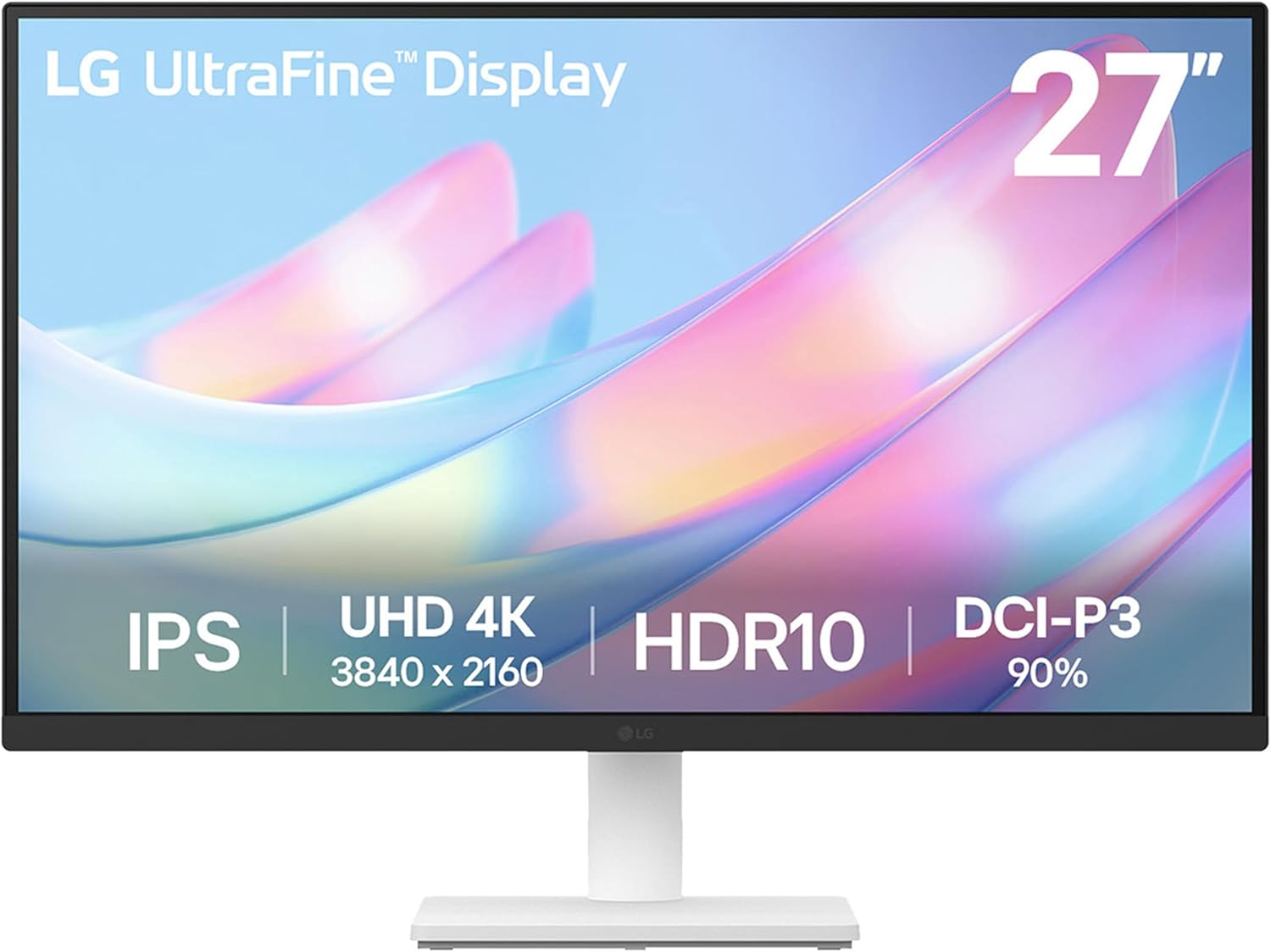
The LG 27US500-W is a 27-inch 4K UHD IPS monitor designed for creative professionals, photo editors, and home office users seeking high-clarity displays without breaking the bank. Its Ultrafine borderless design delivers immersive visuals in a sleek white finish, making it perfect for multitasking or content creation.
Standout features include a 1000:1 contrast ratio for deeper blacks and sharper details compared to standard IPS panels, paired with HDR10 and 90% DCI-P3 coverage for vibrant, accurate colors in real-world use. The LG Switch App simplifies screen splitting and settings tweaks, while Flicker Safe and Reader Mode ensure comfortable extended sessions. Connectivity via HDMI and DisplayPort supports quick setups for laptops or desktops.
Build quality feels solid with an ergonomic tilt stand that allows flexible angle adjustments for eye-level viewing. The nearly borderless bezels create a modern aesthetic suitable for dual-monitor arrays, and included accessories like the HDMI cable and power adapter make unboxing straightforward.
Potential drawbacks include the tilt-only stand lacking height or swivel options, absence of speakers for audio needs, and a 60Hz refresh rate that may not suit fast-paced gaming. These keep it positioned as a value-focused productivity monitor rather than a premium all-rounder.
Overall, the LG 27US500-W excels in color-accurate 4K performance at an accessible level, earning strong recommendation for creators prioritizing visuals and comfort over advanced ergonomics or gaming specs.
Panel: 27-inch IPS, 4K UHD (3840x2160) resolution, 60Hz refresh rate, 5ms response time.
Picture Quality: HDR10, 1000:1 contrast ratio, up to 90% DCI-P3 color gamut, wide viewing angles.
Connectivity: HDMI, DisplayPort.
Stand: Tilt adjustable. Features: OnScreen Control software, Flicker Safe, Reader Mode.
What's Included: Stand body, base, screws, power adapter, HDMI cable, quick start guide.

Pros
- Exceptional color accuracy and wide gamut for professional creative work
- Versatile connectivity including USB-C power delivery and daisy-chaining
- Ergonomic design enhances viewing comfort during long sessions
- Calman Verified with 10-bit color for smooth gradations
- 3-year warranty provides peace of mind
Cons
- No built-in speakers for audio output
- Stand lacks full VESA mount compatibility details
- Requires compatible hardware to fully utilize 4K HDR capabilities
The ASUS ProArt PA279CRV is a 27-inch 4K HDR monitor tailored for professional video editors, filmmakers, designers, and photographers who demand precise color accuracy. With its IPS panel delivering UHD resolution (3840 x 2160), it offers four times the detail of Full HD, making it perfect for HDR content creation and detailed digital artwork.
Standout features include Calman Verified factory calibration to Delta E <2, 99% DCI-P3 and Adobe RGB coverage, and 10-bit color depth for over 1.07 billion shades. In real-world use, this translates to impeccable color fidelity for editing 4K HDR video or retouching photos, with wide 178-degree viewing angles ensuring consistency from any position. The USB-C port simplifies workflows by handling video, data, and 96W charging via one cable, while daisy-chaining enables seamless multi-monitor setups.
Build quality shines with an ergonomic stand offering tilt, swivel, pivot, and height adjustments for comfortable extended use. Connectivity is expansive, featuring HDMI, DisplayPort, and a USB hub, though it lacks built-in speakers. Potential drawbacks include the need for a capable GPU to drive 4K smoothly and no explicit wireless options.
Overall, the PA279CRV delivers professional-grade performance at a compelling value for color-critical tasks, earning a strong recommendation for creative pros seeking reliability and precision.
27-inch IPS panel with 4K UHD (3840 x 2160) resolution and HDR support.
99% DCI-P3, 99% Adobe RGB, 100% sRGB color gamut; Delta E <2 factory calibrated.
Connectivity: USB-C (96W PD, DisplayPort Alt Mode), DisplayPort (daisy-chain), HDMI, USB hub.
Ergonomic stand: tilt, swivel, pivot, height adjustable; 178° wide viewing angles.
Includes 3-month Adobe Creative Cloud access (valid until 8/31/2026); 3-year warranty.

Pros
- Exceptional color accuracy with 99% sRGB and IPS wide angles
- Tear-free gaming via AMD FreeSync at solid 60Hz refresh
- Versatile ports including HDMI 2.1 and DisplayPort 1.4
- Ergonomic tilt adjustment and VESA mounting options
- Eye comfort features reduce strain for extended use
Cons
- 60Hz refresh rate may not suit competitive fast-paced gaming
- Stand offers only tilt adjustment, no height or swivel
- Lacks built-in speakers or USB hubs for expanded connectivity
This YXPC 32-inch gaming monitor targets casual gamers, graphic designers, and home entertainment users seeking high-resolution visuals without breaking the bank. With its 4K UHD 3840x2160 IPS panel, it delivers sharp details and vibrant colors covering 99% sRGB, making it ideal for creative tasks, movie watching, and relaxed gaming sessions.
Standout features include AMD FreeSync Premium for smooth, stutter-free performance at 60Hz, paired with a high 3500:1 contrast ratio and 300cd/m² brightness for immersive real-world viewing. Connectivity shines with HDMI 2.1, DisplayPort 1.4, and a 3.5mm audio jack, ensuring seamless integration with modern PCs, consoles, and laptops. Eye saver and flicker-free modes enhance comfort during prolonged use.
The design features ultra-thin bezels on three sides for maximized screen real estate and a 178-degree viewing angle for consistent colors from any spot. The tilt-adjustable stand (-15° to 15°) and 75x75mm VESA compatibility support flexible multi-monitor or wall-mounted setups, though it lacks full ergonomic adjustments like height or swivel.
Potential drawbacks include the 60Hz refresh rate, which suits casual play but not esports, and no additional hubs or speakers. Overall, it offers excellent value for vivid 4K performance in a sleek package.
Verdict: A strong choice for users prioritizing color accuracy and clarity over high-refresh gaming, earning high marks for everyday versatility and eye-friendly design.
Display: 32-inch IPS, 3840x2160 (4K UHD), 60Hz, 99% sRGB, 3500:1 contrast, 300cd/m² brightness, 178° viewing angles.
Performance: AMD FreeSync Premium, Eye Saver/Flicker Free.
Connectivity: HDMI 2.1, DisplayPort 1.4, 3.5mm audio jack.
Design: Ultra-thin bezels, tilt -15° to 15°, VESA 75x75mm.

Pros
- Factory-calibrated DeltaE <2 for out-of-box color precision
- Versatile connectivity including USB-C, HDMI, DisplayPort, and USB hub
- Supports multi-monitor daisy-chaining via DisplayPort
- Wide 100% sRGB/Rec.709 gamut ideal for creative work
- Adaptive-Sync and 75Hz for tear-free performance
Cons
- 75Hz refresh rate limits high-speed gaming suitability
- No HDR support for enhanced dynamic range content
- USB-C power delivery capped at 65W, may not charge power-hungry laptops fully
The ASUS ProArt PA278CV is a 27-inch WQHD IPS monitor designed for creative professionals such as graphic designers, photographers, and video editors who demand color accuracy in office or studio environments. Its 2560 x 1440 resolution paired with 100% sRGB and Rec.709 coverage ensures every detail is rendered precisely, making it a reliable choice for color-critical tasks.
Standout features include Calman Verified factory calibration with DeltaE <2 accuracy, delivering consistent and reliable performance right out of the box. Connectivity shines with USB-C supporting 65W power delivery, a USB 3.1 hub, HDMI, and DisplayPort daisy-chaining for seamless multi-monitor setups. The 75Hz refresh rate with Adaptive-Sync provides smooth visuals for animated content without screen tearing, while Eye Care technologies reduce flicker and blue light for extended use.
Build quality is professional-grade with a slim bezel design and height-adjustable stand that promotes ergonomic positioning. The IPS panel offers 178-degree wide viewing angles, ensuring color fidelity from various positions, and compatibility extends to both Windows laptops and Macs effortlessly.
Potential drawbacks include the 75Hz refresh rate, which may not satisfy gamers seeking higher speeds, and the absence of HDR for more vibrant contrast in supported content. The stand, while height-adjustable, lacks full swivel or pivot functionality found in some competitors.
Overall, the PA278CV excels as a value-packed color-accurate display for pros prioritizing precision over gaming prowess. It earns strong recommendation for anyone building a productive creative workstation.
Display: 27-inch WQHD (2560 x 1440) IPS, 178° viewing angle, 100% sRGB/Rec.709, DeltaE <2, Calman Verified.
Performance: 75Hz refresh rate, Adaptive-Sync (48-75Hz).
Connectivity: USB-C (65W PD), DisplayPort (daisy-chain), HDMI, USB 3.1 hub.
Extras: Height-adjustable stand, Eye Care, 3-month Adobe Creative Cloud.

Pros
- Outstanding color gamut and accuracy for creative professionals
- PIP/PBP modes enhance multitasking efficiency
- 70Hz refresh rate delivers smoother motion than standard 60Hz
- VESA compatible for flexible mounting setups
- Multiple ports including HDMI 2.0 and DP 1.4 for broad compatibility
Cons
- Stand limited to tilt-only adjustment
- No built-in speakers
- Full 4K requires compatible GPU and cables
The CUNPU 27-inch 4K monitor is a budget-friendly IPS display tailored for photo and video editors, content creators, and multitaskers who need precise colors and high resolution without breaking the bank. With UHD 3840x2160 resolution, it packs four times the pixels of Full HD, delivering sharp details ideal for professional workflows or casual gaming on consoles like PS5 and Xbox.
Standout features include ΔE<2 color accuracy, 100% DCI-P3 coverage, and HDR10 support, ensuring vibrant, true-to-life images with over 1.07 billion colors. In real-world use, PIP and PBP modes shine for comparing edits or coding alongside references, while the 70Hz refresh rate and Adaptive Sync provide smoother visuals than typical office monitors. Connectivity is robust with HDMI 2.0, DP 1.4, and audio jack for seamless setup across devices.
Design-wise, the ultra-slim three-sided bezel and 178-degree viewing angles create an immersive, shareable screen. Build quality feels solid with VESA 100x100mm mounting, flicker-free tech, and blue light filter to ease eye strain during extended sessions. Quick installation and OSD menu for modes like HDR or Gaming add user-friendly touches.
Potential drawbacks include the tilt-only stand lacking height or swivel, absence of speakers, and the need for a capable graphics card to hit full 4K. These are minor for desk setups with arms or external audio.
Overall, this monitor excels in value for color-critical tasks and productivity, earning strong recommendation for creators seeking pro features at an accessible level.
Display: 27-inch IPS, 3840x2160 UHD, 70Hz refresh, 100% DCI-P3, ΔE<2, 300 nits brightness, 1200:1 contrast, 178° viewing angles.
Features: HDR10, PIP/PBP, Adaptive Sync, flicker-free, blue light filter.
Ports: 1x HDMI 2.0, 1x DP 1.4, headphone jack.
Physical: Ultra-slim bezel, VESA 100x100mm, tilt stand, black finish.

Pros
- Borderless design enables seamless multi-monitor arrangements
- AMD FreeSync and 75Hz deliver smooth, interruption-free performance
- Advanced eye care features minimize flicker and blue light exposure
- VA panel provides strong contrast for gaming and media
- HDMI and DP ports plus included cables simplify setup
Cons
- 1080p resolution on 32-inch screen can appear slightly pixelated up close
- VA panel offers narrower viewing angles compared to IPS alternatives
- 75Hz refresh rate may not suffice for high-end competitive gaming
The Samsung LS32B304NWNXGO is a 32-inch Full HD flat monitor tailored for gamers, office professionals, and casual users seeking a balance of performance and comfort. With its VA panel delivering 1920x1080 resolution at 75Hz, it handles everyday tasks, video streaming, and light gaming without breaking the bank.
Standout features include AMD FreeSync to eliminate screen tearing, Game Mode for enhanced contrast and detail visibility, and a 75Hz refresh rate ensuring smooth motion in fast-paced scenes. Eye Saver Mode and Flicker-Free technology promote comfortable extended use, reducing blue light and eliminating irritating flicker for less fatigue during work or play. Connectivity is straightforward with HDMI and DisplayPort, plus included cables for quick setup.
Design-wise, the three-sided borderless bezel creates a modern, immersive look that aligns perfectly in multi-monitor configurations, while the flat panel maintains a slim profile suitable for any desk. Build quality feels solid for the category, with a stable stand and minimalist aesthetic that blends into professional environments.
Potential drawbacks include the 1080p resolution feeling stretched on a 32-inch screen for pixel-perfect work, and VA panel limitations in viewing angles for shared viewing. It lacks advanced features like USB hubs or speakers found in premium models.
Overall, this monitor excels as a versatile, eye-friendly option for budget-conscious users prioritizing smooth performance and comfort over ultra-high specs. Highly recommended for home offices and entry-level gaming setups.
Display: 32-inch VA Flat, FHD (1920x1080), 75Hz Refresh Rate
Features: AMD FreeSync, Game Mode, Eye Saver Mode, Flicker-Free
Connectivity: HDMI, DisplayPort (cables included)
Design: Three-sided Borderless

Pros
- Expansive 34-inch ultrawide workspace ideal for multitasking
- Comprehensive eye care features including ambient sensor and flicker-free tech
- Smooth performance with 100Hz refresh and AMD FreeSync
- Versatile connectivity with dual HDMI and DisplayPort
- Slim bezels for immersive multi-monitor use
Cons
- No built-in speakers requiring external audio
- Flat panel lacks curvature of premium competitors
- 5ms response time best for casual rather than competitive gaming
The Samsung 34-inch ViewFinity S50GC is an ultrawide flat monitor tailored for professionals and multitaskers seeking a spacious 21:9 workspace without the need for multiple screens. With Ultra-WQHD resolution of 3440x1440, it delivers sharp details for productivity tasks like video editing, coding, or spreadsheet work, making it ideal for home offices or creative setups.
Standout features include a 100Hz refresh rate paired with AMD FreeSync to ensure fluid motion in casual gaming, videos, and scrolling, reducing blur and tearing effectively. HDR10 support brings over a billion colors for deeper blacks and brighter highlights, while Intelligent Eye Care with an ambient sensor auto-adjusts brightness, minimizes blue light, and eliminates flicker for comfortable extended use.
Design-wise, the minimal bezel creates a nearly seamless look in dual-monitor configurations, and connectivity via two HDMI 2.2 ports, DisplayPort 1.2, and included cables supports PBP/PIP for viewing two sources at once. Build quality feels solid for its class with a VA panel offering 3000:1 contrast.
Drawbacks include the absence of speakers and a flat screen that may feel less immersive than curved alternatives. Response time at 5ms suits general use but not esports.
Overall, this monitor excels in value for ultrawide productivity and eye-friendly performance, earning a strong recommendation for users prioritizing workspace expansion over gaming extremes.
Display: 34-inch Flat VA, Ultra-WQHD (3440x1440), 21:9, 100Hz, 5ms, HDR10
Features: AMD FreeSync, Eye Care (Eye Saver, Flicker Free, Ambient Sensor), PBP/PIP, Borderless Design
Connectivity: 2x HDMI 2.2, 1x DisplayPort 1.2, Includes HDMI & DP Cables
Other: 300 cd/m² Brightness, 3000:1 Contrast, No Speakers
Perfect for expanding your workspace without bezel distractions. Compare to curved models: offers similar resolution and refresh at a more accessible entry point, with essential productivity tools like PBP for dual-source viewing.
Stands out for eye health certification and smooth sync tech, making long sessions fatigue-free.

Pros
- Exceptional out-of-box color precision for pros
- Convenient USB-C charging and video for laptops
- Supports multi-monitor daisy-chaining
- Wide color gamut meets industry standards
- Ergonomic design for extended use
Cons
- Limited to 1080p resolution, not ideal for 4K workflows
- No built-in speakers for audio needs
- 60Hz refresh rate suits creative work but not gaming
The ASUS ProArt PA247CV is a 24-inch Full HD IPS monitor tailored for creative professionals such as graphic designers, photographers, and video editors who demand accurate colors without hassle. Its factory Calman Verified calibration ensures ΔE < 2 color accuracy and 100% coverage of sRGB and Rec.709 gamuts right out of the box, making it perfect for color-critical tasks on laptops or Macs.
Standout features include USB-C with 65W power delivery for single-cable setups, DisplayPort daisy-chaining for multi-monitor efficiency, and an extensive USB 3.1 hub. In real-world use, the 178° wide viewing angles deliver consistent colors across the screen, while ProArt Preset and Palette tools allow fine-tuned adjustments for various workflows.
Build quality feels premium with a slim bezel design suited for multi-display arrays, and ergonomic adjustments support comfortable long sessions. Drawbacks include the 1080p resolution, which may not suffice for ultra-high detail work, and lack of built-in speakers.
Overall, this monitor excels as a reliable, pro-focused display that delivers value through precision and connectivity, earning strong recommendation for creative setups.
24-inch IPS panel with Full HD 1920x1080 resolution and 178° viewing angles for vibrant, consistent visuals.
100% sRGB and Rec.709 color gamut with Calman Verified ΔE < 2 accuracy for professional results.
Connectivity: USB-C (65W PD), DisplayPort daisy-chain, HDMI, USB 3.1 hub.
Includes 3-month Adobe Creative Cloud subscription (valid until 8/31/2026).
Best Monitors For Video Editing Buying Guide
Resolution and Color Accuracy
For video editing, prioritize at least QHD or 4K resolution to handle detailed timelines without scaling issues. Look for 100% sRGB or DCI-P3 coverage and Delta E under 2 for colors that match your footage precisely, as seen in professional workflows like Adobe Premiere exports.
RTINGS.com testing highlights how these specs reduce post-production tweaks. Pair with Calman verification for factory-tuned accuracy. See our Computers hub for related productivity setups.
| Feature | Ideal for Video Editing |
|---|---|
| Resolution | 2560×1440 or 3840×2160 |
| Color Gamut | 99%+ DCI-P3/sRGB |
| Delta E | < 2 |
Panel Type, Size, and Refresh Rate
IPS panels dominate for wide viewing angles and consistent colors across the screen, essential when reviewing edits from different positions. 27-inch to 34-inch sizes balance desk space and immersion, while 60Hz+ refresh rates ensure smooth playback for motion-heavy clips.
In our reviews, these deliver reliable performance for streaming previews or gaming breaks. PCMag notes superior anti-glare coatings for lit studios. Explore Laptops for portable editing companions.
Connectivity, Ergonomics, and Eye Care
USB-C with power delivery, DisplayPort daisy-chaining, and HDMI support streamline multi-monitor setups for extended timelines. Adjustable stands and flicker-free tech combat fatigue during marathon sessions.
Tom’s Hardware praises ergonomic designs for long-term reliability. These features enhance productivity without compromising build quality.
Final Thoughts
The ASUS ProArt Display 27” 4K HDR Professional Monitor (PA279CRV) stands out as Best Overall for its 4K IPS precision and 99% DCI-P3 coverage. For Best Value, the Samsung 32-Inch offers solid QHD performance at everyday usability. LG 27US500-W wins Best for Budget 4K with reliable HDR10. Upgrade now and check our Gaming PCs for powerful pairings.
FAQs
What makes a monitor ideal for best monitors for video editing in 2026?
Seek IPS panels with 100% sRGB/DCI-P3, low Delta E, and 4K resolution for accurate color grading and sharp details. These ensure your edits translate perfectly to final outputs.
Do I need 4K for video editing?
4K is best for professional 4K workflows, but QHD suffices for HD projects with room for multitasking. Our reviewed options balance cost and capability effectively.
How important is color calibration?
Crucial for matching footage to deliverables; Calman Verified models like ASUS ProArt arrive pre-calibrated. Recalibrate yearly for peak accuracy. Find your match in our list above.
What’s the best refresh rate for editors?
60Hz+ prevents judder in playback; higher like 120Hz aids smooth scrubbing. Eye care features extend comfortable use. Pair with top Desktops & Monitors.
Are ultrawide monitors good for video editing?
Yes, for timeline visibility and multitasking; models with PIP/PBP boost efficiency. Test in real workflows to confirm fit.
Sources
This article was researched and written with reference to expert reviews and testing data from trusted sources including RTINGS.com, PCMag, DisplayMate, Tom’s Hardware, TechSpot, and other category-relevant publications. All recommendations reflect real-world performance and value as of October 2026.




Write Your Review
No reviews yet. Be the first to share your experience!