

Struggling with eye fatigue from long hours staring at your monitor in dim rooms? In 2026, the 6 Best Monitor Light Bars from Quntis, BenQ, YEELIGHT and more deliver glare-free illumination, auto-dimming precision, and customizable color temperatures to transform your setup. We’ve reviewed these for real-world use in home offices, gaming dens, and creative studios, focusing on comfort and performance. Check our Desktops & Monitors category for more essentials. Find your ideal match below and upgrade your setup today.

Pros
- Superior eye protection with certified no blue light and flicker-free tech
- Intelligent auto-dimming adapts to ambient light seamlessly
- Compact, stable clip mount fits most monitors including curved
- Versatile for reading, gaming, and professional color-critical tasks
- Natural light simulation enhances productivity and comfort
Cons
- Requires USB power source, limiting placement without nearby ports
- Basic model lacks remote control and backlight features
- Clip may not suit extremely thick bezels over 1 inch
The Quntis ScreenLinear Monitor Light Bar is a USB-powered LED lamp designed to clip onto the top of your computer monitor, providing targeted desk illumination without screen glare. It targets office workers, students, designers, and gamers who spend hours in front of screens and need to combat eye strain while maintaining productivity.
Standout features include an asymmetrical optical design that lights your workspace evenly while avoiding reflections, an auto-dimming sensor that adjusts to 900 lux based on ambient light, and manual stepless controls for brightness and color temperature from warm 3000K to cool 6500K. The flicker-free LEDs with high Ra98 CRI deliver natural, shadow-minimizing light ideal for color-accurate tasks, and certifications confirm no blue light hazards for prolonged comfort.
Build quality shines with a stable weighted clip that fits most flat and curved monitors up to 16.1 inches wide, touch controls for easy operation, and a slim profile that saves desk space. In real-world use, it creates a focused atmosphere, reducing fatigue during late-night sessions or detailed work.
Potential drawbacks include dependency on a USB port for power and absence of advanced features like remote or backlight in this basic model, which might limit appeal for users wanting more customization.
Overall, the Quntis ScreenLinear excels as an eye-caring upgrade for screen-heavy routines, earning high marks for comfort and practicality. Highly recommended for anyone prioritizing vision health at their desk.
Lamp Length: 16.1'' / 41cm
Shade Color: Gray
Color Temperature: 3000K-6500K
Key Functions: Auto-Dimming, Stepless Dimming, Touch Control, Memory Function, Fits Curved Monitors, Eye Caring
Power: USB

Pros
- Superior glare reduction and ambient balance proven by ANSI standards for extended eye comfort
- Intuitive wireless controls and smart auto features minimize manual adjustments
- Wide compatibility with flat and curved monitors, including Apple displays
- High CRI for accurate colors ideal for photo/video professionals
- Space-saving design frees desk real estate while enhancing workspace ambiance
Cons
- Wireless controller requires tapping to reactivate when idle, which may feel unintuitive at first
- Precise mounting needed to fully eliminate any potential glare on certain screens
- Auto on/off motion detection might trigger unexpectedly in busy environments
The BenQ ScreenBar Halo 2 is an advanced LED monitor light bar designed for professionals who spend long hours at their desks, such as coders, designers, photographers, and gamers. It clamps securely on top of most monitors, including curved ones up to 1800R, to provide targeted desk illumination without screen reflections or direct eye glare. Tailored for dark room work, it balances screen and ambient light to reduce contrast fatigue, aligning with ANSI illuminance standards for sustained visual comfort.
Standout features include asymmetrical front lighting refined through a million simulations, delivering 500 lx over a 33.5 x 19.7-inch area, paired with a tri-zone backlight that covers 423% more area than predecessors. The wireless controller offers numeric touch controls for independent front/backlight adjustments, spanning stepless 0-100% brightness and 2700K-6500K temperatures. Smart ultrasonic presence detection turns it on when you sit down and auto-dims with ambient sensors, while flicker-free LEDs with no blue light hazard and CRI over 95 ensure precise, safe lighting for color-critical tasks.
Build quality shines with a patented counterweight clamp that protects screens and avoids webcam obstruction, plus an elegant design awarded iF and Red Dot honors. LEDs boast a 50,000+ hour lifespan after rigorous testing. In real-world use, it transforms dim workspaces into focused havens, though initial setup requires ensuring level mounting to maximize glare prevention, and the controller needs a tap to wake from idle.
Minor drawbacks like occasional controller reconnection or motion sensor quirks do not overshadow its reliability. Overall, the ScreenBar Halo 2 earns top marks for eye-care innovation and productivity boost, making it a must-have for anyone prioritizing long-term desk comfort over basic lighting.
Lighting: Max >1000 lx at 19.5 inches, coverage 33.5 x 17 inches at 500 lx, CRI >95, 2700K-6500K color temp, flicker-free, no blue light hazard.
Smart Features: Ultrasonic motion sensor (23.6-inch range), ambient auto-dimming, wireless controller with My Favorite mode.
Compatibility: Monitors 0.17-2.36 inches thick, 1000R-1800R curved; USB-C power (5V/3A max).
Design: Patented clamp, 50,000+ hour LEDs, award-winning aesthetics.
Pros
- Superior eye protection with certified no blue light and flicker-free tech
- Intelligent auto-dimming adapts to ambient light seamlessly
- Compact, stable clip mount fits most monitors including curved
- Versatile for reading, gaming, and professional color-critical tasks
- Natural light simulation enhances productivity and comfort
Cons
- Requires USB power source, limiting placement without nearby ports
- Basic model lacks remote control and backlight features
- Clip may not suit extremely thick bezels over 1 inch
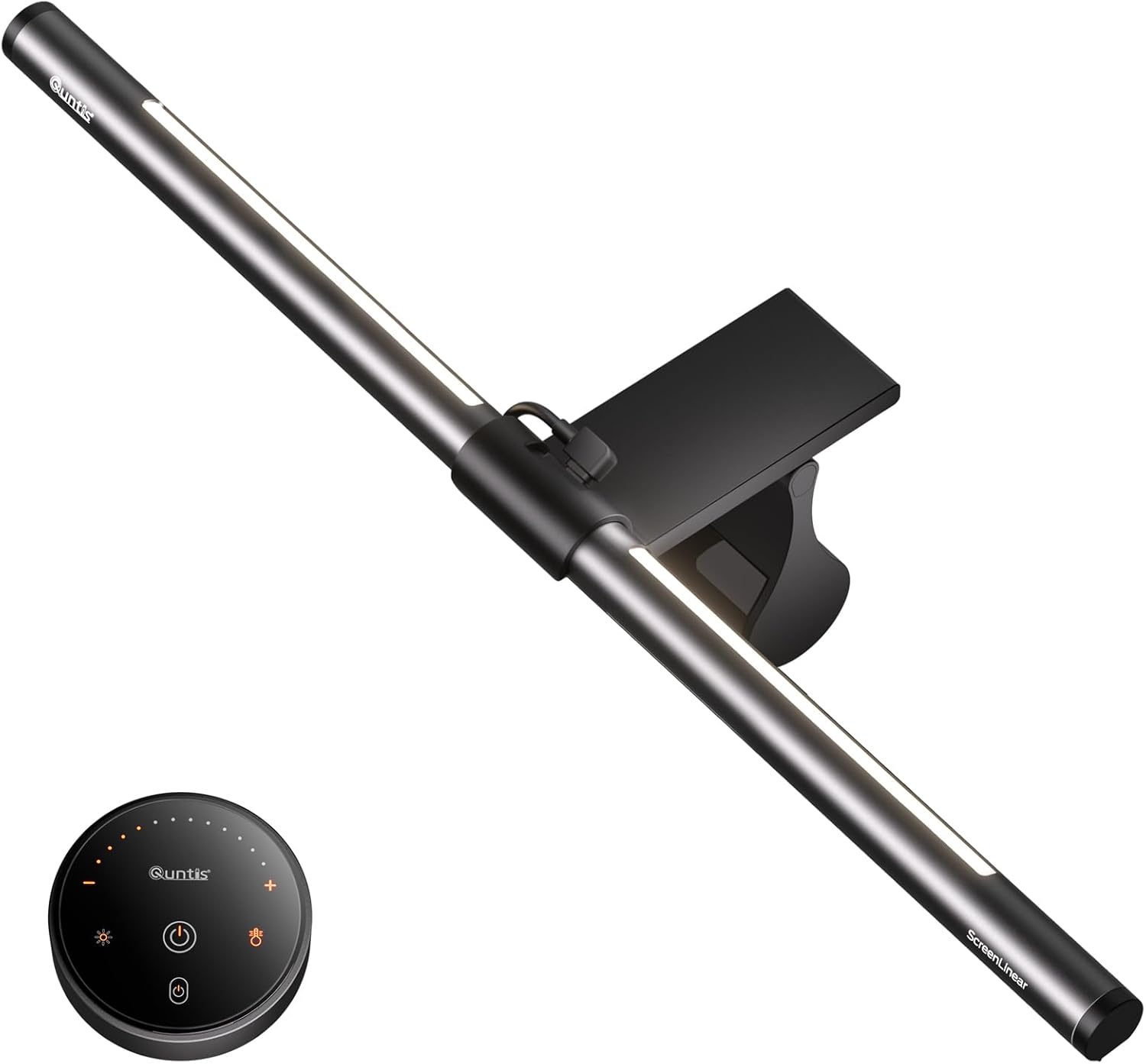
The Quntis ScreenLinear Monitor Light Bar is a USB-powered LED lamp designed to clip onto the top of your computer monitor, providing targeted desk illumination without screen glare. It targets office workers, students, designers, and gamers who spend hours in front of screens and need to combat eye strain while maintaining productivity.
Standout features include an asymmetrical optical design that lights your workspace evenly while avoiding reflections, an auto-dimming sensor that adjusts to 900 lux based on ambient light, and manual stepless controls for brightness and color temperature from warm 3000K to cool 6500K. The flicker-free LEDs with high Ra98 CRI deliver natural, shadow-minimizing light ideal for color-accurate tasks, and certifications confirm no blue light hazards for prolonged comfort.
Build quality shines with a stable weighted clip that fits most flat and curved monitors up to 16.1 inches wide, touch controls for easy operation, and a slim profile that saves desk space. In real-world use, it creates a focused atmosphere, reducing fatigue during late-night sessions or detailed work.
Potential drawbacks include dependency on a USB port for power and absence of advanced features like remote or backlight in this basic model, which might limit appeal for users wanting more customization.
Overall, the Quntis ScreenLinear excels as an eye-caring upgrade for screen-heavy routines, earning high marks for comfort and practicality. Highly recommended for anyone prioritizing vision health at their desk.
Lamp Length: 16.1'' / 41cm
Shade Color: Gray
Color Temperature: 3000K-6500K
Key Functions: Auto-Dimming, Stepless Dimming, Touch Control, Memory Function, Fits Curved Monitors, Eye Caring
Power: USB

Pros
- No screen reflections for clear viewing and less eye strain
- Flexible lighting adjustments match any task or mood
- Stable clip frees up desk space and ensures even illumination
- Long-lasting 84 LED beads provide soft, uniform light
- Simple USB setup works anywhere with a power source
Cons
- Clip fits only monitors 1-3cm thick, may not suit very thin or thick bezels
- Requires constant USB power, no built-in battery for mobility
- Fixed 40cm length best for standard monitors, not ultrawides
The Wodgreat Monitor Light Bar is a clip-on USB lamp designed for anyone spending hours at a computer, such as office professionals, students, or gamers. It mounts easily on top of most monitors, directing soft light onto the keyboard and desk while avoiding the screen to prevent glare and eye strain.
Standout features include an asymmetric optical design with 84 LED beads for even, flicker-free illumination, 10 brightness levels from 10% to 100%, and three color temperatures: warm 2800K for relaxation, neutral 4000K mix, and cool 6500K for focus. In real-world use, it delivers consistent performance, reducing shadows and reflections effectively, with the remote control on the USB cable allowing quick adjustments without interrupting workflow.
Build quality shines with durable materials, a sleek matte black frame, and a flexible weighted clip that holds firm without damaging screens or blocking webcams. The 2m USB cable powers it via any 5V/1A source like a PC port or adapter, remembering your last settings for convenience. It frees up desk space compared to traditional lamps, enhancing organization.
Potential drawbacks include compatibility limited to 1-3cm monitor bezels and reliance on USB power without a battery option. Overall, this light bar excels at improving workstation lighting and eye comfort, making it a smart upgrade for daily computer users.
Verdict: Highly recommended for reducing eye fatigue and optimizing setups, especially at this accessible price point with strong customer support.
Eye Protection: Asymmetric light avoids screen glare, 84 LEDs for soft even glow.
Customization: 10 brightness levels, 3 color temps (2800K warm, 4000K mix, 6500K cool).
Power & Install: USB 5V/1A, clip-on for 1-3cm monitors, 40cm length, 2m cable.
Design: Space-saving, webcam-friendly, portable matte black build.
Ideal for desk-bound workers needing glare-free light. Check monitor bezel thickness (1-3cm) before purchase. Pair with USB hub if ports are limited. Great gift for students or remote professionals.

Pros
- Exceptional eye care with no glare, flicker-free tech, and asymmetric optics
- Dynamic 15-mode RGB backlight creates atmospheric gaming environments
- Easy remote control for quick customization
- Wide monitor compatibility including curved designs
- High center brightness exceeds 900 lux for ample illumination
Cons
- Pink color scheme limits appeal to neutral or male-dominated setups
- Remote requires direct line-of-sight for reliable operation
- USB power may need separate adapter for some devices
The Quntis 20-inch Pink RGB Monitor Light Bar is a sleek USB-powered lamp designed for gamers, remote workers, and anyone wanting to upgrade their desk aesthetics. It clamps onto monitors to provide wide frontlight and dynamic RGB backlighting, ideal for late-night sessions where traditional desk lamps fall short.
Standout features include flicker-free illumination over 900 lux, 15 gaming backlight modes, and a high CRI of Ra95 for vivid colors without eye strain. The asymmetric optics eliminate screen glare and shadows, while the pink remote allows effortless stepless dimming of brightness and color temperature, enhancing immersion during gaming or focused work.
Build quality shines with a patented retractable clamp that fits most monitors, including curved ones from 1000R to 1800R, without obstructing webcams. The minimalist pink design adds playful charm to workspaces, though the hue might not suit every taste.
Potential drawbacks include the color-specific appeal and reliance on USB power, which could require an adapter. Overall, it excels in eye comfort and ambiance, making it a top pick for stylish, functional desk lighting.
Verdict: Highly recommended for gamers and aesthetic-driven users seeking eye-friendly, customizable monitor lighting that revitalizes any setup.
Dimensions: 20.1 inch (51 cm) length
Lighting: Frontlight brightness >900 lux center, RGB backlight with 15 modes, stepless dimming, adjustable color temperature
Eye Care: Flicker-free, RG0 no-blue light risk, Ra95 CRI, glare-free asymmetric optics
Compatibility: Fits monitors with 1000R-1800R curvature, non-flat bezels; USB powered
Included: Pink remote control, clamp mount
Pros
- Superior eye protection with no glare and high blue light safety rating
- Stepless dimming and color adjustment for personalized lighting
- High CRI Ra95 ensures accurate colors for professional tasks
- Space-saving clip-on design with anti-slip stability
- Camera-friendly low profile for seamless video calls
Cons
- Requires constant USB power source, no built-in battery
- Fits only monitors 0.3-1.4 inches thick, may not suit thicker bezels
- Lacks app control or smart features found in some competitors
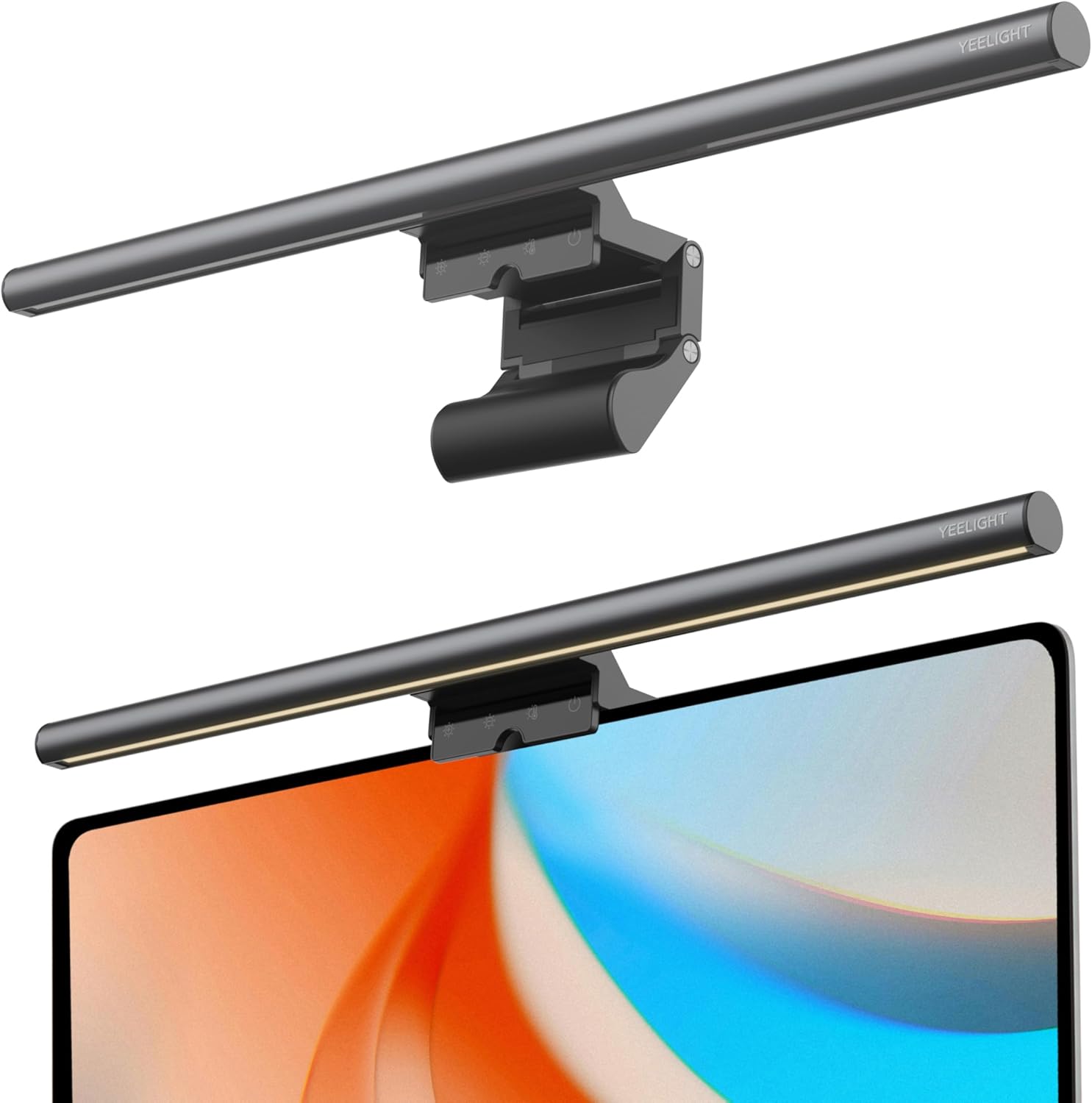
The YEELIGHT Monitor Light Bar is a compact USB-powered LED lamp designed to clip onto computer monitors, providing targeted backlighting for home offices, gaming setups, or study desks. It targets users like programmers, designers, and remote workers who spend hours in front of screens and need relief from eye strain caused by poor lighting.
Standout features include 250LM brightness with no-glare asymmetric light distribution, RG0-rated blue light filtering for ultimate eye safety, and flicker-free performance. Stepless dimming and adjustable color temperatures from 2700K warm to 6500K cool allow quick adaptations via touch controls, while Ra95 CRI delivers precise color rendering essential for creative work. In real-world use, it evenly lights keyboards and desks without screen reflections, enhancing focus during long sessions.
Build quality shines with a premium full-metal body for heat dissipation and durability, plus anti-slip silicone pads for secure fit on flat or curved screens up to 1.4 inches thick. The slim design avoids blocking webcams, and the 1.5m USB-C cable ensures flexible powering from laptops or chargers. Installation takes seconds, freeing up desk space compared to traditional lamps.
Potential drawbacks include dependency on a USB power source without battery option and compatibility limited to specific monitor thicknesses. Overall, the YEELIGHT Monitor Light Bar excels in eye care and workspace efficiency, earning strong recommendation for anyone prioritizing comfort and productivity.
Brightness: 250LM
Color Temperature: 2700K-6500K adjustable
CRI: Ra95
Power: USB-C, no battery
Compatibility: Monitors 0.3-1.4 inches thick, flat/curved screens
Controls: Touch stepless dimming, 3 fixed modes
Pros
- Glare-free design with asymmetric optics reduces eye fatigue effectively
- Easy one-second installation on various monitor types including curved
- Versatile remote control with stepless adjustments for precise customization
- High CRI ensures true color representation for creative professionals
- Multiple lighting modes suit work, gaming, and ambient needs
Cons
- Remote requires 3AA batteries, not included
- Lacks auto-dimming or timer functions found in higher models
- Backlight adjusts brightness only, not color temperature
The Quntis ScreenLinear Glow is a premium monitor light bar designed for anyone spending long hours in front of screens, from home office professionals and gamers to students and designers. It mounts effortlessly on 15-22 inch monitors, including curved ones, via a patented sliding weighted clip, delivering glare-free front and backlight illumination without desk space intrusion.
Standout features include three lighting modes: Work Mode for focused desk light, Ambient Mode for relaxing backglow, and Design Mode combining both for even coverage. Stepless dimming allows precise control over brightness and color temperature (3000K-6500K) on the front light, while the high Ra95 CRI ensures vivid colors. In real-world use, it softens harsh contrasts, minimizing eye strain during extended sessions, with the smart remote enabling easy adjustments via intuitive, glow-lit buttons.
Build quality shines with a sturdy, damage-free clip and flicker-free LEDs powered by 84 beads for shadow-free light. The gray finish and premium packaging make it gift-ready. While it excels in versatility, it misses auto-dimming or timers present in pro models.
Overall, the ScreenLinear Glow earns high marks for eye comfort and ease of use, making it a smart upgrade for balanced desk lighting and reduced fatigue. Ideal if you prioritize remote control and backlight ambiance over advanced automation.
Lamp Length: 15.7'' / 40cm (fits 15-22'' monitors)
Color Options: Gray
Control: Smart remote with stepless dimming
Color Temperature: 3000K-6500K (front light)
Features: Backlight function, high Ra95 CRI, memory function, curved monitor compatible, 3 lighting modes
Included: Light bar, remote, USB-C cable, 3AA batteries
Choose ScreenLinear Glow if you need remote-controlled backlight for gaming or office setups on smaller monitors. For larger screens (22''+), consider Glow Plus or Pro. Prioritize auto-dimming? Opt for Pro models. All share eye-care benefits, stepless dimming, and easy installs.
Best Monitor Light Bars Buying Guide
Brightness and Color Temperature Control
The best Monitor Light Bars offer stepless dimming and adjustable color temperatures from warm to cool, mimicking natural light to minimize strain during extended sessions. In our reviews, models with auto-dimming adapt seamlessly to ambient changes, perfect for gaming marathons or productivity workflows.
Look for at least 250 lumens for balanced desk coverage without hotspots. According to PCMag reviews, precise controls enhance focus for late-night use. Pair this with our PC Components guide for a full build.
Installation, Compatibility, and Build Quality
Clip-on designs fit most monitors, including curved ones up to 35 inches, saving desk space while ensuring stability. We’ve reviewed clamps that grip securely without scratching bezels, ideal for dynamic setups like multi-monitor productivity or gaming rigs.
| Feature | Key Consideration |
| Clamp Size | Fits 0.4-3 inch bezels |
| Power | USB or wireless |
| Weight | Under 1 lb for easy install |
Eye Care Features and Extras
No-glare asymmetrical lighting directs light over the screen, reducing reflections for clearer visuals in streaming or photo editing. Motion sensors and remotes add convenience, as noted in Tom’s Guide evaluations, while RGB backlights elevate gaming aesthetics without distraction.
USB powering ensures reliability across devices. Explore Computer Accessories for complementary gear.
Final Thoughts
The BenQ ScreenBar Halo 2 stands out as Best Overall for its wireless controller, motion sensing, and superior eye care in professional setups. For Best Value, the Quntis basic model excels in dimming and no-glare performance. Gamers love the Quntis Pink RGB for immersive backlighting. Grab the Quntis Computer Monitor Lamp to start. Elevate your workspace now and see our Computers section for more.
FAQs
What is a Best Monitor Light Bars and why do you need one?
A Best Monitor Light Bars clips to your monitor, casting light from behind to illuminate your desk without screen glare. It combats eye strain from dark surroundings, boosting comfort for daily use, gaming, or work. Our 2026 picks make setup effortless.
Do Best Monitor Light Bars really reduce eye strain?
Yes, by providing even, indirect lighting that follows the 20-20-20 rule indirectly through better contrast. TechRadar notes significant improvements in long-term sessions. Upgrade today with our top recommendations.
Are Best Monitor Light Bars compatible with curved monitors?
Most fit curved and flat screens up to 34 inches with adjustable clamps. We’ve reviewed durable builds that stay put during adjustments.
How do I choose between remote control and touch models?
Remotes suit multi-monitor or bed setups for hands-free tweaks; touch works for single-desk simplicity. Both deliver reliable performance in our evaluations. Check Desktops & Monitors for pairs.
Can Best Monitor Light Bars work with any power source?
USB-powered options plug into PCs, Laptops, or chargers universally. Wireless models use batteries for flexibility. Find your match from our 6 Best Monitor Light Bars list.
Sources
This article was researched and written with reference to expert reviews and testing data from trusted sources including PCMag, TechRadar, CNET, Tom’s Hardware, Wirecutter, and HowToGeek. All recommendations reflect real-world performance and value as of October 2026.







Write Your Review
No reviews yet. Be the first to share your experience!