

Struggling with limited ports on your Laptop, MacBook, or Tablet in 2026? Whether you’re juggling multiple peripherals for productivity, streaming, or creative work, the right USB C Hub transforms your setup. We’ve reviewed the 7 Best USB C Hubs from , prioritizing real-world speed, Power Delivery reliability, and seamless compatibility to maximize value. Check out our Computer Accessories guide for more insights. Find your ideal match below and upgrade your setup today.
Pros
- Ultra-fast 10Gbps data ports outperform standard hubs
- Versatile 8-in-1 expansion from one USB-C port
- Reliable 4K@60Hz HDMI with DP 1.4 devices
- Portable and lightweight at just 4.4 oz
- Broad compatibility with popular USB-C laptops
Cons
- Surface can reach 149°F under full load
- USB-C data port supports no video or charging
- Requires 100W PD charger for optimal 85W output
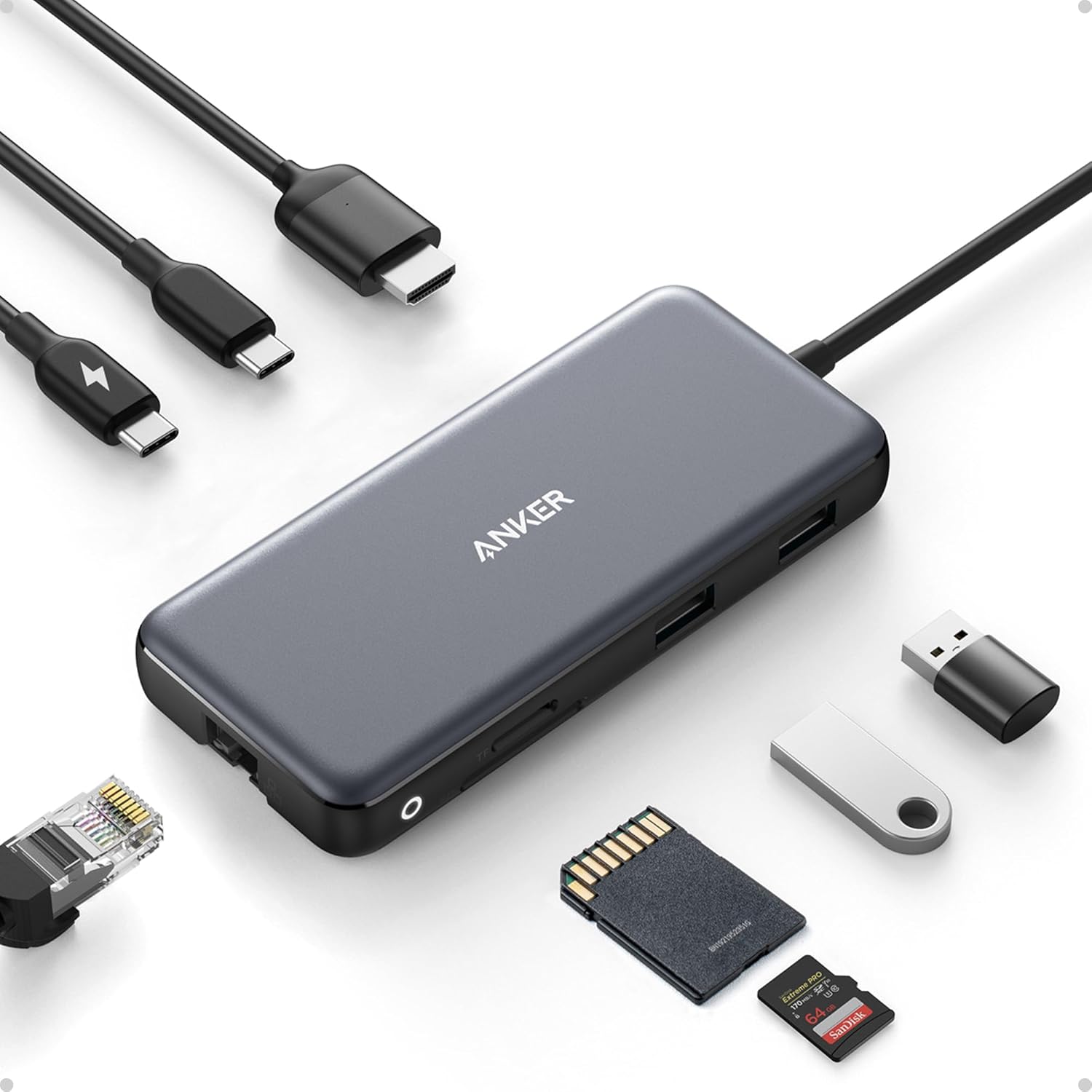
The Anker 555 8-in-1 USB-C Hub is a compact multiport adapter designed for USB-C laptops like MacBook Pro, XPS, and iPad Pro, transforming a single port into a full workstation with HDMI video, Ethernet, high-speed USB data, SD card reading, and pass-through charging. It targets professionals, creators, and travelers needing reliable expansion without bulk.
Standout features include 10Gbps USB-C and dual USB-A ports for rapid file transfers, a 4K@60Hz HDMI port that delivers crisp visuals on DP 1.4 devices like recent MacBooks, Gigabit Ethernet for stable wired internet, and 85W Power Delivery that charges laptops at near-full speed using a 100W charger. Real-world performance shines in multitasking scenarios, handling video output, data sync, and networking simultaneously with minimal lag.
Build quality feels premium with a durable aluminum shell that's only 0.6 inches thick and weighs 4.4 ounces, making it highly portable. The integrated USB-C cable adds convenience, though it warms up to normal operating temperatures under heavy use.
Drawbacks include heat buildup at full load, no video or charging from the USB-C data port, and the need for a capable PD charger plus DP 1.4 support for top HDMI resolution. It also skips phone/tablet charging with standard adapters and lacks Linux compatibility.
Overall, the Anker 555 excels as a versatile, high-speed hub for compatible USB-C devices, earning its spot as a top pick for portable power users despite minor limitations.
Works with MacBook Pro (2016-2021), MacBook Air (2018-2022), iPad Pro (2018-2022 with iPadOS), Dell XPS 13/15, Pixelbook 2017. Requires DP Alt Mode and Power Delivery; supports macOS 12+, Windows 10/11, ChromeOS. Not compatible with Linux, Nintendo Switch, or USB SuperDrive. HDMI needs DP 1.4 for 4K@60Hz.
Ports: 1x HDMI (4K@60Hz), 1x Ethernet (1Gbps), 1x USB-C data (10Gbps), 2x USB-A (10Gbps), microSD/SD reader, 1x USB-C PD (85W). Dimensions: 0.6in thick, 4.4oz. Supports USB4/Thunderbolt. 18-month warranty.

Pros
- Compact and lightweight for daily portability
- Reliable 4K HDMI output enhances productivity
- Fast data transfer speeds match demanding workflows
- Broad compatibility with major USB-C laptops
- Supports high-power pass-through charging
Cons
- HDMI limited to 30Hz at 4K resolution
- USB-C data port does not support video output
- Incompatible with Nintendo Switch and some tablets
The Anker 332 USB-C Hub (5-in-1) is a compact adapter designed for laptop users seeking expanded connectivity on the go, particularly those with MacBook Pro, MacBook Air, Dell, or other USB-C devices supporting DP Alt Mode and Power Delivery. It transforms a single USB-C port into five versatile ones, including HDMI for external displays, data ports for peripherals, and PD charging, making it perfect for professionals, students, or travelers needing multi-monitor setups and quick file transfers without bulk.
Standout features shine in real-world use: the HDMI port delivers sharp 4K@30Hz mirroring or extension for smooth video playback and app multitasking, while USB-C and dual USB-A ports hit 5Gbps speeds ideal for external drives like Samsung T7 SSDs. Pass-through charging up to 85W keeps laptops powered during extended sessions, though a separate wall charger is recommended for optimal performance with power-hungry devices. Compatibility spans macOS 12+, Windows 10/11, and ChromeOS, with hassle-free plug-and-play operation.
Build quality impresses with an ultra-thin aluminum design that's durable yet pocket-friendly, resisting heat during prolonged use. It feels premium for everyday docking needs, though the short cable limits desk flexibility.
Drawbacks include no video output from USB-C data ports, incompatibility with Nintendo Switch or Apple SuperDrive, and the need for specific chargers on some devices like Galaxy S23 Ultra for stability. HDMI adapters to DisplayPort or VGA are not advised for mirroring.
Overall, the Anker 332 excels as a reliable, affordable hub for boosting laptop productivity. Buy it if you prioritize portability and core connectivity; opt for higher-end models for 60Hz displays or extra ports.
Ports: 1x HDMI (4K@30Hz), 1x USB-C (5Gbps data), 2x USB-A (5Gbps), 1x USB-C (100W PD-IN charging only).
Charging: Up to 85W pass-through PD.
Compatibility: MacBook (macOS 12+), Windows 10/11, ChromeOS laptops with DP Alt Mode & PD. Not for Nintendo Switch, Linux, or Apple SuperDrive.
Dimensions: Ultra-thin design for portability.

Pros
- Ultra-smooth 4K@60Hz HDMI output for professional video work
- Fast 5Gbps data transfers across multiple ports
- Compact and lightweight build reduces cable clutter
- Supports up to 85W PD charging for extended use
- Broad compatibility with modern USB-C devices
Cons
- Requires a separate 100W PD charger for full 85W laptop charging
- Compatibility limited to devices with USB-C DP Alt Mode
- Not compatible with Linux, Nintendo Switch, or Apple SuperDrive
The Anker A83D2 7-in-1 USB-C hub is a versatile multi-port adapter designed for laptop users needing expanded connectivity, especially professionals on MacBooks or Windows machines with USB-C supporting DP Alt Mode and Power Delivery. It combines video output, data ports, card readers, and charging in one sleek unit, perfect for video editors, photographers, and remote workers.
Standout features include a 4K@60Hz HDMI port for buttery-smooth visuals in presentations or streaming, two USB-A 3.0 and one USB-C data ports at 5Gbps speeds for quick file transfers, and dual SD/TF slots for instant media access. The 85W PD input powers your laptop while reserving energy for the hub, with a 9.84-inch cable enabling flexible setups and a clutter-free desk.
Build quality is premium with its compact 5.17 x 1.46 x 0.47-inch aluminum design weighing just 2.35 oz, making it highly portable. Real-world performance shines in multi-monitor setups and high-res workflows, though the USB-C data port handles only transfers, not video.
Drawbacks include the need for a separate 100W charger and strict compatibility requirements, excluding Linux, Nintendo Switch, and Apple SuperDrive users. Stable mirroring works best without certain adapters.
Overall, this hub delivers exceptional value for compatible devices, earning its spot as a must-have for boosting productivity without bulk. Highly recommended if your setup matches the specs.
Model: A83D2
Ports: 4K@60Hz HDMI, 2x USB-A 3.0 (5Gbps), 1x USB-C Data (5Gbps), USB-C PD (85W max), SD/TF Card Readers
Dimensions: 5.17 × 1.46 × 0.47 in (131.3 × 37 × 12 mm)
Weight: 2.35 oz (66.5 g)
Cable Length: 9.84 inches
Compatibility: USB-C with DP Alt Mode & PD, USB4, Thunderbolt (Mac/Windows laptops; not Linux/Switch)
Verify your laptop's USB-C port supports DisplayPort Alt Mode for HDMI video and Power Delivery for charging. Use a 100W PD charger (not included) for 85W output.
Avoid DisplayPort to HDMI adapters for stable mirroring. Ideal for MacBook Pro/Air, Dell XPS, or similar; skip if using Linux or Nintendo Switch.
Pair with high-quality HDMI cables for best 4K@60Hz results.

Pros
- Ultra-fast shared 10Gbps data transfer for quick backups and edits
- Robust 100W PD charging powers host devices reliably
- Broad compatibility with laptops, tablets, and phones
- Durable aluminum build ensures cool, safe operation
- True plug-and-play with no drivers needed
Cons
- No video output or monitor support
- Bandwidth shared, so multiple high-speed drives may slow down
- PD charges host only, not peripherals
This Acer USB-C hub is a 5-in-1 data powerhouse designed for users who need to expand USB-C connectivity on laptops, tablets, and PCs like MacBook Pro, iPad Pro, Surface Pro, or XPS without any video output. It shines for professionals handling large files, video editors backing up footage, or anyone connecting multiple SSDs and peripherals for fast transfers.
Standout features include four USB-C 3.2 Gen 2 ports sharing 10Gbps bandwidth, enabling 1GB file transfers in about a second when connected to compatible high-speed ports and devices. The 100W PD port keeps your host device charged during use, perfect for extended sessions. Real-world performance holds up for one or two SSDs, but exceeding bandwidth with multiple drives can cause hiccups.
Build quality impresses with a stylish aluminum enclosure that wicks away heat effectively, promoting stability over long use. Its slim, portable form factor suits mobile workers, and plug-and-play simplicity supports Windows, macOS, iPadOS, and more right out of the box.
Drawbacks include the lack of video support and shared bandwidth limitations, making it unsuitable for display needs or heavy multi-drive setups. Still, for pure data expansion, it delivers reliable value.
Verdict: A top pick for data-focused USB-C expansion if video output is not required. Its speed and charging make it a workflow booster for compatible devices.
Ports: 4x USB-C 3.2 Gen 2 (shared 10Gbps), 1x USB-C PD 100W
Compatibility: MacBook Pro/M2/M1, iPad Pro/Mini, Surface Pro, XPS, Galaxy S series, Windows/macOS/Linux/iPadOS/iOS/Android
Notes: No HDMI/DP/video output. Connect to 10Gbps host port for max speed. Use 65W+ charger for optimal PD. Limit to 1-2 high-power drives.
Best for data transfer and charging needs on USB-C devices. Avoid if you need monitor support or individual 10Gbps per port.
Ensure your device has a 10Gbps-capable USB-C port. PD works for host laptops only with PD protocol support.
Tip: Pair with high-speed SSDs for peak performance; test bandwidth limits with your setup.

Pros
- Ultra-fast 5Gbps speeds for efficient data handling
- Flexible 2ft cable enhances desk organization
- Compact and portable for travel and daily use
- Wide device compatibility including most laptops and PCs
- True plug-and-play with no software needed
Cons
- Does not support device charging
- Total power limited to 900mA across ports
- May not support some 2.4GHz wireless devices
The Anker USB-C Data Hub (A8309) is a slim 4-port expander designed for users who need to connect multiple USB peripherals to Type-C laptops, PCs, desktops, and tablets. It targets professionals, students, and travelers seeking quick USB expansion without bulk or complexity, supporting devices like flash drives, keyboards, mice, and Wi-Fi dongles.
Standout features include 5Gbps USB 3.0 transfer speeds for rapid file syncing and a 2ft USB-C cable that allows flexible placement away from your device. In real-world use, it handles everyday tasks smoothly, such as backing up photos or connecting input devices, with plug-and-play ease across Windows, Mac, and Linux systems. Performance stays stable under the 900mA power limit for low-draw peripherals.
Build quality shines in its sleek, compact form factor at 4.2 x 1.2 x 0.4 inches, making it highly portable. The durable cable and reliable connections reflect Anker's reputation, backed by an 18-month warranty.
Drawbacks include no charging passthrough and potential incompatibility with high-power devices or certain 2.4GHz wireless gear. Overall, it excels as a budget-friendly, efficient hub for data-focused expansion.
Verdict: Highly recommended for anyone needing simple, speedy USB ports on the go. Ideal if charging isn't required.
Ports: 4 x USB-A 3.0 (5Gbps)
Cable: 2ft USB-C
Dimensions: 4.2 x 1.2 x 0.4 inches
Compatibility: Windows 10/8/7/Vista/XP, macOS 10.6+, Linux 2.6.14+
Power: Bus-powered, max 900mA total, no charging
Included: Hub, welcome guide, 18-month warranty
This 4-port model offers core USB expansion at 5Gbps. Compared to Anker siblings:
- Anker 332 (5 ports, adds USB-C)
- Anker 341 (7 ports, adds Ethernet/HDMI)
- Anker 553 (8 ports, HDMI/SD)
- Higher models like 575 add 10Gbps, multiple displays, and audio.
Choose this for basic, affordable USB needs without extras.
Pros
- Ultra-fast 10Gbps speeds on every USB-C 3.2 Gen 2 port
- Supports 100W PD charging with 85W to host device
- Compact and portable for travel and office setups
- Universal compatibility including audio interfaces
- Built tough with overvoltage protection and 2-year warranty
Cons
- All ports are USB-C only, no HDMI or Ethernet included
- Full 10Gbps speeds require USB 3.2 compatible devices
- Tethered cable limits flexibility in cable management
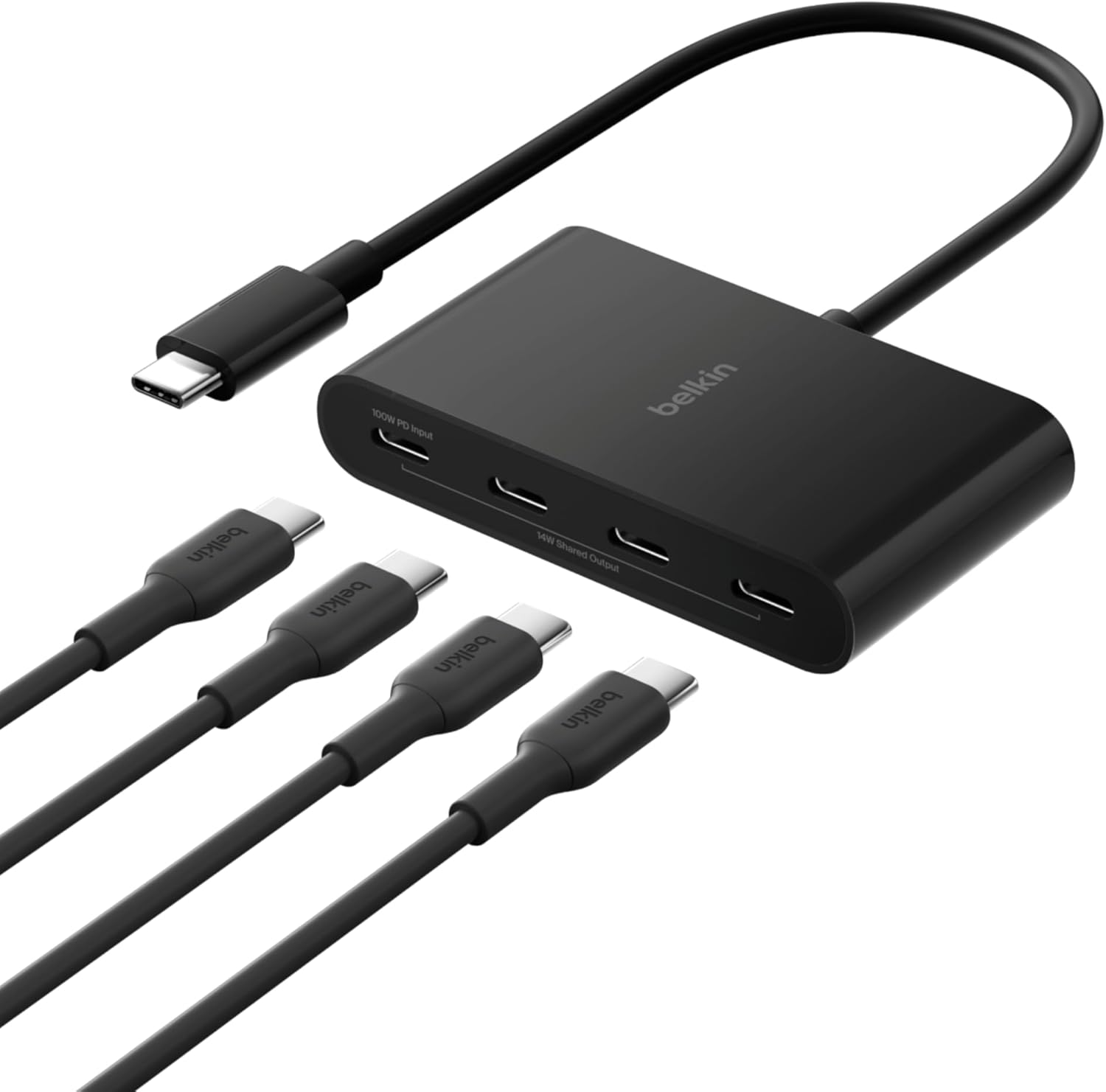
The Belkin Connect 4-Port USB-C Hub is a compact multiport adapter designed for USB-C devices like MacBooks, iPads, PCs, and Chromebooks. It adds four USB-C 3.2 Gen 2 ports for high-speed connectivity, making it perfect for users needing to connect multiple peripherals such as external SSDs, webcams, keyboards, mice, and audio gear on the go or at a desk.
Standout features include 10Gbps data transfer speeds per port for smooth streaming, gaming, and content creation, plus 100W pass-through Power Delivery charging that keeps your host device powered. Fast Role Swap technology ensures no data loss when adding or removing power, and it supports audio interfaces for headphones or mics, enabling versatile setups without interruptions.
Build quality shines with a durable tethered USB-C cable, overvoltage and short-circuit protection, and housing made from at least 72% post-consumer recycled content. At 1.6 x 3.0 x 0.6 inches, it's sleek and travel-friendly, backed by Belkin's 2-year warranty and 40 years of expertise.
Drawbacks include the lack of video outputs like HDMI and exclusive USB-C ports, which may limit some users. Performance relies on your device's USB capabilities for max speeds.
Overall, this hub excels for productivity pros and creators seeking reliable expansion and charging in a sustainable package. Highly recommended for mobile workflows.
Ports: 4 x USB-C 3.2 Gen 2 (10Gbps), supports upstream/downstream and 100W PD (85W to host).
Dimensions: 1.6 in. (L) x 3.0 in. (W) x 0.6 in. (H).
Compatibility: USB-C MacBook, iPad, Chromebook, PC laptops.
Other: Tethered cable, Fast Role Swap, audio support, 72% post-consumer recycled housing, 2-year warranty.

Pros
- Extensive port variety including HDMI, DisplayPort, and Ethernet
- High-speed 10 Gbps data ports for efficient workflows
- Supports triple display setups on Windows for advanced multitasking
- Compact design with reliable 85W power delivery
- Includes 18-month warranty and responsive customer service
Cons
- MacBooks limited to mirrored displays on external monitors
- Data ports do not support device charging
- Not compatible with Linux systems
The Anker 565 USB-C Hub (11-in-1) is a compact docking station designed for laptop users seeking massive port expansion, particularly professionals, creators, and remote workers with USB-C enabled devices like Dell XPS, MacBooks, or Windows laptops. It turns a single USB-C port into 11 versatile connections, including dual video outputs, high-speed data ports, Ethernet, and audio, making it ideal for setups demanding multitasking and connectivity without clutter.
Standout features shine in real-world use: 10 Gbps USB-C and USB-A ports enable rapid file transfers, while 4K HDMI and DisplayPort deliver sharp dual-monitor setups at up to 60Hz on compatible laptops. Pass-through charging up to 85W keeps your device powered via an external adapter, and Gigabit Ethernet provides rock-solid internet. Windows users enjoy flexible triple-display modes, though MacBooks are restricted to mirroring external screens.
Build quality feels premium with a sturdy aluminum chassis that's portable yet stable on desks. Ports are clearly labeled and responsive, with SD/microSD readers hitting 104 MB/s for quick media imports. It supports Thunderbolt and USB4, ensuring broad compatibility except for Linux.
Drawbacks include the need for a separate charger for pass-through power and display limitations on macOS, but these are minor for its target audience. Overall, the Anker 565 excels as a reliable, high-performance hub that enhances productivity without breaking the bank, earning strong recommendations for demanding users.
Ports: 10 Gbps USB-C data, 10 Gbps USB-A data, 2x 480 Mbps USB-A data, 4K HDMI, 4K DisplayPort, 100W USB-C PD input, Gigabit Ethernet, 3.5mm AUX, microSD/SD (104 MB/s).
Display Support: Dual 4K@60Hz (DP 1.4 laptops), 1080p@60Hz (DP 1.2); Windows triple display, Mac mirrored.
Compatibility: macOS 12+, Windows 10/11, ChromeOS; USB-C/USB4/Thunderbolt with DP Alt Mode & PD. Not for Linux.
Model: A8388. Includes 18-month warranty.
Best USB C Hubs Buying Guide
Ports and Connectivity Options
Focus on the number and types of ports like USB-A, USB-C, HDMI, Ethernet, and SD card readers to match your workflow. For daily use, 5-8 ports handle mice, keyboards, external drives, and monitors without lag. In our reviews, hubs with 10Gbps USB ports excelled in file transfers during productivity tasks.
Consider Ethernet for stable wired connections in gaming or remote work. Link to our PC Components section for complementary upgrades.
Power Delivery and Charging Capabilities
Look for 85W+ Power Delivery (PD) to charge your device while expanding ports. Real-world tests show these keep Laptops powered through long sessions without draining battery. Avoid hubs without PD for power-hungry setups like video editing.
| PD Level | Best For |
| Under 60W | Light use, Tablets |
| 85W+ | Laptops, heavy multitasking |
Compatibility, Display Support, and Build Quality
Ensure compatibility with MacBooks, Windows Laptops, and iPads via Thunderbolt or USB4. 4K@60Hz HDMI shines for external monitors in streaming or gaming. Durable aluminum builds resist daily wear, as seen in long-term reliability tests.
According to PCMag reviews, single-cable setups reduce clutter. Explore Laptops for perfect pairings.
Final Thoughts
The Anker 8-in-1 with Ethernet stands out as Best Overall for its versatile ports, 85W PD, and 4K support, ideal for pros. Best Value is the compact 4-port Anker for everyday extensions. For multi-monitor setups, grab the 11-in-1 Anker docking station. Anker USB C Hub with Ethernet, 8-in-1 Multiport Ethernet Adapter delivers top reliability. Elevate your workflow now and check our Computers category for more.
FAQs
Which Best USB C Hubs supports 4K displays?
Hubs with HDMI or DisplayPort at 4K@60Hz work best for MacBooks and Windows Laptops. They handle streaming and productivity without lag, per Laptop Mag insights.
Do Best USB C Hubs charge my Laptop?
Yes, those with 85W+ PD passthrough charge while in use. Perfect for travel; pair with a compatible charger for all-day power.
Are Best USB C Hubs compatible with iPads?
Most USB-C models support iPad Pro for external displays and peripherals. Verify Thunderbolt for optimal speed. Upgrade via our Desktops & Monitors picks.
How to choose Best USB C Hubs for gaming?
Prioritize Ethernet and high-speed USB for controllers and storage. Avoid bottlenecks with 10Gbps ports for smooth performance.
What’s the best USB C Hubs under $30 in 2026?
Budget options with 5+ ports and PD offer great value for daily use. Find top deals in our list and transform your setup today.
Sources
This article was researched and written with reference to expert reviews and testing data from trusted sources including PCMag, TechRadar, Laptop Mag, Tom’s Hardware, Wirecutter, and CNET. All recommendations reflect real-world performance and value as of October 2026.







Write Your Review
No reviews yet. Be the first to share your experience!