

Tired of wrist pain and discomfort during long typing sessions? In 2026, ergonomic keyboards are game-changers for productivity pros, remote workers, and anyone glued to their desk. We’ve reviewed the 7 Best Ergonomic Keyboards from ARTECK, ProtoArc, SABLUTE, focusing on real-world comfort, natural key travel, and lasting build quality to maximize your daily use. Check out our Computers section for more setup essentials. Find your ideal match below and upgrade your setup today.

Pros
- Ergonomist-approved design lowers muscle strain and improves posture
- Quiet, full-size layout with numpad supports productivity workflows
- Versatile compatibility across Windows, Mac, Chrome OS, Linux, and mobile
- Sustainable build with 71% post-consumer recycled plastic
- Customizable via Logitech Options software for personalized shortcuts
Cons
- Split keyframe may require short adjustment period for some users
- No key backlighting for low-light environments
- Full-size layout takes more desk space than compact alternatives
The Logitech Ergo K860 is a premium wireless ergonomic keyboard designed for anyone spending long hours typing, from office professionals to remote workers. Its split, curved keyframe and integrated wrist rest promote a natural hand position, making it ideal for preventing strain before issues like carpal tunnel arise.
Standout features include the pillowed wrist rest with three comfort layers - memory foam, high-density foam, and stain-resistant fabric - delivering 54% more support and 25% less bending than standard keyboards. Perfect Stroke keys offer scooped shapes for fingertip precision, while adjustable tilt legs ensure optimal wrist alignment whether sitting or standing. Real-world use shows smooth multi-device switching via Bluetooth or USB, with quiet keys and a two-year battery life supporting uninterrupted productivity.
Build quality shines with a robust, familiar full-size layout including a numpad and CAPS LOCK indicator. The graphite finish uses 71% recycled plastic, and the easy-clean wrist rest holds up well to daily spills. Logitech Options software adds customization for Fn keys and notifications, enhancing usability across Windows, Mac, and more.
Potential drawbacks include the learning curve for the split design and lack of backlighting, plus its larger footprint on smaller desks. However, these are minor compared to the comfort gains.
Overall, the Ergo K860 earns high marks for transforming typing into a strain-free experience, making it a top pick for ergonomic-focused users willing to invest in long-term wrist health.
Full-size curved split layout with integrated numpad. Connectivity: Bluetooth or USB receiver, up to 3 devices. Power: 2 AAA batteries, up to 24 months. Tilt angles: 0, -4, -7 degrees. Compatibility: Windows, macOS, Chrome OS, Linux, Android, iOS. Dimensions and weight not specified, but designed for standard desks.
Compared to MX Keys or K780, the K860 uniquely offers a pillowed wrist rest, adjustable palm lift, and split design for superior strain reduction. Pairs perfectly with MX Vertical mouse for full ergonomic setup.

Pros
- Ergonomic wave shape promotes natural hand position and reduces strain
- Cushioned palm rest provides lasting comfort during long sessions
- Easy multi-device connectivity and long battery life
- Customizable via app for personalized efficiency
- Ergonomist-approved design for proven wellbeing
Cons
- Compact size omits full numpad for some users
- Initial adjustment to wave layout may take time
- Uses replaceable AAA batteries instead of rechargeable
The Logitech Wave Keys is a wireless ergonomic keyboard tailored for professionals spending hours at desks, offering a curved keyframe that mimics natural hand curves for effortless typing. Ideal for Windows, Mac, tablets, and phones, it promotes healthier posture by keeping shoulders relaxed and mouse within easy reach.
Standout features include the multi-layer cushioned palm rest with deep memory foam that molds to wrists, dispersing pressure effectively, and fluid keys that deliver satisfying tactile feedback. Real-world performance shines in extended workdays, with smooth Bluetooth or Logi Bolt connections enabling quick device switches, while the Logi Options+ app allows shortcut customization for apps like email or browsers, boosting efficiency.
Build quality impresses with durable construction using recycled plastic, a soft-cleanable surface, and a compact footprint that fits modern workspaces. Videos demonstrate intuitive setup and unpacking, highlighting its familiar feel from first use.
Drawbacks include the lack of a numpad due to its compact design and a short adaptation period for the unique wave shape. Batteries are standard AAA, requiring eventual replacement.
Verdict: A top pick for ergonomic comfort without sacrificing functionality, pair it with the Lift mouse for optimal setup. Highly recommended for sustained typing comfort.
Developed with Logi Ergo Lab and approved by United States Ergonomics, Wave Keys features a 57-degree wrist elevation in pairing with Lift mouse to align forearms naturally. This reduces strain during prolonged use.
Compact keys position shoulders ideally, while the palm rest's layers ensure pressure relief: memory foam for contouring, support dispersion, and a soft, cleanable surface.

Pros
- Ergonomic split layout promotes natural hand positioning
- Extended 6-month battery life minimizes charging interruptions
- Effortless setup without drivers or software
- Soft wrist rest enhances comfort for extended use
- Quiet typing ideal for shared workspaces
Cons
- Windows layout may differ on Mac systems
- Requires separate nano USB dongle for connection
- Larger size less ideal for travel or small desks
The Arteck Split Ergonomic Keyboard is a wireless input device tailored for users prone to repetitive strain, such as office professionals, writers, and programmers who type for hours daily. Its innovative split design and cushioned wrist rest promote a neutral wrist angle, helping prevent discomfort and potential injury during prolonged sessions.
Standout features include low-profile quiet keys that deliver responsive, whisper-quiet typing with durable scissors-switch construction rated for millions of presses. The built-in rechargeable battery offers up to six months of use on a single charge, while media hotkeys, arrow keys, and a full number pad boost efficiency. Real-world performance shines in its stable 2.4G wireless connection over 33 feet and adjustable legs for optimal tilt.
Build quality feels solid with a comfortable palm rest and ergonomic layout, though its 36-ounce weight adds desk stability rather than portability. The nano receiver stores neatly on the back for convenience.
Potential drawbacks include a Windows-focused key layout that varies on Mac and reliance on a USB dongle rather than Bluetooth. It also charges via USB-C but does not connect that way.
Overall, this keyboard excels for stationary setups prioritizing comfort and reliability, earning strong recommendation for anyone battling wrist fatigue.
Split ergonomic design for natural wrist alignment and reduced strain.
Soft cushioned wrist rest supports forearms during extended typing.
2.4G wireless with nano USB receiver for lag-free use up to 33 feet.
Rechargeable Li-polymer battery lasts 6 months based on 2 hours daily use.
Quiet low-profile keys with media controls, numpad, and adjustable legs.
Connection: 2.4G USB Wireless (nano receiver).
Size: 16.5 x 9.6 x 1.18 inches.
Weight: 36.3 oz.
Battery: Rechargeable Li-polymer, USB-C charging.
Compatibility: Windows computers (desktop/laptop).
Layout: Full-size with numpad, arrow keys, Windows hotkeys.

Pros
- Exceptional battery life lasts weeks on a single charge
- Superior comfort from ergonomic wave design and premium palm rest
- Outstanding durability rated for 10 million keystrokes
- Customizable lighting enhances productivity and aesthetics
- Broad compatibility with plug-and-play USB receiver
Cons
- Relies on 2.4GHz USB receiver instead of Bluetooth for some users
- Larger footprint due to integrated palm rest may not suit compact desks
- Mouse battery at 700mAh requires more frequent charging than keyboard
The SABLUTE ergonomic wireless keyboard and mouse combo is designed for professionals, home office workers, and anyone spending hours typing. It combines a full-size backlit keyboard with a responsive mouse, emphasizing comfort through its wave-shaped keys and luxurious faux lambskin palm rest, making it ideal for extended use without strain.
Standout features include a massive 4000mAh rechargeable battery that powers the keyboard for weeks, far outlasting typical models, paired with intelligent auto-sleep for efficiency. The wave keys and adjustable stands promote natural wrist positioning, reducing fatigue over 8-hour days. The keyboard's 10 backlighting options—from soft blues to vibrant purples—add style, while the mouse delivers precise control with 3 DPI settings (800/1200/1600), 6 buttons, and customizable RGB lighting in fixed colors or cycles. Real-world performance shines in productivity tasks, with 9 shortcut keys and stable 33ft wireless range via a single USB receiver.
Build quality impresses with a matte finish, durable synthetic leather that's sweat-proof and low-maintenance, and components rated for twice the keystrokes of standard keyboards. It's compatible with Windows, Mac, and Chrome OS, ensuring plug-and-play simplicity across devices. The craftsmanship feels premium, justifying its investment value with a 30-day return and 1-year replacement policy.
Potential drawbacks include the need for the USB receiver (no Bluetooth) and a bulkier profile from the palm rest, which might crowd smaller setups. The mouse's smaller 700mAh battery also charges more often than the keyboard.
Overall, the SABLUTE combo excels as a comfortable, long-lasting upgrade for daily typists seeking ergonomic relief and reliable wireless performance. Highly recommended for those prioritizing comfort and durability over minimalism.
Keyboard: Rechargeable 4000mAh battery, backlit with 7 colors (blue, cyan, white, red, green, purple, yellow), wave ergonomic design, faux lambskin palm rest, adjustable stands, 9 shortcut keys, 10M keystroke durability, 2.4GHz wireless (33ft range).
Mouse: 700mAh rechargeable battery, 6 buttons, 3 DPI levels (800/1200/1600), RGB with 6 fixed colors or 5 cycle modes, auto-sleep.
Connectivity: Single 2.4GHz USB-A/C receiver, plug-and-play for Windows/Mac/Chrome OS.

Pros
- Ergonomic wave shape promotes natural posture and reduces strain
- Cushioned palm rest provides lasting comfort with memory foam
- Long battery life and easy multi-device switching
- Compact layout keeps mouse closer for better shoulder alignment
- Made with recycled plastic for eco-friendly appeal
Cons
- Compact key layout may feel cramped for users preferring full-size keyboards
- Requires disposable AAA batteries instead of rechargeable option
- Customization needs Logi Options+ app download
The Logitech Wave Keys Wireless Ergonomic Keyboard in Rose is crafted for anyone spending extended hours at a desk, from office professionals to remote workers seeking to alleviate wrist strain. Its unique wavy keyframe mimics natural hand curvature, promoting a relaxed typing posture that feels intuitive right away, while compatibility spans Windows, Mac, and more via Bluetooth or Logi Bolt.
Standout features shine in real-world use: the cushioned palm rest layers deep memory foam with supportive textiles for pressure dispersion, enabling comfortable typing sessions without fatigue. Connectivity is smooth with Easy-Switch for up to three devices, and the Logi Options+ app lets users tailor shortcuts for apps, enhancing efficiency. Battery life stretches up to three years, ensuring reliability during demanding workflows.
Build quality impresses with durable construction using recycled plastic, available in stylish Rose, and an ergo-certified design validated by United States Ergonomics. The compact form draws the mouse nearer, optimizing shoulder position, though some may need adjustment from traditional layouts.
Minor drawbacks include non-rechargeable batteries and a learning curve for the curved keys, but these pale against its comfort benefits. Overall, the Wave Keys delivers exceptional ergonomic performance, earning strong recommendation for those prioritizing health and productivity.
Maximize comfort by pairing Wave Keys with the Logitech Lift Vertical Ergonomic Mouse, ideal for small to medium hands. Its 57-degree angle elevates the wrist, aligning forearms naturally to complement the keyboard's wave design for full desk ergonomics.
Both products stem from Logi Ergo Lab testing, approved by ergonomists, ensuring a cohesive setup that transforms long workdays into supportive experiences.
Pros
- Ergonomic design supports natural typing and reduces strain for extended use
- Exceptional battery life minimizes interruptions
- Quiet mouse enhances office focus
- Versatile multi-OS and multi-device compatibility
- High-quality memory foam palm rest for superior support
Cons
- Compact layout lacks full numpad for data-heavy tasks
- Uses disposable batteries instead of rechargeable
- Mouse limited to single device pairing
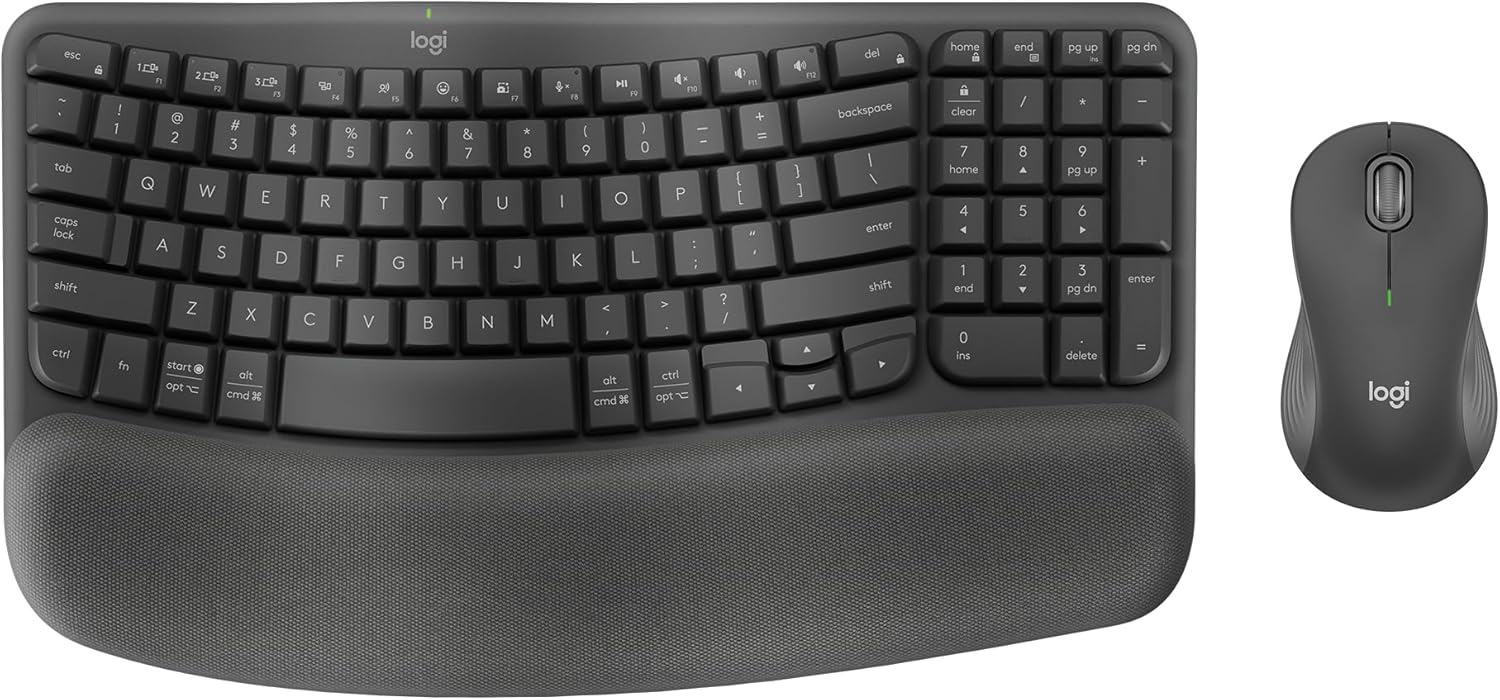
The Logitech Wave Keys MK670 Combo pairs an ergonomic wireless keyboard with the Signature M550 L mouse, targeting users with medium to large hands who spend hours typing and clicking. It excels for office professionals, remote workers, or anyone prone to wrist fatigue, promoting a natural hand position across Windows, Mac, Chrome OS, Linux, iPadOS, and Android.
Standout features include the keyboard's wavy keyframe for fluid typing, a three-layer cushioned palm rest with deep memory foam that disperses pressure, and the mouse's contoured grip with SilentTouch technology for 90% less noise. SmartWheel offers precise line-by-line scrolling or fast web navigation, while Logi Options+ app customization streamlines workflows with app-specific shortcuts. Real-world performance delivers reliable connectivity via Bluetooth or Logi Bolt, with batteries lasting up to three years on the keyboard and two on the mouse.
Build quality shines through durable construction using over 60% post-consumer recycled plastic, a soft cleanable palm rest surface, and rubber grips for secure handling. The compact design pulls the mouse closer for better posture, though it sacrifices a numpad.
Drawbacks include disposable batteries and the mouse's single-device limitation, which may frustrate multi-taskers. Overall, this combo transforms long sessions into comfortable, productive ones.
Verdict: Highly recommended for ergonomic relief without complexity; a top pick for sustained daily use.
Ergonomic wavy keyboard design for natural typing and reduced strain.
Cushioned palm rest with memory foam, support, and soft surface layers.
Signature M550 L mouse with contoured shape, rubber grips, SilentTouch, and SmartWheel.
Dual Bluetooth/Logi Bolt connectivity; multi-OS support including Easy-Switch for keyboard.
Long battery life: 3 years keyboard, 2 years mouse.
Logi Options+ for personalization; made with recycled plastic.

Pros
- Promotes natural typing posture with curved split keys
- Multi-device Bluetooth and 2.4G connectivity
- Responsive scissor keys for effortless typing
- Rechargeable USB-C with extended runtime
- Soft white LED backlighting reduces eye strain
Cons
- Split layout requires initial adaptation time
- 2.4G mode has limited Mac compatibility
- Larger full-size design takes more desk space
The ProtoArc EK01 Plus is a full-size ergonomic wireless keyboard designed for users who spend hours typing, such as office workers, writers, and programmers. Its split curved keyframe and cushioned wrist rest target wrist strain and poor posture, making it a strong choice for anyone seeking long-term comfort without sacrificing functionality.
Standout features include adjustable white LED backlighting with three brightness levels, offering 12-36 hours of use depending on settings, and seamless switching between three devices via Bluetooth or 2.4G USB. In real-world use, the responsive scissor keys and ergonomic layout promote natural hand positioning, while the multi-layer wrist rest - soft leather over memory foam - provides substantial support. Battery life shines with up to 100 days backlight-free, minimizing downtime.
Build quality feels premium with a sturdy frame and spill-resistant design, available in grey black. The full-size layout includes a numpad and multimedia keys, switchable via FN lock, ensuring versatility across Windows, Mac, and Android. Adjustable tilt feet allow three angles for personalized ergonomics.
Drawbacks include a learning curve for the split layout and occasional connectivity hiccups on Mac in 2.4G mode, best resolved by Bluetooth. It also occupies more desk space than compact models.
Overall, the EK01 Plus delivers exceptional ergonomic relief and productivity, earning high marks for comfort-focused users willing to adapt to its design. Pair it with a matching mouse for an optimal setup.
Layout: Full-size 117 keys with numpad
Connectivity: Dual Bluetooth + 2.4G USB
Battery: 2000mAh rechargeable USB-C, up to 100 days backlight off
Backlight: White LED, 3 levels
Compatibility: Windows 8+, Mac OS 10.12+, Android 4.3+
Dimensions: Full-size ergonomic with wrist rest (check desk space)
Best Ergonomic Keyboards Buying Guide
Ergonomic Layout and Comfort
The best ergonomic keyboards feature split or wave designs that promote a neutral wrist position, reducing strain during extended productivity sessions or content creation. Look for cushioned palm rests and tenting options for customizable angles—we found these shine in real-world office marathons, preventing RSI over hours of use.
Key travel and feedback matter too; scissor or low-profile switches offer quiet, responsive typing without fatigue. Pair with a good mouse for full setup harmony, as seen in combos from our PC Components guide.
Connectivity and Compatibility
Wireless freedom via Bluetooth or 2.4GHz USB receivers ensures clutter-free desks, with multi-device pairing ideal for switching between your work Laptop and personal Tablet. We prioritize low-latency connections for seamless daily use and light gaming.
Cross-platform support for Windows, Mac, and even Chrome OS is crucial—test easy-switch buttons in your workflow to avoid frustration. According to PCMag reviews, reliable Logi Bolt tech stands out for stability.
Battery Life and Build Quality
Rechargeable batteries lasting weeks on a charge mean uninterrupted sessions, perfect for travel or busy days. Durable, spill-resistant fabrics and sturdy frames ensure long-term reliability, holding up to daily spills and heavy use.
Opt for models with backlighting for low-light environments. Tom’s Hardware notes that premium builds like split designs maintain performance over years. Explore more in our Computer Accessories category.
| Feature | Why It Matters |
| Split/Wave Design | Neutral wrist alignment |
| Wireless Range | Up to 30ft reliable |
| Battery | Months per charge |
Final Thoughts
The Logitech Ergo K860 Wireless Ergonomic Keyboard is our Best Overall for its premium split layout and wrist rest that deliver unmatched natural typing and all-day comfort. For Best Value, the Arteck Split Keyboard offers cushioned support at an unbeatable price point. The Logitech Wave Keys Combo wins Best with Mouse for versatile productivity setups. Grab yours now and check our Laptops guide for complementary gear.
FAQs
What makes a keyboard truly ergonomic?
Ergonomic keyboards reduce strain with split or curved layouts, adjustable angles, and palm rests that keep wrists straight. In 2026 Best Ergonomic Keyboards, these features excel in long sessions, as Wirecutter highlights in their reviews.
Are Best Ergonomic Keyboards good for gaming?
While optimized for typing, many Best Ergonomic Keyboards offer low-latency wireless for casual gaming. They prioritize comfort over ultra-fast mechanical switches, making them ideal for mixed productivity and play.
Do Best Ergonomic Keyboards work with Mac?
Yes, top Best Ergonomic Keyboards support multi-OS compatibility via Bluetooth, with dedicated keys for Mac shortcuts. Upgrade to one today for seamless cross-platform use.
How long do batteries last in Best Ergonomic Keyboards?
Most last 1-6 months per charge depending on backlighting and usage. PCWorld testing shows rechargeables outperform disposables for reliability.
Can Best Ergonomic Keyboards help with RSI?
Absolutely—natural positioning minimizes repetitive stress. Pair with breaks and check our Gaming PCs page for full ergonomic setups.
Sources
This article was researched and written with reference to expert reviews and testing data from trusted sources including PCMag, Tom’s Hardware, Wirecutter, PCWorld, Laptop Mag, and other category-relevant publications. All recommendations reflect real-world performance and value as of October 2026.







Write Your Review
No reviews yet. Be the first to share your experience!